68kMLA Classic Interface
This is a version of the 68kMLA forums for viewing on your favorite old mac. Visitors on modern platforms may prefer the main site.
| Click here to select a new forum. | |
| PowerView - The Weird PowerBook SCSI External Video Card | |
| Posted by: KeithTilton on 2021-11-15 17:31:17 I've seen this elusive peripheral referenced for years. There's a few pictures of the device and a video capture of it actually working online but I knew it was rare. I saw one pop up on Mercari for ~$40 and knew I needed to grab it. Box: 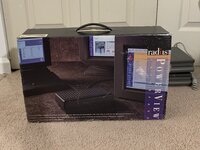 Contents: 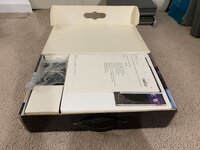 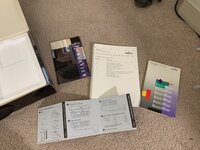 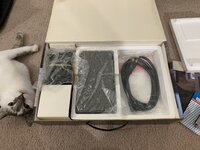 Unfortunately, mine is missing the original 1.0 software floppy disk and the HDI-30 to SCSI-50 cable. The 1.0 software would not have worked on my PowerBook 160 and fortunately you can pick up the cable for $20 on our favorite auction site. The Device 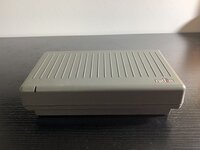 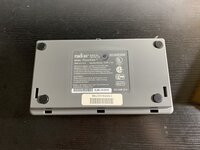 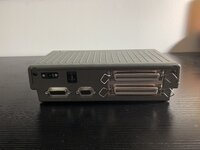 Internals The PowerView will come apart by removing the two T-15 screws on the back. Three plastic clips on the inside of the front of the shell lock it in place. Inside, there are clips on both sides of the metal box holding it to the shell. Releasing those will allow you to remove the metal box. 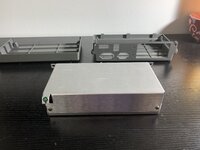 Two phillips head screws can be removed, and then the top shield can be removed. This is a lot harder than I was expecting as there are two clips that fit into the bottom shield, but then you have to flex the casing so that you can slide the top part off. I really wish I got a better photo of it. However, then you're inside. 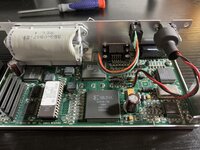 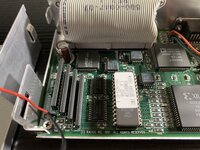 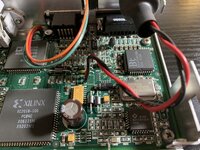 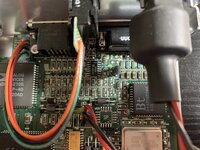 Software Installation For some reason, Radius decided that you need to have the original disk in order to use the Installer. Even after using DiskDup the installer would ask for me to put the original PowerView disk in. As far as I can tell, it's just a script. The 2.1 software on MacintoshRepository works great. All you have to do is copy RadiusWare, PowerView, and SCSIProbe to your Control Panels folder, and then copy the Color Extensions file to your System folder. Connecting the PowerView It's pretty self explanatory. 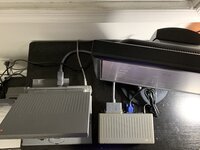 Using the PowerView This is honestly pretty fun. I can't believe you're connecting it over what is usually just used for data transfer... I guess there was nothing stopping Radius from doing this, but it is a little ridiculous. Especially since I am connecting this to a passive-matrix 1-bit Mac. 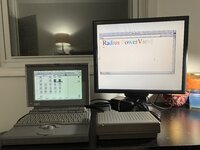 All of these are 640x480 at 256 colors. 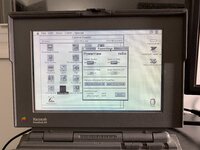 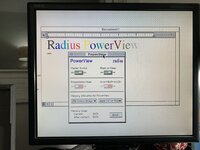 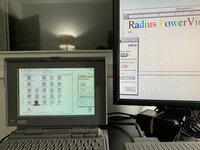 This is setting the secondary monitor as the main monitor 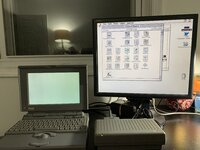 Who doesn't like some color Monopoly on a black and white PowerBook? 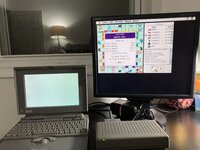 Not good enough? Ok ok ok. How about black and white Monopoly AND color Monopoly on a black and white Mac? 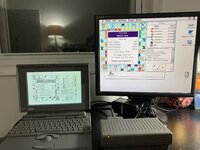 Other Resolutions Now, I don't have an Apple sRGB display to test this with, but I was able to run it at 832x624 at 256 colors... But it was incredibly slow. I can't imagine getting any actual work done on this back in the 90's but I guess it had it's use cases. Even with screwing with the contrast, it was still light on my monitor. The photos just don't do it justice. 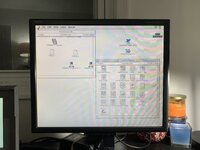 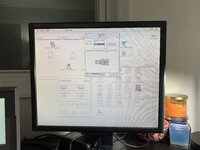 I absolutely love this thing. It's a very ridiculous little device and I am so glad to have been able to actually play around with one after all these years. | |
| Posted by: Fizzbinn on 2021-11-15 18:22:45 Cool write up, thanks for sharing! I like how the case matches PB 100/200 series design language. | |
| Posted by: Trash80toHP_Mini on 2021-11-15 19:30:59 Ditto! Nice addition to your collection. I've got the same box, but in its earlier SuperView attire. As a Radius collector I'm green with envy. 😉 | |
| Posted by: deltroid on 2021-11-24 08:31:40 Nice write up. I have the earlier software I think either 1 .1 or 2.0 ; have to check Its' the early model 0346 (mentions the 160, 180 Classic II etc. not the 180 or 145b) I've tried for years to find the elusive PowerView Control Panel 2.2Beta update; had to get directly shipped on floppy by calling etc? The Beta is mentioned here For the Powerbook 145B and 180c you will need the PowerView Control Panel 2.2Beta. Still the wrong cable but right color (hdi-30 to cd-25) lol; I think mine is pretty similar; lol. Going off by memory and tired so don't quote me here; this is a alpha post. Powerview doesn't support full color quidraw (32bit yes but quickdraw the full routines?) so things like games or QuickTime video support are more limited or don't work; not a full video card I think because scsi is to slow for full acceleration and bandwidth (chip is technically cables etc). If you would like the earlier software I think I have one of few working copies; or more info. 7..0 works. 7.01, 7.1.1; after 7.5 it gets dicey and with a powermac 8600 (wish i were, resedit mod) with 7.6.1 if barely works ( if you would call i that ; lol). I can't remember. I know other people have gotten up to the 180 series working well but not much about the Classic II or later models? The powerview is mentioned in Macuser and Macworld; I found some articles on arhive.org etc. The radius powerview is the one of the most compatible and was cheaper (cost some costs from the superview version?) but it was sloooow from what I remember. You may have to use archive.org to get some the links below to work; been awhile.I can book system 6.08l jp version on my 170 but I don't remember if it worked (1.1? PowerView SuperViewPiSCSI allows a Raspberry Pi to function as emulated SCSI devices (hard disk, CD-ROM, and others) for vintage SCSI-based computers and devices. This is a fork of the RaSCSI project by GIMONS. - Pi...
 github-wiki-see.page
Re: Radius Power View - need drivers www.mail-archive.com
PowerView SuperViewPiSCSI allows a Raspberry Pi to function as emulated SCSI devices (hard disk, CD-ROM, and others) for vintage SCSI-based computers and devices. This is a fork of the RaSCSI project by GIMONS. - Pi...
github.com

TMS34010 - Wikipedia
Radius PowerView (SCSIビデオアダプター) - ねこのこね!SCSIからビデオ出力できるもの。モノクロマックからカラー出力できる。sys6....
neconocone.cocolog-nifty.com
Radius Haul: Pivot Interface Card & PowerViewFound both of these at my local recycler on my way home. Both are brand new, still shrink wrapped. A Pivot Interface Card, and more interestingly, a PowerView. It's a color interface adapter for the SCSI port. Says it's built for PowerBook, but it'll work on any Mac with Color QuickDraw...
 68kmla.org
What the hack! My current Powerbook 170 SetupWhat we see is a Powerbook 170 with an external Apple Studio Display, Radius SCSI PowerView graphics adapter, NeXT keyboard, black ADB mouse, TouchPad, QuickTake 150, SCSI PowerCD, Port Juggler, ADB-doubler, SCSI EZ 135 drive. The computer is networked via appletalk / Ethernet (IpNetRouter)...
68kmla.org
| |
| Posted by: BacioiuC on 2021-11-24 08:37:01 Oh Crap, I've been looking for something like this for a while! Amazing find @KeithTilton! This would work great to add external monitor support to a Color Classic II! | |
| Posted by: olePigeon on 2023-03-04 16:58:21 I thought I'd mention that the manual says it's for PowerBook & Classic II, and the software installer with default options refused to install onto my IIfx (no compatible hardware detected.) However, if you do a "Manual Install" and select just the PowerView Control Panel, it installs just fine. It also works just fine. My IIfx had a second monitor out the SCSI port. So I'm not sure why the artificial limitations. | |
| Posted by: Iesca on 2023-03-04 20:06:08 Just like a ScuzzyView! | |
| Posted by: joshc on 2023-03-04 21:00:42 RaSCSI has PowerView emulation which I really want to try at some point: PowerView SuperViewPiSCSI allows a Raspberry Pi to function as emulated SCSI devices (hard disk, CD-ROM, and others) for vintage SCSI-based computers and devices. This is a fork of the RaSCSI project by GIMONS. - Pi...
github.com
| |
Posted by: avadondragon on 2023-03-04 21:59:33RaSCSI has PowerView emulation which I really want to try at some point: I haven't tried it either but I think it is super cool that they are working on it. I hope they get it working good enough to include in the main branch some day. | |
Posted by: cheesestraws on 2023-03-05 03:21:25So I'm not sure why the artificial limitations. I wonder if it's an 'expectations management' thing. If someone plugs it into a II-series, they are likely to be disappointed, it being nowhere near as fast as a nubus graphics card. PowerBook and C II users are more likely to be so glad to have colour at all that they won't get grumpy about it being a bit slow. So if they limit it to the latter—which are the machines it's really aimed at—they will have to deal with fewer angry letters, and those they get they can say 'we told you it wasn't for those machines...' | |
Posted by: lemketron on 2023-09-14 00:06:20I've seen this elusive peripheral referenced for years. How cool it is to see this post and hear how much you love the Radius PowerView. I wrote the PowerView software (which was based on Radius Dynamic Desktop as well as Soft Pivot, both initially created by Nick Moss) and also wrote the Installer. So many stories and fun memories of hacking (I mean extending) the Mac OS. PowerView was developed at Apple’s request to provide a video output on the PowerBook 140 and 170 for their business customers who wanted to be able to present on external displays. Later PowerBooks all had video outputs but because these earliest models didn’t, we had to send pixels over SCSI to the external frame buffer. The hardware was simple but clever: just a DSP with a SCSI interface and a Xilinx FPGA which was programmed as the display controller (loading a different program for each resolution and bit depth). The magic was all in the Mac OS system extension which created a new virtual display, collected any pixels that were changed, and instead of rotating them (as Soft Pivot did), packaged them up and sent them over SCSI to the external PowerView display hardware. I found the original software disk (with some screen shots from the installer and readme file) on MacintoshGarden. Anyway thanks for preserving one of my favorite (and very successful) projects from my seven years at Radius. I also wrote the firmware for all of the various (resolution switching) Radius PrecisionColor graphics cards (and the 24*AC which was licensed to Apple), and later worked on VideoVision PCI and VideoVision Telecast software. Steve Lemke Radius Software Engineer, 1989-1996 | |
Posted by: Phipli on 2023-09-14 01:33:12Radius PrecisionColor graphics cards (and the 24*AC which was licensed to Apple), and later worked on VideoVision PCI and VideoVision Telecast software.I've spent a while playing with the Precision Colors. While I have to avoid settings the overclock the RAMDAC or use more VRAM than fitted on boards like the 24XP and XK.... I may have ended up fitting a larger ROM and reappropriating the jumper header to use as bank selection between the correct V2.0 ROM and the 24AC ROM... This gives me the option of using the 24AC's PPC acceleration on other boards! Thank you for the PPC acceleration 🙂 I have one question (possibly others). The jumper I used to switch the bank. As manufactured, one position pulled the most significant address bit high (I think) if you fit a double sized ROM, or I think a write enable pin if you had a standard sized ROM. The other position connects the same pin to one of the custom ICs - do you know what functionality this was for? Flashing the ROM? Bank swapping? Big ROMs? Couple of convoluted threads on PrecisionColors. There are more about... Some with... Inaccuracies... What's the difference between the various Radius 24 cards?So I happen to have a Radius 24X, 24XP, and 24XK. According to LEM, the 24XP appears to be the budget card. It doesn't do the higher 1152 resolution, though it it's still 24-bit and accelerated. The 24X and the 24XK, on the other hand, I can't tell the difference. I tried both on my IIci...
68kmla.org
Help for a nubus Radius PrecisionColor Pro 24X ROM/firmware upgradeHi friends! I want to upgrade my nubus Radius video card to a newer rom version (now 1.50). I need compatibility with Mac OS 9.1. I remember in the nineties, Radius distributed these kinds of updates... Anybody of you have an application utility that can help me for the upgrade? Thank you all...
68kmla.org
| |
| 1 |