68kMLA Classic Interface
This is a version of the 68kMLA forums for viewing on your favorite old mac. Visitors on modern platforms may prefer the main site.
| Click here to select a new forum. | |
| SE/30 System 7.5.3 installation problem | |
| Posted by: fatal3rror on 2021-11-04 18:09:43 Hi everyone, I've been trying to do a clean install of System 7.5.3 on my SE/30 but have an issue near the end of installation which throws the following error: The Installer Cannot copy the file "SimpleText Guide" onto the disk "Macintosh". Installation cannot continue. Please delete this file and try running the Installer again. Is deleting the file and continuing installation really the right thing to do here? This would be going onto a 2GB virtual SCSI device (SCSI device 0) hosted by a SCSI2SD v6 board. | |
| Posted by: Nixontheknight on 2021-11-04 18:34:20 Yes, I don’t believe that is needed unless you need the guide for simpletext | |
Posted by: fatal3rror on 2021-11-04 18:51:59Yes, I don’t believe that is needed unless you need the guide for simpletextGood to know! My next question would be: Where do I find this file? It does not seem to be on my installation disk. | |
Posted by: Nixontheknight on 2021-11-04 18:53:15Good to know!I don’t think it would be uncompressed on the installer disk, but next time you run the installer, just hit continue next time the error pops up | |
Posted by: fatal3rror on 2021-11-04 19:01:54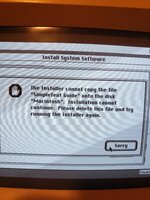 I'm not given the option to continue. Or do you mean click "Install" again and start over? Is it possible that the file is hidden somehow? I apologize if that is a dumb question. | |
Posted by: Nixontheknight on 2021-11-04 19:04:29View attachment 35532What happens if you hit “sorry?” And I don’t think hiding files is possible in the Mac OS | |
Posted by: fatal3rror on 2021-11-04 19:10:05What happens if you hit “sorry?” And I don’t think hiding files is possible in the Mac OSIf I hit "sorry", it kicks me back to the "Install System Software" screen where I can restart the install. I didn't think hiding files was possible on this OS but I thought I'd ask! I've tried with 3 different sets of floppy images for System 7.5.3 (including those which came with my BMOW floppy emulator) and gotten the exact same result after making it to Disk #10 (at least that's what I think it was). | |
Posted by: fatal3rror on 2021-11-04 20:06:12Disk #10 (at least that's what I think it was).I was wrong -- its Disk #12. Has anyone else had this problem when trying to install 7.5.3? | |
| Posted by: BacioiuC on 2021-11-04 22:49:34 Can you disable Simple Text when doing a custom install? | |
| Posted by: Crutch on 2021-11-05 04:48:12 It sounds like the issue is with your HD, not the installer. Is your disk almost full? Have you run any HD verification tools to ensure you don’t have bad sectors etc. where it’s trying to write that file? It actually is possible to have hidden files under system software versions going all the way back to 1984 (the term used is “invisible”) but I don’t think that’s relevant here. You certainly don’t need that file. Trying a ”Custom Install” and disabling SimpleText is a good idea. | |
| Posted by: LaPorta on 2021-11-05 07:24:44 There’s always the possibility that the SimpleText program is corrupt on the install disk as well. | |
Posted by: fatal3rror on 2021-11-06 15:05:26It sounds like the issue is with your HD, not the installer. Is your disk almost full? Have you run any HD verification tools to ensure you don’t have bad sectors etc. where it’s trying to write that file? I think the installation issue had to do with my HD. After wiping the SD card and flashing the SCSI2SDv6 with the newest firmware I was able to successfully install OS 7.5.3! Unfortunately then I had a different problem -- the system wouldn't boot up and instead hung at "Welcome to Macintosh". 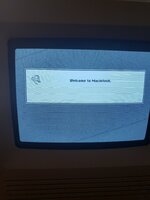 I've got a Mac ROM-inator II with 128 MB RAM installed and this turned out to be the culprit. I booted into the ROM drive of the ROM-inator and used ResEdit to do the following to both "System 7.5 Update" and "System" files in "System Folder": ‘gusd’ resource ‘ID 1’ at offset ‘000018’, replace data ‘0008 0003 0009 0003‘ with data ‘0008 0003 0009 0005‘ As per https://www.bigmessowires.com/mac-se30-with-upgraded-rom/ Now everything works perfectly! | |
| 1 |