68kMLA Classic Interface
This is a version of the 68kMLA forums for viewing on your favorite old mac. Visitors on modern platforms may prefer the main site.
| Click here to select a new forum. | |
| LaserWriter II NT | |
| Posted by: robin-fo on 2021-11-01 05:00:25 Bought this "tank" yesterday for fifty swiss francs.. I was able to test it with my Colour Classic, and it took a very long time to transfer some basic text to it – a lot longer than it takes to print on my 4/600PS if I remember correctly (haven't used it for a while now). I really like its iconic silhouette.  | |
Posted by: Gorgonops on 2021-11-01 10:44:13I was able to test it with my Colour Classic, and it took a very long time to transfer some basic text to it It's kind of shocking today just how slow those early Postscript printers with 68000 CPUs were. You really want to have a good time, try sending a Postscript page to an HP LaserJet II with a Postscript language cartridge in it. (CPU's just a little over half the speed of the IINT's.) | |
| Posted by: joshc on 2021-11-01 10:59:06 They are sure iconic and must have sold a stack of them over the years. I actually don't know when they stopped making them. Was an upgrade from II to II NT a thing? Just noticed it only says II on the silkscreen but you mentioned it's a II NT? My dad had a II NT, unfortunately he didn't keep it but that thing just kept on going for years. | |
Posted by: AndyO on 2021-11-01 11:17:56It's kind of shocking today just how slow those early Postscript printers with 68000 CPUs were. You really want to have a good time, try sending a Postscript page to an HP LaserJet II with a Postscript language cartridge in it. (CPU's just a little over half the speed of the IINT's.) I used to send postscript files from my SE to an ImageWriter 2 .... about 30 minutes to print each page, if I recall. Pretty good quality output though. Can't remember the name of the postscript software that I had installed on the SE though, so sadly can't retrace my steps! | |
Posted by: robin-fo on 2021-11-01 11:22:57Was an upgrade from II to II NT a thing? Just noticed it only says II on the silkscreen but you mentioned it's a II NT?I guess the whole LaserWriter II series used the same body and the logic board was the only difference. As far as I know, there is also no "original" LaserWriter II, so "upgrading" would simply mean to change how the printer is connected. I know it is a IINT because of the silkscreening near the ports – so if you would exchange the logic board, the plate with the silkscreening would change as well. Does anybody know what the ADB port is for? 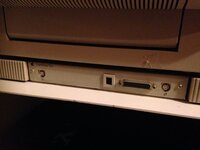 | |
Posted by: robin-fo on 2021-11-01 11:26:37It's kind of shocking today just how slow those early Postscript printers with 68000 CPUs were. You really want to have a good time, try sending a Postscript page to an HP LaserJet II with a Postscript language cartridge in it. (CPU's just a little over half the speed of the IINT's.)That's somehow relieving to know – I was inclined to blame my CC for the slow speed. Would it be faster to use the serial connector instead of LocalTalk? | |
| Posted by: robin-fo on 2021-11-01 11:36:03 It would look fabulous next to a Macintosh II, IIx or IIfx, but I sadly have none of them. My SE would probably match its design best, or maybe the Quadra 700 or IIsi... | |
Posted by: Gorgonops on 2021-11-01 12:01:22Was an upgrade from II to II NT a thing? Just noticed it only says II on the silkscreen but you mentioned it's a II NT? It was the "NTX" that was the high-end one. There was also a brain-damaged IISC that lacked a real imaging image, it took a bitmap over SCSI. (Which, ironically, might mean it was faster than the higher spec ones if your computer was enough faster to make up for it.) That's somehow relieving to know – I was inclined to blame my CC for the slow speed. Would it be faster to use the serial connector instead of LocalTalk? Nope, it'd just make it worse. That said, your CC may certainly well be contributing to the problem if you're trying to send stuff it has to chew over a lot (scaling graphics, etc.) Does anybody know what the ADB port is for? The manual says it's for "Future Expansion". So apparently even Apple didn't know. | |
| Posted by: joshc on 2021-11-01 12:02:11 Aha, for some reason I always thought they changed the silkscreen on the front but yeah seems it was only on the logicboard tray that they did that, interesting. It's a really nice looking example that you've got. | |
| Posted by: Cory5412 on 2021-11-01 13:12:45 congratulations on this fun find! Nice to hear it works! I think this was posted in the lounge but this printer family inspired a recently published novel: https://www.mcdbooks.com/books/laserwriter-ii There was also a brain-damaged IISC that lacked a real imaging image, it took a bitmap over SCSI. (Which, ironically, might mean it was faster than the higher spec ones if your computer was enough faster to make up for it.) Adding this to my mental image of someone using other cascaded Mac II/early Quadra era stuff like the 16/21-inch color displays or the full/two-page displays, plus the Apple Extended Keyboards. | |
Posted by: robin-fo on 2021-11-01 14:44:08It's a really nice looking example that you've got. congratulations on this fun find! Nice to hear it works!Thanks guys! | |
| Posted by: ScutBoy on 2021-11-02 07:10:32 Careful what you wish for, I recently restored a LWII, and this happened... One is a complete disaster with rodent infestation BUT it had the nicest skins. I'll see if I can get one more out of this stack. Why I would need two, I don't know; trade bait for something else, I guess. If you power yours up and get the two flashing red lights, I've found the first thing to replace is the A/C power block. That's common with the HP Laserjet 2 series, and is available reasonably on the 'bay. You'll see it under two different part numbers. It's pretty easy to replace. HP SX-ACPM-B RG9-0205 | |
| 1 |