68kMLA Classic Interface
This is a version of the 68kMLA forums for viewing on your favorite old mac. Visitors on modern platforms may prefer the main site.
| Click here to select a new forum. | |
| Disk images for scsi2sd? | |
| Posted by: btse on 2021-10-13 08:06:47 So I recently got hold of an image file. There are multiple partitions in the same image. The question now is how can I get this working with an external scs2i2sd (the one that plugs into the back). The file(1) command gives me the output below. How do I configure the scs2sd to get it booted? There is supposedly at least one bootable SSW 7.1 on one of the partitions. Also, on the macs there are internal drives that I'd like to have working along with this. The target macs are one SE FDHD and one SE/30. Another question is how can I get this going in Basilisk and/or vMac? Any help greatly appreciated 🙂 Mac71.vhd.img: Apple Driver Map, blocksize 512, blockcount 30934016, devtype 0, devid 0, driver count 1, contains[@0x200]: Apple Partition Map, map block count 11, start block 1, block count 100, name Apple, type Apple_partition_map, valid, allocated, in use, readable, writable, contains[@0x400]:, contains[@0x600]: Apple Partition Map, map block count 11, start block 1125, block count 120, name FWB Disk Driver, type Apple_Driver43, processor 68000, valid, allocated, in use, readable, writable, real driver, contains[@0x800]: Apple Partition Map, map block count 11, start block 1245, block count 4194304, name MacOS, type Apple_HFS, valid, allocated, in use, readable, writable, real driver, contains[@0xA00]: Apple Partition Map, map block count 11, start block 4195549, block count 4194304, name MacOS, type Apple_HFS, valid, allocated, in use, readable, writable, real driver, contains[@0xC00]: Apple Partition Map, map block count 11, start block 8389853, block count 4194304, name MacOS, type Apple_HFS, valid, allocated, in use, readable, writable, real driver, contains[@0xE00]: Apple Partition Map, map block count 11, start block 12584157, block count 4194304, name MacOS, type Apple_HFS, valid, allocated, in use, readable, writable, real driver, contains[@0x1000]: Apple Partition Map, map block count 11, start block 16778461, block count 4194304, name MacOS, type Apple_HFS, valid, allocated, in use, readable, writable, real driver | |
| Posted by: just.in.time on 2021-10-17 21:49:06 Hi @btse In my experience, leaving the SD card as a single partition and using a vintage Mac to format it while it’s in the SCSI2SD using Lido has worked fairly reliably. While using Lido you can then create multiple partitions. | |
| Posted by: btse on 2021-10-18 02:41:40 Hi @just.in.time, thanks for answering 🙂 Yes I see. Reformating will destroy the contents. Currently there are partitions in the image file with lots of stuff in them. If possible, I'd like to keep that. I'm not really interested in having lots of partitions as it seems very complicated, but rather get to the contents of the image file. One option will probably be to dump individual partitions to separate image files using dd or so. These could possibly be used in emulators, as a bonus 😎 Or, configure sd2scsi to map the contents correctly. If I for instance would like to get the partition known by file as: Apple Partition Map, map block count 11, start block 1245, block count 4194304, name MacOS, type Apple_HFS, valid, allocated, in use, readable, writable, real driver, contains[@0xA00]: How would that translate to this. Ideally, I could map at least 4 of the partitions in the file. 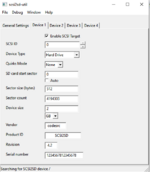 | |
| Posted by: LaPorta on 2021-10-18 02:58:20 I agree with JIT. While you can probably theoretically do what you are proposing, it sounds complex...definitely way more complex than I would have the knowledge for. I would also think it would be simpler to just make one new partitiona nd format it, then copy all the stuff you are talking about over. I assume part of the issue is having no modern Mac to use? | |
| Posted by: btse on 2021-10-18 08:53:36 Yes, I totally agree 🙂 But how can I access the contents of the image file then? That's the question. How can I access the contents of a multi partition image file? I do have (limited) access to an iMac G4 with 10.5.something on it, and also a Macbook with Big Sur. | |
| Posted by: Andrew on 2021-10-18 09:15:39 If your images are mountable in mini vmac, then you can use magicsd (you can find it in this forum) and use mini vmac to copy all contents (at file level) over to the sd card. It essentially formats the sd in a way that is usable with scsi2sd and at the same time can mount on mini vmac. While on the topic of scsi2sd images, does anyone know if an image exists with collection of freeware/shareware apps so I can sample? | |
| Posted by: btse on 2021-10-18 09:34:16 I tried that and unfortunately vMac thinks it's not a mac disk at all and asks to initialize it. Basilisk cannot see the file at all, probably due to size (15GB). But I really like the idea and I appreciate all help so far. | |
| Posted by: Andrew on 2021-10-18 09:50:44 Try to dd the contents of the image directly to sd card (or use balena etcher in windows, or disk tool on macos) and setup your scsi2sd as follows: setup only one scsi device start sector:0 sector size: 512 sector count: 20972765 (or more - it doesn't hurt) Most probably it will not be mountable on a modern pc, but should work on the physical vintage mac | |
| Posted by: btse on 2021-10-19 04:17:54 Yes, that's a good idea. But are you sure about the sector count? According to file(1) the first partition is only 100 blocks and the second 120...? But then again, I'm not really sure 1) how to interpret the output of file or 2) that file is correct. On the other hand, what can go wrong by a simple test. I'll do a test and report back. Thanks for all help 🙂 ! Ps. file above refers to: file(1) | |
| 1 |