68kMLA Classic Interface
This is a version of the 68kMLA forums for viewing on your favorite old mac. Visitors on modern platforms may prefer the main site.
| Click here to select a new forum. | |
| iMac G4: No screen activity | |
| Posted by: EvieSigma on 2021-10-11 13:47:11 I picked up a 1.25GHz 17 inch iMac G4 at VCF East this weekend but despite being in very nice shape overall, it seems to be troubled. When you press the power button it bongs like normal and the internal fan spins, but the screen never comes on. I've already tried pulling the RAM (it was already upgraded to 2GB, nice!) and cleaning the slots but it had no effect, what else could I try? The only other thing I can think of is to pull the PRAM battery and press the PRAM reset button (assuming there is one), but I'm not sure if the problem here is with the display panel or the rest of the computer. | |
| Posted by: beachycove on 2021-10-11 16:23:38 Unfortunately, plenty of imac g4s have fried graphics chips, owing to poor cooling/ heavy use. I have one of earlier USB1 models that was similarly afflicted, and went through several replacement logic boards before finding one that worked. Disassembly and reassembly is not that bad once you get into the way of it, but is not trivial. Having said which, open it up and see if the video cable has been properly seated, Maybe someone was in there before it came your way; the cable is often disconnected just to get at the hard drive or RAM. | |
Posted by: EvieSigma on 2021-10-11 16:32:15Unfortunately, plenty of imac g4s have fried graphics chips, owing to poor cooling/ heavy use. I have one of earlier USB1 models that was similarly afflicted, and went through several replacement logic boards before finding one that worked. Fried graphics chips? Jeez...I sure hope not. What does the video cable look like? There's a lot of cables inside the iMac G4 and to be brutally honest, outside of the obvious IDE drive cables I don't know what the other ones are for. | |
| Posted by: re4mat on 2021-10-11 17:05:18 I believe this is for your model. (USB 2.0) 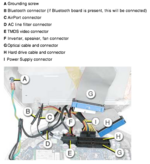 Source: https://tim.id.au/laptops/apple/imac/imac_usb2.pdf | |
| Posted by: EvieSigma on 2021-10-11 18:58:12 Thank you! The connector was still attached, but I disconnected and reconnected it and also pulled the PRAM battery to drain the PRAM too just in case. Sadly it had no effect, and I don't have an adapter from mini-VGA to VGA to see if the machine will output video externally. | |
| Posted by: EvieSigma on 2021-10-26 16:10:35 Took a while but I got a mini-VGA adapter and still nothing. I guess this iMac G4 is a goner. | |
| 1 |