68kMLA Classic Interface
This is a version of the 68kMLA forums for viewing on your favorite old mac. Visitors on modern platforms may prefer the main site.
| Click here to select a new forum. | |
| Mac Classic in possibly dead state. | |
| Posted by: The_Theramist on 2021-09-30 01:46:18 Greetings all, I just joined the forums as I've never restored a Mac of any type in the past but I have repaired boards with battery leak damage before. I picked up this classic for £40 from a local seller and decided I should have a go at restoring. 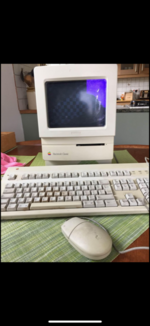 It was advertised with checkerboard pattern so a re-cap would fix but when I got it home, it didn't do that and gave me an error in hitting the interrupt button: 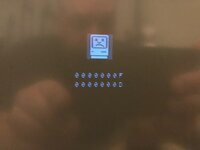 So given it's like this, I assumed it couldn't be too bad, and then I opened it up. 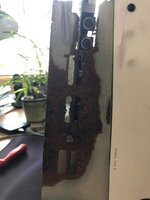 The main board was stuck into the chassis with all the corrosion. When I finally got it out it looked like this. Battery holder just fell off the board on removal. I suspect it was being held in by the case. 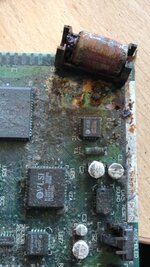 I've managed to clean it up a bit but the C3 cap fell off along with the Y1 component. 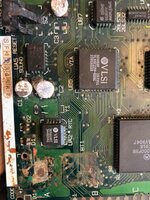 What is the Y1 component? I've got some caps on order and will continue to clean and scrape the crap off the board. Wish me luck. !m! | |
Posted by: cheesestraws on 2021-09-30 02:06:36What is the Y1 component? Y1 is a 32.768 KHz crystal that drives the RTC: 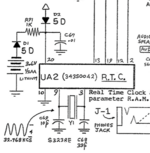 The schematics for the Classic are part of the Bomarc schematic collection that's around online, which might help: https://archive.org/download/Macintosh68kSchematics Good luck! | |
Posted by: cheesestraws on 2021-09-30 02:10:22and gave me an error in hitting the interrupt button: Forgive the double post, but that error is normal when you hit the interrupt button with no OS running. That error is "I have received an NMI, I have no handler for it, I don't know what to do so I'm giving up now". This cheat sheet might be useful: https://udcf.gla.ac.uk/~gwm1h/Error_Codes/Sad_Mac_Codes.html | |
| Posted by: demik on 2021-09-30 02:21:30 For a battery leakage this isn't too bad. Its does need a recap indeed. I agree with cheesy, the error with the NMI is ok. Every old-world Mac does it. What does it do without pressing the interrupt button ? | |
Posted by: The_Theramist on 2021-09-30 02:28:32For a battery leakage this isn't too bad. Its does need a recap indeed.It just stays on a grey screen. I even tried a reboot without the HDD connected and it did the same. I tried with <CMD>+<OPT>+X+O held to boot from rom and that seems to do nothing too. | |
Posted by: cheesestraws on 2021-09-30 02:32:01It just stays on a grey screen. I even tried a reboot without the HDD connected and it did the same. This is actually a good thing; if it gets to a grey screen (50% dither) it means that quite a lot of the computer is working. Code has to be running from ROM and the RAM has to be at least arguably good to get to that stage. If you don't have anything running at all, that's when you get the checkerboard. Have you unplugged the floppy drive too? | |
Posted by: The_Theramist on 2021-09-30 02:38:07This is actually a good thing; if it gets to a grey screen (50% dither) it means that quite a lot of the computer is working. Code has to be running from ROM and the RAM has to be at least arguably good to get to that stage. If you don't have anything running at all, that's when you get the checkerboard.Yes I did I think. | |
Posted by: cheesestraws on 2021-09-30 02:52:09Yes I did I think. OK. What this probably means is that the code that's polling for a boot device is hanging, which usually IME means it's waiting on a piece of hardware to respond that just isn't responding. It polls them one at a time, so it's totally possible for a misbehaving SCSI chip, for example, to block booting from ROM. Obviously one should look at the visible battery damage first, but after that, I'd suggest looking at connections to the SCSI chip and the SWIM, based on this symptom. I can't remember if a dead RTC can cause this (given your missing crystal). I don't think it does, but I might be wrong. That said, if it's behaving as you say, I think it probably counts as "mostly alive". Chances are good that it's repairable, IMO. | |
Posted by: The_Theramist on 2021-09-30 02:55:07OK. What this probably means is that the code that's polling for a boot device is hanging, which usually IME means it's waiting on a piece of hardware to respond that just isn't responding. It polls them one at a time, so it's totally possible for a misbehaving SCSI chip, for example, to block booting from ROM. Obviously one should look at the visible battery damage first, but after that, I'd suggest looking at connections to the SCSI chip and the SWIM, based on this symptom. I can't remember if a dead RTC can cause this (given your missing crystal). I don't think it does, but I might be wrong.Thanks for that. I assumed it wasn't completely dead seeing as It actually gave an error message at one point so I'm hopeful. | |
| Posted by: cheesestraws on 2021-09-30 02:56:51 Yup. Let us know how it goes! (I like your choice of musical instrument in your avatar, btw) | |
Posted by: The_Theramist on 2021-09-30 03:00:29Yup. Let us know how it goes!I mainly use that as I built a Theramin once for some crazy reason. Winding coils yourself is an interesting thing and tuning it feels like some kind of ancient magic. | |
Posted by: max1zzz on 2021-09-30 09:42:23I can't remember if a dead RTC can cause thisI know the SE (Which is very similar architecture wise to the Classic) will boot fine with no clock chip installed, so it's unlikley a totally dead clock chip would cause this. A misbehaving could conceivably though. I have no idea what a working clock chip would do with no crystal, I presume it would work but the clock would just not advance | |
| Posted by: cheesestraws on 2021-10-01 02:27:48 Yeah, I think you're right there. | |
Posted by: The_Theramist on 2021-10-02 02:28:49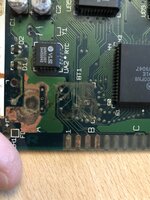 Looking a little better now. has anyone got a picture of how the board should look under there with no corrosion? | |
| Posted by: cheesestraws on 2021-10-02 02:55:25 I don't, unfortunately. All I have is the schematic. Did you find that? I can send it if not. Don't worry about the traces going to the edge connector, though, that isn't actually used for anything in normal use. | |
Posted by: The_Theramist on 2021-10-02 04:53:23I don't, unfortunately. All I have is the schematic. Did you find that? I can send it if not.I did get the schematic. Very helpful. The ones I’m most worried about is the 3 pads in the middle under the battery. I’ll just reflow those when I get the iron out. | |
| Posted by: SuperSVGA on 2021-10-02 21:31:53 Here's some shots of that area on a slightly less corroded board. I ended up ripping up the left trace while desoldering the holder to take these pictures. Oh well, I'll probably just put a CR2032 holder on instead. 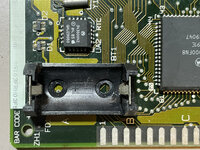 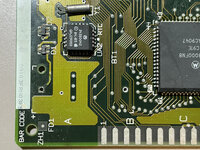 | |
| 1 |