68kMLA Classic Interface
This is a version of the 68kMLA forums for viewing on your favorite old mac. Visitors on modern platforms may prefer the main site.
| Click here to select a new forum. | |
| LaCie 1992 Pocket Drive | |
| Posted by: florr@mac.com on 2016-03-31 07:09:05 Hi, I have a vintage LaCie 40 MB Pocket Drive (a SCSI drive — not to be confused with the more modern FireWire LaCie PocketDrive, without a space between “Pocket” and “Drive”), with all necessary connectors, which seems to work with an old Macintosh Classic I have. However, the connectors have tiny toggle switches on the connectors, whose function I don’t understand. Here’s a picture: 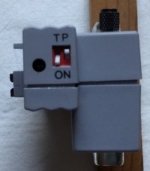 The switches move vertically. The T and O supposedly relate to the left switch, the P and N to the right switch. Would the T and O relate in any way to whether the SCSI chain terminates (T) there or continues further? But what about the P and N? Would anyone have information on these switches — or even (prayer!) a copy of the original manual? I’ve been unable to find information on this drive on the Internet, except for an old Macworld ad from 1992: Macworld, August 1992, p. 36 https://archive.org/details/Macworld_9208_August_1992 In particular, no information seems to be available on the LaCie site, nor at www.noappleis2old4us.com Thanks in advance for any help on this. florr | |
| Posted by: CC_333 on 2016-03-31 07:42:59 I would guess that the switch labelled "T" is termination. But "P"? No clue. "O" and "N" are probably connected to each other, though, and I think it's there to indicate that the down position is the "ON" position. c | |
| Posted by: florr@mac.com on 2016-03-31 11:10:22 Your idea about ON makes a lot of sense, c. I did think of this, but was unsure. This leaves the mysterious P. Maybe somebody will have an idea. Thanks! | |
| Posted by: butterburger on 2016-03-31 11:16:27 First thing to hit my mind is "termination power: on". My instant reaction after recognising letters, before even seeing the switches. Then, seeing two switches, I do not know what it means. | |
| Posted by: olePigeon on 2016-03-31 13:51:13 I think ON means On. T is probably termination. So you flip it to the ON to turn on Termination. Maybe P is for Passive Termination? So you'd set the T to ON and the P to not-ON, and that would give you active termination. | |
| Posted by: techknight on 2016-03-31 15:25:50 T = Termination Enable. P = Parity Enable. Thats the only thing I can think of that would make sense. | |
| Posted by: johnklos on 2016-03-31 22:18:19 By 1992 all drives should've been supporting parity. There's a chance that on means on, that T means termination, and that P is termination power. Sometimes termination is powered by the cable (from the computer), and sometimes by the device itself. | |
| Posted by: Macdrone on 2016-04-01 05:43:20 i agree with the last statement as the 2 of these I have have power supplies that attach to the adb cable. | |
| Posted by: olePigeon on 2016-04-01 12:27:16 Maybe it's the first toilet paper SCSI attachment. Make sure TP is set, or it'll get messy. | |
| Posted by: Bunsen on 2016-04-01 22:57:24 There are four possible combinations to try, soo ..... maybe try them? | |
| Posted by: florr@mac.com on 2016-04-02 06:30:51 Thank you all! Now I can indeed try the four combinations — but with an idea about the meaning of each! | |
| Posted by: CelGen on 2016-04-02 18:53:11 Come on you guys, really? T = Termination enable/disable P = Parity enable/disable (just because it was sold in the 90's didn't mean there was no assumption you might want to use it on something older like a Macintosh Plus) O and N are exactly that....ON No point printing ON twice. Failing that, crack the thing open and see where the traces go. | |
| Posted by: olePigeon on 2016-04-03 16:29:32 Are you saying my Toilet Paper theory isn't correct? | |
| Posted by: florr@mac.com on 2016-04-04 16:56:06 Thank you all for your comments. I tried all four switch positions on my Mac Classic and… all seemingly worked — at least for saving and opening documents on the drive. I didn’t try with a second drive along the SCSI chain, however… No matter, at least I have some good guesses at the meaning of those switches. 68LC04, I also tried the four combinations toilet on/off, paper on/off, and only one of them really worked. Thanks for the tip! | |
| Posted by: register on 2016-04-10 02:54:28 The LaCie Pocket Drive also works like a charm with a CF or SD card to SCSI adapter inside. | |
| 1 |