68kMLA Classic Interface
This is a version of the 68kMLA forums for viewing on your favorite old mac. Visitors on modern platforms may prefer the main site.
| Click here to select a new forum. | |
| Need Disk Image/Documentation for ImageWriter II AppleTalk | |
| Posted by: LaPorta on 2021-09-15 19:57:31 Through the gracious beneficence of a forum member, I will soon be in possession of an ImageWriter II AappleTalk Card. What I need now is the installation disk images, and I was hoping for a PDF or other form of documentation to tell me how to set it up properly. Does anyone have either of these things? | |
| Posted by: Fizzbinn on 2021-09-15 21:18:40 Will it need configuration? Once the card is installed I would think the ImageWriter printer would just show up in the Chooser when you click the AppleTalk ImageWriter icon (Assuming you have the physical cabling right and the extension). I don‘t have a lot of experience with pre System 7 but I think the “AppleTalk ImageWriter” chooser extension is installed along with default OS install. I believe you can use the “Namer” printer utility application to set the AppleTalk name of AppleTalk LaserWriters and ImageWriters. I think I recall that app being on the legacy OS CD images that are out there. | |
| Posted by: NJRoadfan on 2021-09-16 04:18:46 The card is straight forward to install in the printer, but you do need to flip a DIP switch to indicate to the printer that its installed. System 7 and later come with the drivers you need. | |
| Posted by: LaPorta on 2021-09-16 05:16:06 Yes, that was what I read that the DIP switches had to be set to something different. That was why I was hoping to score some documentation, even electronically. Of course, expert help would be just as good. | |
| Posted by: NJRoadfan on 2021-09-16 08:06:33 I have the ImageWriter Technical Reference, I'll grab the info when home. | |
Posted by: Fizzbinn on 2021-09-16 15:30:29The card is straight forward to install in the printer, but you do need to flip a DIP switch to indicate to the printer that its installed. System 7 and later come with the drivers you need.Huh, makes sense. Looking at the ImageWriter II Owner's Manual I have (copy-write 1985), page 52 says the following: 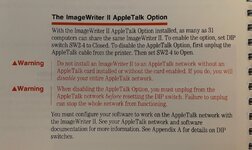 “To enable the option (the AppleTalk card), set DIP switch SW2-4 to Closed.” I half expected my old manual to say nothing about an AppleTalk option but apparently it was available early in the history of AppleTalk. Having a much lower cost network printer option vs. a LaserWriter was seen as a good idea early on I suppose. Found a copy of the manual online here: 
ImageWriter II Owner's Manual : Apple Computer, Inc. : Free Download, Borrow, and Streaming : Internet ArchiveApple printer manual
archive.org
| |
| Posted by: NJRoadfan on 2021-09-16 16:57:32 That's what the Technical Reference says. I like the bit about DDoSing an entire network by plugging in a regular old ImageWriter II! | |
| Posted by: joethezombie on 2021-09-16 17:51:10 I have a sealed in box ImageWriter II/LQ LocalTalk Option. If you can’t get yours up and going, I can unseal it and archive the contents. | |
| Posted by: LaPorta on 2021-09-16 17:56:36 Wouldn’t that just be the best prank? Have someone try to diagnose a non-working AppleTalk network that you hooked the non-AppleTalk ImageWriter to! | |
| Posted by: cheesestraws on 2021-09-17 01:24:23 "Nah, we don't have a big red stop button, if there's an emergency just plug this printer in" | |
| Posted by: pcamen on 2021-09-18 07:26:53 @LaPorta I have the manual, PM sent. | |
| 1 |