68kMLA Classic Interface
This is a version of the 68kMLA forums for viewing on your favorite old mac. Visitors on modern platforms may prefer the main site.
| Click here to select a new forum. | |
| Is it worth repairing a Mac's external hard drive? | |
| Posted by: Virtual Davey on 2021-09-13 13:43:16 I have this ProApp 20S external hard drive for my 1984 Macintosh Plus All-in-One. When I plugged it in and turned it on, it began to smoke profusely after 10 minutes or so. I opened it and noticed it had 4 RIFA capacitors, and at least 1 was blown. I changed all 4, light on the switch goes on, and I hear a little "click" coming from somewhere on the board. I narrowed it down to that blue coil with the number 216-03 marked on the top. Occasionally that coil will really act up and make quite a bit of noise. I hear absolutely nothing from the hard drive itself. I'm presuming that the board is attempting to start the hard drive but is unable to do so. I should hear the hard drive spin even though it's not connected to the Mac, correct? From what I've read it could very well be seized. Is it even worth replacing it's hard drive? I can't find the exact model, and they are not cheap. I have other options (I own a FloppyEmu), I just enjoy restoring things if it's at all possible and economical. I haven't connected it to the Macintosh because I just restored the Mac to working order and don't want to cause issues. Is it safe to connect without causing damage to the Mac? Pictures: | |
| Posted by: LaPorta on 2021-09-13 14:16:50 If it means enough to you, anything is worth fixing, in my opinion. The HD itself may be bad. One way to salvage the actual case is by putting a SCSI2SD inside instead of the HD. | |
| Posted by: Unknown_K on 2021-09-13 14:25:52 Everybody has had to deal with the repair or replace question. I remember when I started having issues with dead G4 MDD power supplies and it was cheaper to replace (at that time) then repair so that is what I did. I did save the old supplies because I knew whatever problem they have will affect the replacement supply sooner or later and I will have to repair them because replacement costs would be too high. Even if the power supply in the external case is bad I don't think it would affect the SCSI interface to your mac, it might keep the HD from working or fry it depending on the design. You can probably replace that hard drive with something larger and newer if it is dead, its not something special. Some people want to keep external drives stock and some want to keep the look and put something more useful inside. | |
| Posted by: bdurbrow on 2021-09-13 15:01:31 I would check the power supply voltages before re-connecting it, just in case. New power supplies can also be had as well, the 5v/12v output it needs is very common. As for repairing the drive itself, if it’s actually malfunctioning then the issue is more likely going to be physical; and you would need a clean room to even open the enclosure. Were it my drive; I would replace the power supply and stick a SCSI2SD in there. | |
| Posted by: Virtual Davey on 2021-09-13 16:33:56 I connected the drive using an external power source (see pic). Started right up, mac responded (2nd pic). The voltages coming out of the ProApp's enclosure power connector to the drive fluctuates all over the place. 12v, 19v, 25v up & down, etc. The board is faulty. Can someone direct me to a new board that can replace the faulty one in this enclosure (3rd pic)? | |
| Posted by: mg.man on 2021-09-13 23:23:32 Just a quick question as I have no experience of this particular drive... in your last pic ... 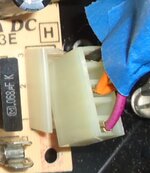 Are you sure that connector is correctly attached? The purple wire doesn't seem to line up - is it connected?? Shouldn't it be?? | |
| Posted by: dochilli on 2021-09-14 00:14:47 As a replacement for the HDD you can also use a BlueSCSI. I built 3 of them and they work fine. | |
| Posted by: Virtual Davey on 2021-09-14 04:18:57 Yes, that purple wire should normally be connected, but in that photo it is not (I have the board removed). It's connected properly however during testing. The hard drive has been working flawlessly while connected to a different power source outside the enclosure but if it does eventually die, I feel SCSI2SD or a BlueSCSI would be a convenient option. At this time it seems all I need is a replacement power supply but the only replacement 12V 5V power supplies I can find are these pictured below (the same type I used for testing). Am I supposed to somehow put one of these into the enclosure? I'd still like to use the power switch on the ProApp enclosure if at all possible though. | |
| Posted by: Virtual Davey on 2021-09-14 08:59:40 I was restless this morning and put something together that looks as though it came straight out of Fallout. It's a tight fit, and I need to complete some safety measures before I seal it up, but it works. The light on the on/off switch no longer illuminates when it's on, but I believe that was slowly going out even before I started this. | |
| Posted by: Virtual Davey on 2021-09-14 13:49:09 Looks a little more orderly and tidy in the enclosure now. Light is working again too. Biggest issue was mounting the drive and power supply securely. Tried many things but ended up using strong mounting tape. | |
| 1 |