68kMLA Classic Interface
This is a version of the 68kMLA forums for viewing on your favorite old mac. Visitors on modern platforms may prefer the main site.
| Click here to select a new forum. | |
| What is this in my 128k? | |
| Posted by: Online persona on 2021-09-01 10:06:34 Cracked open a new to me Mac 128k and found this oddity. 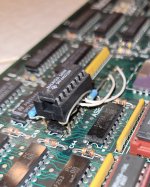 What is this chip piggy backed on a RAM chip? | |
| Posted by: Nixontheknight on 2021-09-01 10:08:03 That’s a 74ls253, an octal bus transceiver. That might be an unofficial upgrade to 512k | |
Posted by: cheesestraws on 2021-09-01 10:29:07What is this chip piggy backed on a RAM chip? That might be an unofficial upgrade to 512k Agreed. The DRAMs, at the bottom left of the image, have been socketed, and if you look carefully in the photo you can see that they're 4256s of some description, which are 256kbit DRAM chips. The stock 128k has 64kbit chips, so this has been unofficially upgraded to 512K, and that chip is probably part of that. | |
| Posted by: Online persona on 2021-09-01 11:02:52 Ah, that makes sense. Thanks!! | |
| Posted by: Crutch on 2021-09-01 19:23:39 I have a board with a similar 3rd party upgrade. You my friend are the proud owner of a 512k. Hope that’s what you wanted 🙂 | |
Posted by: Online persona on 2021-09-01 21:21:50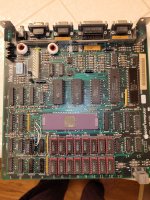 Here's the whole enchilada. It boots up nicely, no screen issues or burn in. The floppy won't read a disc, no surprise there. Dated in late October of 84 on the case. Who would have installed such a memory upgrade, owner, dealer? | |
| Posted by: Nixontheknight on 2021-09-01 21:50:54 Most likely this was done by the end user, considering all the parts were available at any electronics stores. Some people went to the Apple Stores or resellers and got a new logic board to upgrade from 128 to 512. I don’t blame anyone for going the extra mile and doing it themselves, as long as the board worked after they did it. | |
| Posted by: bdurbrow on 2021-09-01 23:23:31 IIRC, there were also various people who would do this for others; often you could find somebody at local user groups. | |
| Posted by: cheesestraws on 2021-09-02 02:58:55 I like the red sockets, they're very stylish... We can piece together a bit more of the story here, because that 128k board is the version that was used before the release of the 512k (that version has an extra part number on the silk screen and a couple of tick boxes to mark whether it's a 128k or 512k board). But the chips have a 1985 date code on them. So it seems likely that the original owner had the true Apple Upgrade Experience, bought this really just before the 512k came out (let's face it, the 128k wasn't around that long on its own before the 512k came out), then ended up bodging it themselves or getting someone else, probably local to do it. | |
| Posted by: Online persona on 2021-09-02 05:50:38 A place I worked in 85' had a fresh made Fat Mac which was my intro to the Macintosh Way. Everything I'd used before suddenly seemed like the dark ages. How much would this upgrade have cost back in 85'? | |
| Posted by: olePigeon on 2021-09-02 20:26:05 Those red sockets are awesome. Excellent OG upgrade. | |
Posted by: Online persona on 2021-09-07 20:34:52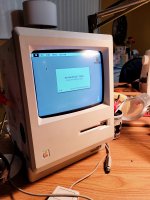 Managed to get it to boot all the way tonight. Swapped in an 800k floppy since the 400k won't read disks. Using the yellow stripe ribbon cable it worked. Confirmed it's got 512k of RAM. Oddly, while it will read the double sided disks it crashes a lot when trying to access it. | |
| Posted by: epooch on 2021-09-08 17:25:44 It looks like your 128k still has the original 64K ROM set, despite the RAM upgrade. It was pretty typical to upgrade to the Mac Plus ROMs when doing this upgrade, aligning with cheesestraw's theory that this was an early upgrade (before the Mac Plus arrived). Without knowing the error you are getting, the crashes could be due to a bug in the early 64K ROM set that would cause a divide by zero error with many of the 800K disk drives. If that is the case, I am surprised you are getting it to boot at all though. There are some 800K drives that don't cause this crash. Another alternative would be to upgrade to Mac Plus ROMs. There should be a fair bit of information about this issue on this site. Personally, I would try to fix the 400K drive and keep it original like you have it. | |
| Posted by: Crutch on 2021-09-08 19:18:40 You definitely have the original 64K ROMs. You can tell because the RAM size in “About the Finder” doesn’t have a dot after it. That Mac won’t read 800k disks. | |
| Posted by: Online persona on 2021-09-08 21:14:52 I'd like to keep the 400k floppy but I don't know anything about fixing them. It accepts the disk, makes some noise, then ejects it smartly. | |
Posted by: epooch on 2021-09-09 14:29:22You can tell because the RAM size in “About the Finder” doesn’t have a dot after it.That's a good tip I never knew about! Here I was looking up Apple part numbers! I'd like to keep the 400k floppy but I don't know anything about fixing them. It accepts the disk, makes some noise, then ejects it smartly.Start with isopropyl alcohol on a Q tip to clean the drive head. Do some searches on this site for troubleshooting info. Those 400K drives are built like tanks, so other than lubrication, I have rarely had problems with them. Do you get any icons that indicate a problem? Crossed out disk, or anything? | |
| Posted by: Crutch on 2021-09-09 17:27:28 If the disk is auto ejecting OP will most definitely be seeing an Xed out disk icon. | |
| Posted by: Online persona on 2021-09-09 22:24:43 Yes, I get the crossed out icon when the disk ejects. What's the scoop on the pressure pads that I hear about? | |
| 1 |