68kMLA Classic Interface
This is a version of the 68kMLA forums for viewing on your favorite old mac. Visitors on modern platforms may prefer the main site.
| Click here to select a new forum. | |
| IIsi Fuse blows in recapped power supply? | |
| Posted by: timoog on 2021-08-26 01:23:36 Recapped the power supply and main board a couple of years ago and all working well, not used for 6months or so went to boot up last week and there was a pop from the psu, I’ve taken it apart and had a clean round no obvious faults, replaced fuse and pop again, any ideas or advice on where to even start diagnosing what I presume is a short somewhere? | |
| Posted by: joshc on 2021-08-26 01:32:52 I assume your PSU is the Sony variant? (There was another make of PSU in the IIsi but most are Sony). There's a short/dead component somewhere. If you don't have a component tester, I'd highly recommend one - I use a TC1 component tester, they are cheap. It will identify a component and tell you what it can about it, it's how I found some dead diodes on my IIsi PSU. See here: Troubleshooting a IIsi Sony APS-06 Power supply - blown capacitor caused by bad diodes in series with C105This post is a recreation of a previous troubleshooting thread (lost in the recent forum crash) where I had some problems identifying the cause of a blown capacitor in a recapped Sony APS-06 from a Macintosh IIsi. The exact PSU in question: I used the correct value capacitor and it was...
 68kmla.org
Other places to look, other than D105 and D106 is checking D301, TH101 and TH301. I would also check the resistors on the high voltage side. You may also find the schematics useful. The IIsi PSU schematics are included in this download: https://archive.org/details/Macintosh68kSchematics Hope this helps | |
| Posted by: timoog on 2021-08-26 02:05:18 Yes Sony, thanks Joshc something to get started with, much appreciated | |
| Posted by: timoog on 2021-09-01 08:31:42 TH101 was blown apart! have replaced, diodes read ok and resistors check out - and still blowing fuse, some corrosion on the board from around D301 C302 see picture, maybe from leaky cap previously could this cause short? 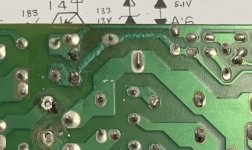 | |
| Posted by: joshc on 2021-09-07 09:21:38 Some of those joints don't look too good, probably an idea to reflow them with fresh solder. Did you get any further with it? | |
| Posted by: timoog on 2021-09-08 00:17:33 Hi Joshc, on pause for a few days, figured out how to test continuity on those traces, all seems good. Ordered some diodes and a couple of thermistors will re-flow those joints at the same time and see. Watching videos on repairing switching PSUs! | |
| Posted by: timoog on 2021-09-10 06:18:35 Replaced the diodes at 105 & 106 same issue, just starting to replace components now! Following this thread https://68kmla.org/bb/index.php?threads/macintosh-iisi-power-supply-diodes.32114/ I’ve ordered a STR80145, not sure how to test these so ordered replacement, probably D101 too. - any advice on testing these multi pin diodes With the TC1? Getting no or broken component on most pins and diode on 1+5 for the 80145. Perhaps D302 & 305 next looks like 30v & 33v Zener diodes from the schematic and post info, anyone know how important is the Max power dissipation? RS have these with 500mW dissipation. thanks ! | |
| Posted by: timoog on 2021-09-13 09:15:51 So following this guide on YouTube looks like the bridge rectifier D101is shorting - I understand from this that both middle ac pins shouldn’t give a reading but I’m getting .6 from pin 3(- lead) & 2(+ lead), can anyone confirm? | |
| Posted by: techknight on 2021-09-15 12:58:14 short means .000 or close to it. That seems normal to me. You should start checking all components instead of throwing parts at it. Such as, check the main regulator for shorts. check the switching transistors for shorts, etc... Sounds like the power supply grenaded itself and thats that. | |
| Posted by: timoog on 2021-09-16 08:25:55 Yeah appreciate that @techknight, not skilled at testing some of these more complicated components - hence the video, trying new parts is a way forward. Even with the schematic I'm not sure which components you're referring to, can you give me a reference at all? Hope it's not grenaded itself, my fist mac, had it since '93 & quite attached! | |
Posted by: techknight on 2021-09-21 04:46:10Yeah appreciate that @techknight, not skilled at testing some of these more complicated components - hence the video, trying new parts is a way forward. Even with the schematic I'm not sure which components you're referring to, can you give me a reference at all? Hope it's not grenaded itself, my fist mac, had it since '93 & quite attached! You do you, so if you wanna just start throwing parts at it, be my guest... but, what you demonstrate in the video is normal. | |
| Posted by: timoog on 2021-09-21 07:30:42 Thanks I will, you too. So yeah the video is a tutorial on testing bridge rectifiers, my question was is it normal to get a reading on the two ac pins? I was getting .600ish in one configuration, see first two pics below. So as it happens the new rectifier turned up today and no, it’s not good to get a reading. Good news is the psu is fixed and the iisi lives to bong another day! | |
| Posted by: joshc on 2021-09-22 05:35:19 @timoog congrats on fixing it. Seems there's a few common components that go in these, so I'm glad you documented this. | |
| 1 |