68kMLA Classic Interface
This is a version of the 68kMLA forums for viewing on your favorite old mac. Visitors on modern platforms may prefer the main site.
| Click here to select a new forum. | |
| Problem Installing "Born Again" on IIfx | |
| Posted by: Concorde1993 on 2021-07-30 15:15:53 Prior to the site crash, I discussed in another thread installing OS 8.1 on my IIfx using an installer script called Born Again. I was able to locate a legit OS 8.1 install disc on eBay on the cheap, however Born Again for some reason does not recognize my OS 8.1 disc (even though it mounts on my desktop and is seen by the IIfx) and suggests that I email its developer should problems persist. For those that have installed Born Again on their 68030 Mac, have any of you run into this snag? I followed the instructions accordingly - I have two partitions on a 1.2GB LaCie SCSI drive, which were created using Silverlining 5.7 - one for System 7.5.1 and another for the OS 8.1 volume. Drive works perfectly and all of my software discs are OEM. | |
| Posted by: DracheMitch on 2021-07-31 10:14:37 Doesn’t “Wish I Were” work on a IIfx? | |
Posted by: aladds on 2021-07-31 11:18:57Doesn’t “Wish I Were” work on a IIfx?From memory, whilst you can use that for installation, you then need an '030 patch to get it to boot. Gamba's site used to have info on about this... Here's a mirror https://www.vintageapple.org/gamba2/os8_68030.html | |
| Posted by: Concorde1993 on 2021-08-06 20:37:21 Any other tips or is this another doomed project? | |
Posted by: DracheMitch on 2021-08-23 12:05:37Any other tips or is this another doomed project? Mac OS 8.1 for a Mac IIfx (or maybe just a 68030) - Macintosh GardenIt is possible to install Mac OS 8.1 onto a Mac IIfx and I have done so (it involved ResEdit). The file above is a stuffed (v4) copy of my bootable Mac OS 8.1 volume. I'd be happy if someone else would try to see if they can use it on their IIfx. Indeed, it may even work on other 68030 Macs...
| |
| Posted by: Concorde1993 on 2021-08-23 23:57:24 @DracheMitch Before the site crash someone posted that link. Might be a last resort if I can't determine why Born Again won't accept my OEM 8.1 disc. | |
| Posted by: BacioiuC on 2021-08-24 02:41:40 You can install without Bourne Again by doing some ResEdit hackery: Vintage Apple - Gamba - >Installing OS 8 & OS 8.1 on 68030 Macs
vintageapple.org
I did this to install 8.1 on my CCII and SE/30 without issue. | |
| Posted by: Concorde1993 on 2022-05-28 00:56:11 Revisiting this as I finally checked out Gamba's site, however I'm having problems expanding some of the software programs listed in the instructions with Stuffit Expander. Thus far, I have successfully downloaded and unstuffed ResEdit 2.1.3 and the OS8-030 Patch onto my IIfx. For whatever reason, Stuffit Expander does not expand System Picker 1.1a3 and Wish I Were Here 2.0. The other notable item is Network Access Disk 7.5 shows as an image file and it cannot be opened. Some of the programs were downloaded from Mac GUI and the Macintosh Repository using my ThinkPad W520 and A21m. Pics: 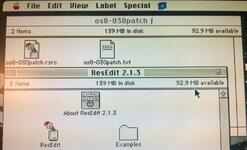 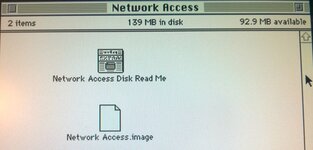 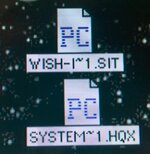 | |
| Posted by: volvo242gt on 2022-05-28 01:50:32 Looks like the files were converted to PC files, which means that the resource forks for the files got stripped. Do you have access to a web-enabled Mac? Might be easier to download the files to that, then either use file sharing over ethernet, or if the Mac is old enough to use a USB floppy drive, save them to a disk. I recently used my G3 wirelessly to access the Macintosh Garden for a few files I needed for the 68K machines. Was easier than saving the files to the MBP, transferring them to an external hard drive, then attaching that to the G3 to access them on a 68K-friendly computer. | |
Posted by: cheesestraws on 2022-05-28 02:18:19Stuffit Expander does not expand System Picker 1.1a3 and Wish I Were Here 2.0 What does it say when you try? The other notable item is Network Access Disk 7.5 shows as an image file and it cannot be opened It's probably just lost its type/creator. Go into ResEdit, go "Get File/Folder Info..." on the .image file and set its type to "dImg" and its creator to "ddsk" (not including quotation marks, case matters). Looks like the files were converted to PC files, which means that the resource forks for the files got stripped. None of these formats (StuffIt, BinHex or DC42 disc images) use the resource fork in any meaningful way, they're probably OK. | |
Posted by: Concorde1993 on 2022-05-28 09:10:49What does it say when you try?Nothing. No dialog box; no activity. Go into ResEditThanks, I'll give it a try. They're probably OK.When I still had my Wallstreet G3, I would connect it to my wi-fi modem by ethernet, make a floppy using my LaCie USB drive, and then transfer it to whatever 68k Mac I was using. All of my Apple laptops are long gone (brittle plastics and logic board failures being the major catalysts) save for my mint Kanga G3, which does not want to boot anymore. My ThinkPads are now the mobile "bridge" computers. | |
| Posted by: Concorde1993 on 2022-05-28 13:51:21 @cheesestraws I changed the Type to dlmg and the Creator to ddsk for Network Access Disk 7.5 - I still get "Application program that created it could not be found. Could not find a translation extension with appropriate translators." | |
Posted by: cheesestraws on 2022-05-28 13:52:43Could not find a translation extension with appropriate translators Do you have DiskCopy 6.3 installed? I should have asked that first... | |
Posted by: Concorde1993 on 2022-05-28 14:08:23Do you have DiskCopy 6.3 installed?No. Did it come with any of the System 7 utility disks or do I have to download a copy online? | |
Posted by: cheesestraws on 2022-05-28 14:10:15No. Did it come with any of the System 7 utility disks or do I have to download a copy online? Ah, you'll need a copy of that. It don't think it came with System 7 but it's pretty widely available... | |
| Posted by: Concorde1993 on 2022-05-28 15:42:59 I downloaded Disk Copy 6.3.3 successfully. I was able to mount the Network Access image file and access it. In the process, I also made a separate floppy for that program. Oddly, it does not show up as an option in the Startup Disk control panel. Am I missing a step somewhere? Furthermore, when I try to mount or convert the image of the Wish I Were Here and System Picker programs in Disk Copy, I get a -8816 error code and a "Does not have a recognized file type" message. As stated earlier, Stuffit Expander does nothing when I attempt to expand either of those programs. | |
| Posted by: volvo242gt on 2022-05-28 17:10:04 The Network Access Disk will need to be booted Apple II style. Insert the disk, then turn on the machine. It won't show up in the Startup Disk control panel, since it's not a hard drive. | |
| Posted by: Concorde1993 on 2022-05-28 19:16:50 Confirming that the Network Access disk does work before turning on the IIfx. On another note, my IIfx has been developing an intermittent power on problem. Sometimes, when I shut it down, and then turn it on from the keyboard switch, it chimes, stays on for a brief moment, then switches off. Using the rear power switch results in a fast clicking sound from the power supply. I checked both batteries with my voltmeter; they each read full. Removing the batteries then reinstalling them or waiting a few minutes gets the IIfx to boot normally. | |
Posted by: Johnnya101 on 2022-05-28 19:20:38Confirming that the Network Access disk does work before turning on the IIfx.Bad power supply? Has it ever been recapped? If you have a lot of cards in there, it could be stressing the 30 year old psu. I just got mine recapped and it's been rock solid on for hours at a time with 5 power demanding cards. That's assuming the two electrolytic caps near the power on circuit have been replaced. | |
| Posted by: Concorde1993 on 2022-05-28 19:29:37 Power supply is an ASTEC unit, and while it has been thoroughly cleaned out, it has never been recapped. The board still has an SMD cap near the power on switch. No leakage as of yet. I have two cards in the IIfx at the moment - my Apple PC 5.25" card, and a standard 256-color Mac Video card. The IIfx is fine on restart; it's shutting down and rebooting from a cold start that's been a pain lately. | |
| 1 > |