68kMLA Classic Interface
This is a version of the 68kMLA forums for viewing on your favorite old mac. Visitors on modern platforms may prefer the main site.
| Click here to select a new forum. | |
| Macintosh II startup circuit is always on | |
| Posted by: Aektann on 2021-07-29 11:12:32 After replacing the broken power switch my Macintosh II motherboard begins to startup immediately after power cord is connected. I tried to de-solder and remove power switch to restore the previous working state with no luck. My board turns up every time when plugged to power. It seems like the power circuit is always on. What should I pay attention first? | |
| Posted by: Verault on 2021-07-29 12:40:01 Its just a basic Mac II? IF I recall (been a while and I cant find my pdfs) wasnt D5 or D4 involved in the startup voltage to turn on the psu? It could be stuck. Are you sure its not the psu? | |
Posted by: Aektann on 2021-07-29 13:28:59Its just a basic Mac II? IF I recall (been a while and I cant find my pdfs) wasnt D5 or D4 involved in the startup voltage to turn on the psu? It could be stuck. Are you sure its not the psu? Its just a basic Mac II? IF I recall (been a while and I cant find my pdfs) wasnt D5 or D4 involved in the startup voltage to turn on the psu? It could be stuck. Are you sure its not the psu? yep, it’s a genuine Mac II board, early revision. The problem is I don’t understand what was broken after the power switch was installed on board. It was the only modification I performed. | |
| Posted by: Verault on 2021-07-29 13:33:14 do a continuity check on your power switch. IS it always on or does it only chime when you push it? Also are those original or new batteries? | |
| Posted by: LaPorta on 2021-07-29 13:33:49 Are you sure the power switch itself is not broken? As in, always closed and not open when not depressed? | |
Posted by: Aektann on 2021-07-29 15:11:26Are you sure the power switch itself is not broken? As in, always closed and not open when not depressed?I de-soldered power switch and checked the board without it. It continues to power on each time I plug a power cord. Before repairing it behaved correctly. I don’t know what could be broken since that time | |
| Posted by: LaPorta on 2021-07-29 15:45:59 Perhaps a solder bridge or other connection? Just running through it. | |
| Posted by: joshc on 2021-07-29 21:24:00 Thankfully, this is a topic that's well documented/explored here: Downtown Doug Brown » Explanation of the Macintosh II/IIx power on/off circuit www.downtowndougbrown.com
Your Mac II is starting, so you know the battery part of the circuit is OK - it wouldn't start without that being OK. I think you need to poke around the bits in the 'Power On' section of the circuit: 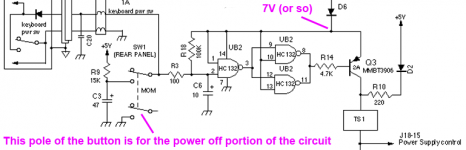 First off: The 7V rail also goes to the emitter of transistor Q3, which is a PNP transistor. We’ll see in a minute, but when the power button is not being pressed, the transistor is turned off, so it shouldn’t be drawing any current.The interesting bit here is Q3 - if that transistor is off, the power supply is off. And that transistor is supposed to be off until the power switch is pressed. According to that page: Since 7V is going into the left side of R14, there is no current between the emitter and base of the transistor. The transistor is turned off.Hopefully that will give you some ideas of other bits to check. Before repairing it behaved correctly.You mentioned replacing a broken power switch before, what made you think it was originally broken? What other work did you do? (I can see the batteries have been replaced), was there anything else? A photo of the back of the board may help myself or others identify a potential problem area. I hope that helps. It's a lot to get your head around, but approach it methodically from the power switch through to each step. | |
Posted by: Aektann on 2021-07-29 23:56:30Are you sure the power switch itself is not broken? As in, always closed and not open when not depressed?Yes, I’m pretty sure. It was de-soldered again to check if the board could power on normally. No way, it continues to fire up immediately even without the switch | |
| Posted by: Verault on 2021-07-30 15:20:11 Again, you should test the contiunity of the switch. You can also desolder the switch and see if the system still turns on. IF it does you have additional problems. Which Is what I would lead to as I havent seen one of those power switches on any of the MACS which had them go bad (other than being snapped off) | |
Posted by: Aektann on 2021-07-31 05:40:31Again, you should test the contiunity of the switch. You can also desolder the switch and see if the system still turns on. IF it does you have additional problems. Which Is what I would lead to as I havent seen one of those power switches on any of the MACS which had them go bad (other than being snapped off)Yes, I’ve already done this check and got the motherboard staring each time when I’m powering my setup. As I have an explanation of schematic I’ll do the check of NAND gates and transistors down the circuit. | |
| Posted by: Verault on 2021-07-31 06:01:17 so it turns on even with the power button removed? | |
Posted by: Aektann on 2021-07-31 06:07:00so it turns on even with the power button removed?Yes, exactly so. | |
| Posted by: Aektann on 2021-08-06 10:18:52 We found a cause, one of the axial capacitors started to leak and made a shortage, making the power controlling transistor always on. | |
| Posted by: Verault on 2021-08-06 15:18:27 Before going further it would be a good idea to change all the capacitors. I know the Axials are far less prone to leak than SMD, but they are 35 years old, and it would be one less variable to consider,. | |
| 1 |