68kMLA Classic Interface
This is a version of the 68kMLA forums for viewing on your favorite old mac. Visitors on modern platforms may prefer the main site.
| Click here to select a new forum. | |
| Get hardware info on system 6 | |
| Posted by: romnes on 2021-07-22 00:29:52 Hi, On a system 6 install, is there a way to get hardware info (CPU type, speed, etc) besides the amount of RAM installed? Preferably without installing additional software. If there's third party software that displays this info please let me know, I already know of MacEnvy. My reason for asking is I bought what was advertised as a working SE/30 (with an SE/30 chassis and serial number) on eBay but turned out to have a regular SE logic board inside. If possible I'd like to avoid that mistake for potential future purchases. The only way I can think of outside of seeing the board is to check is the amount of RAM (I think the regular SE maxes out at 4MB so if it's got more than that it's likely an SE/30) or some utility to check the CPU type or speed? If there are other methods, feel free to let me know. | |
| Posted by: mg.man on 2021-07-22 00:50:29 Sorry to hear you got taken... eBay is not what it used to be. That said, it's usually better / safer than Craigslist, FB Marketplace ,etc. Always best to eyeball stuff from those... Yes, the SE maxxes out at 4Mb. I'm also pretty sure you can't run System 6 (or lower) on an SE/30. | |
| Posted by: romnes on 2021-07-22 01:12:43 Thanks. To be fair, I don't think the seller knew or had bad intentions. FYI https://support.apple.com/kb/sp195 says the SE/30 supports 6.0.3 and upwards so I think it'll run System 6, though not 6.0.0 so that's another thing to look for I guess 🙂 | |
Posted by: mg.man on 2021-07-22 01:18:34SE/30 supports 6.0.3I stand corrected... I was sure my SE/30 complained about trying to boot off a 6.0.8 HD... Will have to investigate. Something else... if the Mac in question is running 7.0.x or 7.1.x, I'm pretty sure the "About this Macintosh" shows the Model... 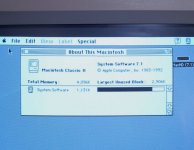 | |
| Posted by: romnes on 2021-07-22 01:24:19 Yeah, System 7 makes it easier 🙂 | |
| Posted by: mg.man on 2021-07-22 01:25:12 That screen grab reminded me... it could have been the Classic II that complained about my 6.0.8 HD... it looks like it only supports 6.0.8L (according to EveryMac). Deffo need to check this out... sorry for the red herring... 🙄 | |
Posted by: mg.man on 2021-07-22 01:27:30System 7 makes it easierI guess you could surmise that if the "About" shows 6.0 [.1, .2] or earlier, it's not a '30. | |
| Posted by: dochilli on 2021-07-23 03:38:16 Classic II can not boot 6.0.8, but 6.0.8 L SE/30 can boot 6.0.8 AFAIK | |
Posted by: MrFahrenheit on 2021-07-23 19:41:58Hi, I also learned the hard way on this. I made up my mind that whenever I looked for an SE/30, I would only either buy one that showed the motherboard inside, or showed MORE than 4MB of RAM installed. | |
| 1 |