68kMLA Classic Interface
This is a version of the 68kMLA forums for viewing on your favorite old mac. Visitors on modern platforms may prefer the main site.
| Click here to select a new forum. | |
| Transfer Data between vintage Macintosh and modern Macintosh | |
| Posted by: MaxL on 2021-07-18 08:35:01 Hi, I have a Macintosh Performa 475 equipped with an Ethernet card and I would like to use it to get data from my modern Mac to my Performa. I tried sharing a folder on my modern Mac and connect my Performa via Fetch to the modern Mac and FTP data to the Performa. But unfortunately, that didn't work and I couldn't find any instructions on the internet, on how to set it up properly. Has anyone tried this yet and can give me some advices? That would be really nice. Have a nice day! Max | |
| Posted by: LaPorta on 2021-07-18 10:29:48 What system is your "modern" Mac running? What is your physical hardware setup? | |
| Posted by: MaxL on 2021-07-18 10:50:28 Thanks for your reply. My modern Mac is a Mac Pro 5.1 running macOS Mojave 10.14.6. It's connected via ethernet to a router (Fritzbox) which acts as a switch. The Performa is as well connected via ethernet to the same router | |
| Posted by: LaPorta on 2021-07-18 14:04:51 First, sometimes, depending on the System and the card, the old Mac may not work well with the auto-sensing hardware in the modern router. That might be the first issue. Second, there is absolutely no way to use the built-in networking solutions to host files with the modern mac; the Performa would never be able to connect to it. Hosting on the Mac Pro with an FTP server could possibly work, using Fetch on the Performa to connect to it. Still, that would not fix the hardware issue. You may need an older ethernet router to use as a bridge for the Performa to be able to connect to the network at all. | |
| Posted by: cheesestraws on 2021-07-18 14:14:55 What interface(s) does the card in the 475 have? AAUI, 10BaseT, 10Base2? | |
| Posted by: MaxL on 2021-07-18 22:51:52 Hi, Thanks, the Performa has a 10BaseT and 10Base2 port. But I use the 10BaseT because the rest of my network is obviously RJ45 as well. I will try later on setting up an FTP Server on my modern Mac and let you know if it worked. | |
| Posted by: MindWalker on 2021-07-21 10:49:55 I've used QuickFTP to run an FTP server on my MBP to move file to and from my IIcx (using Fetch). | |
| Posted by: AndyO on 2021-07-21 12:53:31 I also use QuickFTP on my M1 iMac to allow data sharing with my 630CD, G4 mini and SnowBook - also using Fetch. It works a treat! | |
| Posted by: LaPorta on 2021-07-21 13:18:45 My personal favorite is A2Server. | |
Posted by: Byte Knight on 2021-07-21 17:14:54My personal favorite is A2Server.Agreed - this is the ultimate setup! | |
Posted by: Juror22 on 2021-07-21 20:50:45My personal favorite is A2Server.I did not know about this option - I have got to set one of these up! | |
| Posted by: MaxL on 2021-07-23 09:08:25 I've tried accessing the FTP server (QuickFTP) on my Performa, no luck there. I ensured that the server was working, by connecting a Windows notebook via WLAN to the server, which worked like a charm. @LaPorta mentioned that my Fritzbox router might be the problem, luckily my MacPro has a second Ethernet port, which I could use. It kind of worked, because I was able to ping the Performa and I could see that some packaged were exchanged between the two macs (in Network utility), but still, my Performa won't access the FTP server. The last thing I could try is using my level one switch and hooking up both machines on that one. But I don't think this will work either, because I was already able to ping the Performa. | |
| Posted by: MaxL on 2021-07-23 09:40:58 I am not quite sure, what's going on between those two Macs, so I thought maybe I sould try Wireshark the connection and look at that. 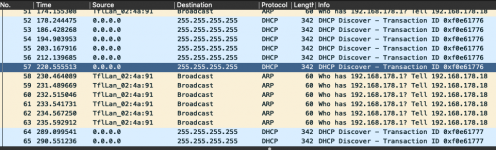 I am not a profi, but it looks like to me, that the Performa tries to send an ARP request, trying to find my MacPro where the FTP server is hosted. And apparently, it doesn't get a response from any device in the network, still, there are those DHCP Messages, which I can't really explain. Because the 0.0.0.0 source IP would indicate that the destination is unknown. 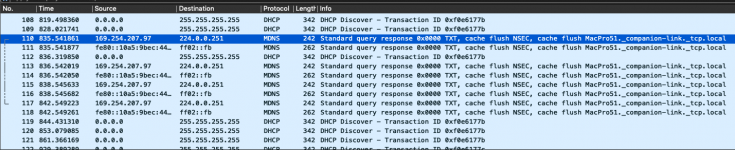  After a while, this popped up, which I can't really make sense of. But as far as I understand it, this MDNS is some kind of special DNS service that directly talks to devices. But apparently, it comunicates via IPV6, which my Performa can't handle. Maybe someone can make sense out of it. | |
| Posted by: olePigeon on 2021-07-25 20:15:14 @MaxL I use NetPresenz on my 68k Mac, and any FTP client on my modern computer. Just make sure to select FTP and not SFTP. I could not get it to work the other way around. | |
Posted by: register on 2021-07-29 05:51:01You may need an older ethernet router to use as a bridge for the Performa to be able to connect to the network at all.Yes, an old router or even a simple Hub is sometimes the solution to hook old hardware to a switch of recent make. | |
| Posted by: slipperygrey on 2021-07-29 10:32:06 What is the make and model of your LC PDS Ethernet card? Can you load stuff over FTP or HTTP from the internet / remote servers? I originally got an Apple branded LC PDS Twisted-Pair Ethernet card for my Performa 476, but it turned out to be very marginal, with *some* packets getting through, but not able to reliably maintain a connection over any protocol. Ended up replacing it with a Farallon EtherMac card which works absolutely beautifully. | |
Posted by: DracheMitch on 2021-07-29 14:01:22the old Mac may not work well with the auto-sensing hardware in the modern routerI think I'm having this problem with my PowerBook Duo 280 and Duo Dock II running Mac OS 8.1. My AAUI transceiver shows network activity, but TCP/IP isn't populated with any information, and every time I try to use Chooser to connect to my NAS (which supports AFP), I get a Type 10 or Type 11 bomb. I put everything in manually and that still didn't work. | |
| Posted by: bdurbrow on 2021-07-29 15:14:48 Or even a new router or switch, if it's configurable to disable auto-negotiation on a per-port basis. | |
| 1 |