68kMLA Classic Interface
This is a version of the 68kMLA forums for viewing on your favorite old mac. Visitors on modern platforms may prefer the main site.
| Click here to select a new forum. | |
| 800k floppy read-write with Greaseweazel + FluxEngine = Success! | |
| Posted by: Andrew on 2021-02-02 09:42:31 Hello all, just wanted to say I had success in reading and writing 800k disks for my mac. Of course credits go to the developers of the above programs. I am more than happy to make a simple guide if there is interest. 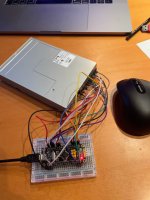 | |
Posted by: erichelgeson on 2021-02-02 09:47:05I am more than happy to make a simple guide if there is interest.Please do! Also what board is that? | |
Posted by: cheesestraws on 2021-02-02 09:50:09I am more than happy to make a simple guide if there is interest. Absolutely do, this sounds like a really useful thing. | |
| Posted by: Andrew on 2021-02-02 10:05:40 I used what Greaseweazel project refers to as the F1 "direct-connection" board. It is a STM32F103C8T6 chip also known as bluepill. However, I was not able to source this blue pill board locally, so I used another one (no name) which has the same chip. The pinouts are located elsewhere on the board, but the functionality is the same. I did not use the recommended firmware upgrade process (https://github.com/keirf/Greaseweazle/wiki/Firmware-Programming) because I did not have the special ST link programmer. However I was able to program it via a generic usb serial (3.3V) adapter I had, together with a programmer called STM32CubeProgrammer. Also, through trial and error I found out that the latest g/w firmware 24 does not work with fluxengine, instead we need to use 2.2. At this point I am trying to figure out how to write custom mini vmac images, as these do not have a header, and fluxengine is complaining about this. Diskcopy 4.2 images that I downloaded from the internet worked fine | |
Posted by: erichelgeson on 2021-02-02 10:26:35STM32F103C8T6 chip also known as bluepillWell well well! I have about 50 of these for a different project 🙂 (see sig) - Thanks for the tip, I'll be giving it a try. | |
Posted by: Andrew on 2021-02-02 10:51:33Well well well! I have about 50 of these for a different project 🙂 (see sig) - Thanks for the tip, I'll be giving it a try.Yes, I know about your project and I am monitoring it. Good luck with that | |
| Posted by: sambapati87 on 2021-02-03 02:32:30 Just want to say that's great! I've always known it to be "impossible" to write 800k floppies for Mac from anything but another Mac drive. | |
| Posted by: Torbar on 2021-02-04 02:04:26 I ordered some PCBs for this project(rather than doing the direct wiring method) which should be here within the next week or 2, so if anyone is interested in a blank PCB or 2 for a few bucks shipped(within the US), let me know | |
| Posted by: mactjaap on 2021-02-04 11:41:26 Wow. Fantastic. Very interesting. | |
| Posted by: erichelgeson on 2021-02-17 06:48:52 Got my boards from @Torbar and got it setup. Seems to read the few disks I tried fine, will be trying a few bad disks I couldn't read in my Mac and see if I can salvage the files. 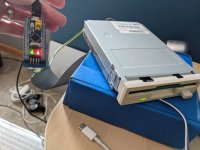 | |
Posted by: Andrew on 2021-02-18 02:37:40Got my boards from @TorbarThat's great. I hope you get good results. I found that the Mac drive is better at reading. E.g. when reading some disks with this setup I might get a few bad sectors, whereas the Mac drive can make an image just fine. But nevertheless it gives more choices which is great. | |
Posted by: erichelgeson on 2021-02-18 03:10:14I found that the Mac drive is better at readingOh, I was not aware of this - for connecting a mac floppy do you need a straight through cable or with the twist? how does power work? Had good results reading 1.44 disks, but no 800k's have worked so far in fluxengine or gw - though I've only spent a few minutes on it so far. | |
| Posted by: Andrew on 2021-02-18 03:12:32 Sorry I meant a Mac floppy drive operating in an actual Mac! | |
Posted by: erichelgeson on 2021-02-18 03:16:42Sorry I meant a Mac floppy drive operating in an actual Mac!Ahh! makes more sense 🙂 what command do you use to read 800k disks? Also I have a bunch of notes i'll post here later as setup is not "simple" - just a lot of things to setup | |
Posted by: Andrew on 2021-02-19 06:25:51Ahh! makes more sense 🙂 what command do you use to read 800k disks? Also I have a bunch of notes i'll post here later as setup is not "simple" - just a lot of things to setup It is the same command as 1.44MB disks. I think it reads the right format from the diskcopy header. The command is fluxengine write mac -i mac.diskcopy and relevant information can be found here http://cowlark.com/fluxengine/doc/disk-macintosh.html | |
| Posted by: erichelgeson on 2021-02-19 07:30:10 It seems my Panasonic JU-256A might be one of the ones that don't work with 800k - What model is your floppy drive @Andrew? | |
| Posted by: Andrew on 2021-02-19 07:50:14 @erichelgeson The label on it says Sony, model: MPF820-E. I pulled it off of an old computer. do you get an error? Do you have problem reading or writing? | |
| Posted by: erichelgeson on 2021-02-19 07:56:31 I have a good 800k disk I formatted on my real mac and put a file or two on to test. I just get a bunch of failures to read tracks - same disk works fine in a real mac. Reading 1.44 disks are fine - recovered a few things already. Someone on the forum mentioned this model had issues with 800k disks too. The Sony & Samsung seem to be validated working.  | |
| Posted by: Andrew on 2021-02-19 08:25:32 Make sure you tape the hole if the disk is hd. also, i. The beginning i also had same issues like you, then I cleaned the heads of the floppy, and steadily the bad sector problem started to go away | |
| Posted by: cheesestraws on 2021-07-13 15:29:23 I've started doing this for archiving 800k floppies now; can confirm that I've had luck with a Sony MPF920 (just out of an old PC) and a greaseweazle f7. Going to stick it in an external USB enclosure now... Thankyou @Andrew for passing this technique on 🙂 | |
| 1 > |