68kMLA Classic Interface
This is a version of the 68kMLA forums for viewing on your favorite old mac. Visitors on modern platforms may prefer the main site.
| Click here to select a new forum. | |
| Powerbook 3400c Ebay find (finally) | |
| Posted by: Rick Dangerous on 2021-01-31 04:29:54 Well i've been wanting one of these FOREVER.... Ever since i saw Meg Ryan using one in You've Got Mail 😉 This is the 200 MHZ machine with 48 MB RAM currently running 8.0. Since they are the last Pre-G3 PB they usually are too pricey for me; but i made an offer for this one at $150 and it was accepted. Upgrades include RAM, and it comes with a working CD drive (the faster 12x) and floppy insert. Really stoked to spend some time with it this week! I did order an additional RAM upgrade on ebay (32MB techworks powerbook 3400 memory module); but wondering if i'll be able to stack it or if it will only accommodate one card and i need to look for the "big one" to get it to 144MB Someone was selling new PRAM batteries for this machine as recently as two years ago on ebay; messaged them but haven't heard back yet. Need to check to make sure i pull the current one when taking a look at the RAM when it comes in. So so excited to finally have a 3400 in my collection! Going to give it lots of TLC and upgrades when/where i can! Any thoughts/advice/tips? Max OS? Etc.? Thanks guys! 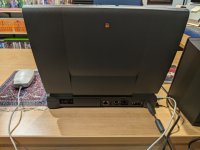 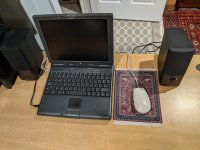 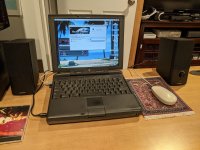 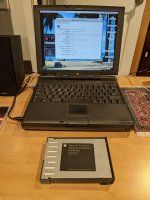 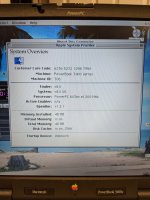 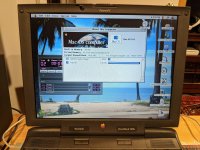 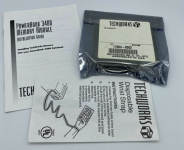 | |
| Posted by: Trash80toHP_Mini on 2021-01-31 05:26:41 Very nice! I set one up for my sister-in law to play some card game or another that she was addicted to in 2004. Told bro to get her that or a Pismo for her after she'd loved living room/ deck portable gameplay on my 5300c. He gave it to me after she'd worn out the trackpad/button and lost interest in the game. With its first ever in a PB stereo speaker setup it was perfect. Came back to me with one of her Cranberries CDs in the drive. Great machine for period gaming and music experience. Have fun with it! :approve: | |
| Posted by: MJ313 on 2021-01-31 08:00:04 Nice machine-- I like the heft of the 3400! Good to get that pram battery out of there-- mine died from one that leaked. I had 8.5 (or 8.6?) on mine and was happy with that. | |
| Posted by: Rick Dangerous on 2021-02-01 09:00:54 Sadly it looks like this machine will only take one additional RAM module, so i need to keep my eyes out now for a 128MB module specifically for the 3400. | |
| Posted by: Rick Dangerous on 2021-02-02 03:26:11 Quick Q: I can't get this machine to boot from the CD; attempting to install 8.6. Held C on restart, , CMD+Option+Shift+Delete, no luck, selected the 8.6 disc as the startup disk, no luck. I tried zapping the PRAM, resetting the PMU, Disabling extensions. Can i just install right from the disk out of OS 8.0? Or would that not work properly? | |
| Posted by: cheesestraws on 2021-02-02 07:01:13 You don't generally have to boot from the CD to install from the CD. FWIW, my 3400 is a right pain to get to boot from CD and I can never reliably get it to do it either, so it's not just you. | |
| Posted by: Rick Dangerous on 2021-02-02 09:45:28 Sweet; updating to OS 8.6 now off the disc. And done! Probably will stay here until RAM is maxed out; or maybe just for good. 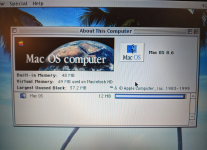 The Imagewriter II ALSO won't work with this 3400 (like it wouldn't with my 1400) exact same error (skips to page two, tells me to hit select even though its green.) I was clicking through extensions for Appletalk and when i switched to the printer port instead of ethernet it printed some random code/error so i know it's not the printer or cable. But....i'll probably start a new thread about it in the PPC Powerbook forum if the System update doesn't solve it. When i updated to 8.6 I got this message: 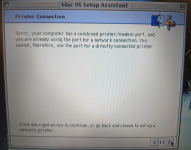 So where is the setting to switch it to a printer port? I can't find it for the life of me. I went into all sorts of setting and it's nowhere to be seen. In the Modem settings its set to internal modem (not the printer/modem port.) I don't know where else it would be. I'm selecting the Printer/Modem port when i select the Imagewriter II in chooser; so you think that would bump off the network setting. Overall this machine is awesome though! I can do just about everything i want with it; between this any my upgraded 8600 i can do everything i need on Classic OS at home or on the go. | |
| Posted by: Rick Dangerous on 2021-02-02 10:02:54 Got it working....don't ask me how. Disabled AppleTalk and restarted, selected the printer in chooser and selected the Printer/Modem port (which i had done 10 times already.) I think what finally did it is I had to disable the "File Sharing Extension" in extensions which was mentioned when turning off AppleTalk...so i guess that did it. Yay! Now I can try the same thing with the 1400c 🙂 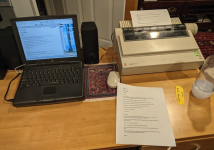 Side note: You can see the odd code that was printed at the bottom of the page from when i was switching to the printer/modem port in the AppleTalk CDEV control panel. LOVE the sweet sounds of the ImageWriter II. Really brings me back! | |
| Posted by: Rick Dangerous on 2021-02-03 10:06:55 Is there a way to test your battery life in 8.6? And PRAM battery? Both appear to be in working order in this machine but i can't imagine how.. | |
| Posted by: CC_333 on 2021-02-03 10:14:16 @Rick Dangerous If you can still find it, I've had success using BatteryAmnesia to measure battery runtime under classic Mac OS (it also gives the battery a good workout). Aside from that, I think the battery/energy saver Control Strip module (the one with the battery charge level meter) can show an approximate time remaining. c | |
Posted by: cheesestraws on 2021-02-03 10:34:55Is there a way to test your battery life in 8.6? And PRAM battery? Both appear to be in working order in this machine but i can't imagine how.. Even if it appears to be working, you really need to get that PRAM battery out pronto. It's dead easy to remove on the 3400, and it kills many, many of them. | |
Posted by: Rick Dangerous on 2021-02-03 15:21:44Even if it appears to be working, you really need to get that PRAM battery out pronto. It's dead easy to remove on the 3400, and it kills many, many of them. Done. And good timing too as it's just starting to melt...thanks. Nothing made it to the motherboard. Wiped it down and saved it; going to have a buddy who's an electrical engineer see if he can re-build a cell for me. Wasn't too hard to get too; the ribbon cables make me a tad nervous of course (of breaking them.) Otherwise not bad at all....wish the 1400 PRAM was this easy to get to. 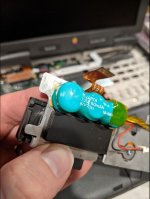 | |
Posted by: MJ313 on 2021-02-04 00:34:55Done. Nice save 🙂 | |
| Posted by: Rick Dangerous on 2021-02-04 06:12:37 Got another Powerbook 3400c, this one has the 240Mhz processor and a 64MB ram upgrade! https://www.ebay.com/itm/Apple-Macintosh-PowerBook-3400C-PowerPC-603ev-240-MHz-64mb-256k-tested-working/124559434484?ssPageName=STRK%3AMEBIDX%3AIT&_trksid=p2057872.m2749.l2649 Now have a spare 1400c and 3400c, with some good parts to boot! Not bad and going to put a hiatus on the buying for a while 😀 | |
| Posted by: Papichulo on 2021-02-04 12:26:19 Good job removing the pram battery in it. That's what destroyed mine | |
| Posted by: Rick Dangerous on 2021-02-08 02:35:48 Okay working on getting this up and running today...going to format the card to Fat32; load a few .Sit files on and pray it works when i load it into the PCMCIA slot. For now just looking for a way to get data to this machine (other than burning files to a CD) This it matters that it's advertised as being for PC? 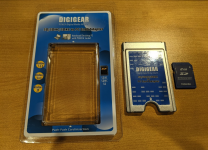 | |
| Posted by: Rick Dangerous on 2021-02-08 03:40:49 All it does is freeze my mouse in place until i eject it. Any thoughts/ideas/tips for getting this to show as a disk? @Trash80toHP_Mini mentioned to ask in the thread. | |
| Posted by: Trash80toHP_Mini on 2021-02-08 04:34:58 Does the adapter seat flush with the side of the 'Book? It won't if there's a gold stripe on the back side. Nomenclature has become garbled, some equate PC Card with PCMCIA these days. Test the adapter sans SD to make sure it's not defective, that would be my first step. | |
| Posted by: Rick Dangerous on 2021-02-08 04:50:44 @Trash80toHP_Mini pretty flush i'd say. It's interesting, the card had the exact same behavior in my 1400c -Boot with card in, goes to gray screen -Insert card with computer running, freezes mouse. I do have the CF and CF/PCMCIA adaptor on the way; so if this refuses to work that is my Plan B.  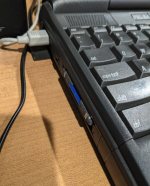 | |
| 1 > |