68kMLA Classic Interface
This is a version of the 68kMLA forums for viewing on your favorite old mac. Visitors on modern platforms may prefer the main site.
| Click here to select a new forum. | |
| M1212 CRT Troubleshoot | |
| Posted by: LCARS on 2021-01-11 06:59:09 Despite using CRT monitors for a while, I'm less familiar with models like the M1212 where geometry adjustments are not part of the OS. I pulled my M1212 out of storage last year and I thought it's operation was normal but now I'm thinking something is up. Before I find plastic adjustment tools and pull the rear cover off to make adjustments, I'd like to run a few things by the board and see if it's capacitor related. Right now, the image seems mildly out of focus just to the right of center, there seems to be "overscan" into the corners of the screen (pictured), and the image widens slightly when I open a drop down menu. As you'll see in the pictures, what I call the over-scan looks it affected by menus and I don't see the same kind of glow in my other Trinitron monitors. Also, please excuse the general lack of focus in the overall picture. It was tough to get a picture without the scan lines. Also, the desktop items are left over from the previous owner (those were the days; when I found most of my Mac collection in 2008-2010, nobody wiped their drive.) The image is the same running from three different Macs. 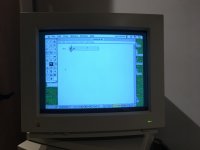 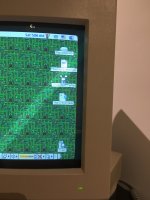  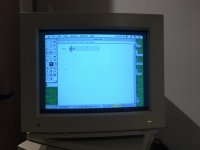 | |
| Posted by: LaPorta on 2021-01-12 01:57:45 If anything, it appears the cutoff point is set too high (the bright transition between the image and where the glass is truly black). There should be an adjustment for it, but it may be internal. Otherwise, I can’t see anything from the pics that could be wrong with it. | |
| Posted by: techknight on 2021-01-12 03:02:01 OT: Couldn't help but notice "Tha Crossroads" on the desktop. Man... one of my favorite songs, and back when hip-hop was good. Anyways... I cant really see any faults with the pictures. Maybe the black level is too high, so knock the brightness down some but otherwise thats it. If anything, it has a CRT that is starting to get a bit soft. | |
| Posted by: LCARS on 2021-01-12 07:09:43 Thank you for your replies. @laporta: by cutoff do you mean the vertical stretch of the viewable image? Those adjustments are internal, unfortunately. It makes me wonder about their in-service life. I suppose they rarely deviated from factory specs when still supported? I wonder if that's also why the image distorts when I open a menu? The manual cautions against metal hex keys (which is all I have). So I'll have to hunt some down I suppose. @techknight: Good eye! That's actually my file. I bought the 2300c and its Dock II on eBay in probably 2009/2010. At the time I didn't know just how awful those Duo keyboards are so while listening to Tha Crossroads on 90s on 9, I wrote a page testing out the keyboard. When you say the CRT is going soft, do you see that in the first two "half" pictures? My iPad had a hard time imaging the screen and in reality, it does look crisper but there's still a region where text isn't as sharp. | |
| Posted by: techknight on 2021-01-12 09:44:10 well soft as in overall kind of fuzzy. But then again, that could be your camera. | |
| 1 |