68kMLA Classic Interface
This is a version of the 68kMLA forums for viewing on your favorite old mac. Visitors on modern platforms may prefer the main site.
| Click here to select a new forum. | |
| Having issue with a Beige G3 desktop... | |
| Posted by: meall on 2021-01-06 14:38:43 Hi all, It's been a while for me here, but still active in my man cave! Recently I got my hands on a tower beige G3, and wanted to give back my desktop beige G3 to a good house. I made sure the tower worked fine for me, and then got my hands dirty on the desktop to prepare it for resale. So far, it is giving me lots of problem, and I cannot figure out why. I tried installing Mac OS 9.2.2, but this one refuses to boot. In the startup sequence, when it try begin loading the extensions, the system cash with a dialog box on screen that do not even get far enough to display a message in it. If I copy (not install) an OS 9.0 or 9.1 folder to the boot disk, sometimes it boots normally, sometimes in hangs at the extension time of load. The disk I'm using is a 1.6Gb Apple IDE probably removed from a failed Performa. If I place the same disk in the tower, same system installation, no issue. The desktop have 256 Mb of RAM, and pretty much the standard stuff there, ZIP, IDE CD-ROM, floppy. Anyone can help me figure out what is wrong with this machine? Thank you | |
| Posted by: History_SE30_Dude on 2021-01-06 20:37:43 Reset the PRAM. I had to do this three times in a row to get one of these working again, somehow it had become terribly corrupted. I would also highly recommend completely disassembling it and throughly cleaning out dust as that can make connections for stuff like ram less than ideal and that can cause crashes. Simply trying to reseat stuff doesn’t always work because of the dust. | |
| Posted by: Brett B. on 2021-01-07 04:57:03 What happens if you hold the shift key while booting to disable extensions? Will it complete a boot then? Might also try initializing the drive using Drive Setup and update the drivers on the drive as well. | |
Posted by: meall on 2021-01-10 14:02:55What happens if you hold the shift key while booting to disable extensions? Will it complete a boot then? In 9.2.x, with or without the SHIFT key to disable extensions, it will crash when booting. I did initialized the drive with Drive Setup and updated the driver as well before posting here. | |
Posted by: meall on 2021-01-10 14:41:45Reset the PRAM. I had to do this three times in a row to get one of these working again, somehow it had become terribly corrupted. I would also highly recommend completely disassembling it and throughly cleaning out dust as that can make connections for stuff like ram less than ideal and that can cause crashes. Simply trying to reseat stuff doesn’t always work because of the dust. I also tried to clear out the PRM before posting, no help. And I have no PRAM battery installed, I do not want them to leak on the board, and the tower do not have a battery either, and a drive formatted and installed with 9.2 in the tower that sucessfully boots, then moved to the desktop won't boot there. I found recently this article, that is related to OS X 10.2, but is giving some hints using the open firmware to reset the NVRAM did not help either. https://lowendmac.com/2012/how-to-recover-from-a-beige-g3-startup-error/ | |
| Posted by: meall on 2021-01-10 15:31:33 is there any hardware diagnostic that we can run on this machine to help detect some hardware issues? | |
| Posted by: History_SE30_Dude on 2021-01-10 19:19:44 Is there a working PRAM battery in it? The test cd for the G3 is a live OS 8. https://macintoshgarden.org/apps/apple-mactest-pro | |
| Posted by: Michael_b on 2021-01-11 13:52:19 Try different combinations of RAM, one stick at a time. if possible might be worth booting off of a SCSI disk rather than IDE and seeing if that makes a difference. | |
Posted by: meall on 2021-01-11 15:27:48Try different combinations of RAM, one stick at a time.I swapped the RAM, change it from slot to slot, but nothing is really helping in the end. Booting from SCSI was one of my next step. One friend will bring me a SCSI HDD, as I do not have a working one with enough capacity to make that test. But I am seriously thinking the IDE controller may be to blame. | |
| Posted by: trag on 2021-01-11 20:59:55 What brand is the IDE drive? One of the major brands, Western Digital, I think, has a setting for "Single" drive. So if the drive is the only one on the cable, the jumpers on teh drive need to be set to "Single", not set to "Master" or "Slave". That was a big trap back when 1.6 GB drives were common. Unreliable symptoms you're seeing were the common result. | |
| Posted by: Franklinstein on 2021-01-12 06:35:07 Yes WD drives preferred that Single setting for years. Usually in a PC they would work if set to Master/Slave as a single drive but they would case the POST to take forever as the system waited for the non-existent second drive to respond. I don't know first-hand how a Mac would respond in that case. Maybe the pre-G3 models would ignore it but perhaps the beige G3s would get fussy? Especially the Rev. B or C ROM models that supported master/slave IDE. | |
Posted by: meall on 2021-01-12 07:29:08Is there a working PRAM battery in it? The test cd for the G3 is a live OS 8.There was no battery as mention before, but to help the matter, I installed one and the issue remains. That said, thank you for the link to hardware test. I could not successfully boot on the burned CD, so I booted from the 9.1 installation mon the HDD and used the CD to launch the hardware test and the memory test. The first worked fine and detected no hardware issue with the HDD and other media. I let the RAM test loop for more than 12 hours, and it stop after 27 loops without any error as well. That was the base test, not the extra-super-long one, but I guess it could prove something anyway. 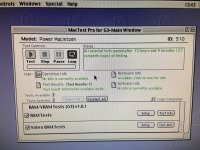 | |
Posted by: meall on 2021-01-12 07:32:58What brand is the IDE drive? One of the major brands, Western Digital, I think, has a setting for "Single" drive. So if the drive is the only one on the cable, the jumpers on teh drive need to be set to "Single", not set to "Master" or "Slave". That was a big trap back when 1.6 GB drives were common.I tested with 3 drives, one Quantum 1.6Gb, one Seagate 60 Gb (partitioned to have less than 8 Gb on the boot partition) and a Fitjitsu 13Gb (partitioned too). All do the same. I must say I do not have any jumpers set on the Quantum and the Futjitsu. The Segate is set as master. I will look at the Quantum specs to find the jumpers settings and retest. 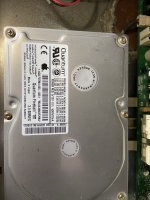 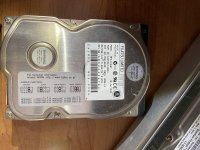 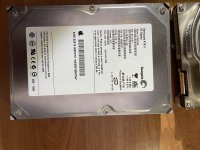 | |
Posted by: meall on 2021-01-12 11:58:39Especially the Rev. B or C ROM models that supported master/slave IDE. What do I see the ROM model?? In my many tests I tried to connect two HDD on a same bus, but could not succeed. Maybe it is the older ROM, just guessing. | |
| Posted by: meall on 2021-01-12 12:05:03 Another strange fact about this G3 is the sound. At first I was thinking the speaker was dead or disconnected, but when I go in the Sound Preferences, the main volume slider is at the lower level possible. When I try to change it, it goes back to level 0 and blink the menu bar. Very strange. System Profiler shows Audio as an installed option. 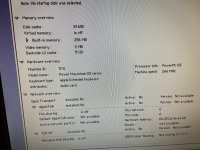 Any idea what can cause that?? 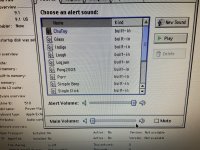 | |
Posted by: trag on 2021-01-12 20:38:44What do I see the ROM model?? If that photo you posted of Apple System Profiler showed a little more of the screen.... Somewhere on there, there should be a line for Firmware revision. $77D.40F2 => Rev. A $77D.45F1 => Rev. B $77D.45F2 => Rev. C Rev. A lacks support for Slave drives on the IDE busses. The Revision of the ROM can also be determined by reading the part number off of the **chips** on the ROM DIMM, but I don't remember the numbers. The part number on the ROM DIMM **circuit board** does not help. | |
| Posted by: Franklinstein on 2021-01-12 23:29:01 Judging by the huge rust stain in the pictures upthread I'm going to guess there's probably some damage to the logic board, likely from damp storage, severely leaked caps, and/or an exploded PRAM battery. I'd probably remove, inspect, and clean the board and case before I continued trying to get it working. | |
Posted by: meall on 2021-01-13 01:36:38Judging by the huge rust stain in the pictures upthread I'm going to guess there's probably some damage to the logic board, likely from damp storage, severely leaked caps, and/or an exploded PRAM battery. I'd probably remove, inspect, and clean the board and case before I continued trying to get it working. Don't worry about that, nothing to be afraid of. The logic board that did this damage was trashed and a new logic board was installed in its place. This damage was not caused by the current logic board. But thanks for the warning. | |
Posted by: meall on 2021-01-13 01:40:16$77D.40F2 => Rev. AThis is a ROM Rev. A with the number above that I can see on the machine. That explain why I could not configure a second slave drive in my previous tests. Thank you | |
| 1 > |