68kMLA Classic Interface
This is a version of the 68kMLA forums for viewing on your favorite old mac. Visitors on modern platforms may prefer the main site.
| Click here to select a new forum. | |
| Direct write to Floppy disk from minivmac | |
| Posted by: AndiS on 2021-01-03 03:05:43 Hi! Maybe this is old news for everyone, but I just discovered how to directly access a floppy disk from minivmac without any of the usual detours using disk images and the like. Using an external USB Floppy Drive, it is possible to directly drag and drop the /dev/sd* device file on the minivmac window to mount it from within the emulation! If write support is needed, the device file has to have write access from the user too! In short: - Figure out what is the device file for the USB Diskette drive. - Mine was /dev/sdc - sudo chmod 777 /dev/sdc - to enable write access to the device for anyone (good idea to reset permissions after you're done) - Drag the /dev/sdc device on the minivmac window - Profit! This is actually quite convenient, even tough I have some older networked Macs that I could use for data transfer. But this way I can do it directly from my day-to-day working machine. 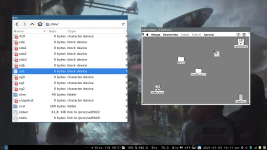 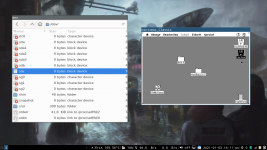 | |
| Posted by: AndiS on 2021-01-03 03:07:10 I forgot to add - I'd like to hear if this is also somehow possible from modern OS X? I have no hope for Windows tough 😉 | |
Posted by: davidg5678 on 2021-01-03 03:48:18I forgot to add - I'd like to hear if this is also somehow possible from modern OS X? I have no hope for Windows tough 😉I have definitely done this before using Basilisk II on a Mac. I am not sure whether or not Mini vMac can do it though. In Basilisk II, you can manually enter a path into the filesystem. Mini vMac usually just uses dragging. I don't think there is a way to access the /dev/ directory on a Mac without terminal, which would make dragging difficult. With that being said, there might be a good chance that you could specify the floppy drive location as a startup parameter when launching Mini vMac through terminal. | |
Posted by: AndiS on 2021-01-03 05:47:46I don't think there is a way to access the /dev/ directory on a Mac without terminal,Well, you should be able to use "Go to" from the Finder. I'm not too experienced with current OS X tough, and there have been some changes about where the filesystem is mounted when the machine is running, so /dev/ might or might not be the correct place. Regarding Commandline arguments to specify the Floppy location. I just checked with the minivmac documentation, and yes this is true. Of course when you eject a disk and want to insert another one, you still have to drag it into the window somehow. | |
| Posted by: cheesestraws on 2021-01-03 05:52:10 I'd assume it'd work the same; use 'diskutil' to work out which device node to use and drag it in from the Finder. | |
Posted by: AndiS on 2021-01-03 06:40:23I'd assume it'd work the same; use 'diskutil' to work out which device node to use and drag it in from the Finder.Nice to hear. Just make sure the device node is writable of course. I think it should be obvious by now, but I somehow edited out the fact that I did this under Linux in the first post. Now I can't find where to edit that post, so here you have it ;-) | |
| Posted by: cheesestraws on 2021-01-03 06:58:57 Oh, looks like you can't open /dev in the finder, but I'm sure you can link the device node somewhere... thanks, Apple | |
Posted by: davidg5678 on 2021-01-03 08:33:28Oh, looks like you can't open /dev in the finder, but I'm sure you can link the device node somewhere... thanks, AppleThis problem is what I was referring to before. | |
Posted by: cheesestraws on 2021-01-03 08:34:38This problem is what I was referring to before. Whoops, I didn't see your earlier post. Sorry! | |
| 1 |