68kMLA Classic Interface
This is a version of the 68kMLA forums for viewing on your favorite old mac. Visitors on modern platforms may prefer the main site.
| Click here to select a new forum. | |
| SE Not Booting Finder | |
| Posted by: soxfanmn on 2020-12-31 09:37:43 Hello all! I'm starting my retro collection with a Mac SE that I got for free from a friend who was going through his fathers things. I brought the unit home and it powered on and booted just fine. However, yesterday I got the following message upon startup (after a happy Mac): The following application is busy or damaged: Finder" (see pic). The only option I have is restart and the process just repeats (see video). The SE did have some issues powering down, and I read that 7.0 did have a 'finder recycler', but I'm on 6.0.8 so is the OS just stuck and can't find it's way back? Will taking the battery out reset it? Or should I boot from a new OS disk? I appreciate any help! Happy New Year! Mike 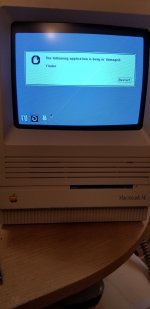 View attachment Booting.mp4 | |
| Posted by: LaPorta on 2020-12-31 09:49:54 I'd first try starting without extensions: hold Shift down while starting and see if there is an extension that is causing an issue or conflict. Then, you can try and track down which extension it is. It is indeed odd that it just happened now. Another possibility is someone moved the Finder out of the System Folder: you or someone else didn't happen to do that by accident, did you? If it really is the Finder being corrupted, almost any 6.0.8 disk will work and you can restore from there. | |
| Posted by: soxfanmn on 2020-12-31 10:09:18 It very well could have been me by accident when I was setting it up when it was brought home. I've tried Shift but only when restarting, I'll try it from a cold start. Worst case, I'll try and track down a new 6.0.8 disk. | |
| Posted by: LaPorta on 2020-12-31 10:11:19 Sounds like the Finder was removed then. Yes, start up from another disk, rectify that issue (put it back in the System Folder if that was the issue), and restart. Shift down whether restart or cold start makes no difference. | |
| 1 |