68kMLA Classic Interface
This is a version of the 68kMLA forums for viewing on your favorite old mac. Visitors on modern platforms may prefer the main site.
| Click here to select a new forum. | |
| Centris 650 CD drive woes | |
| Posted by: kerobaros on 2020-12-30 12:44:30 I guess this should be here instead of Peripherals? I have a 650 here with its original caddy loader that seems to be dead. Will take the caddy in and immediately spit it back out again, and the OS won't see it on the SCSI chain. I assume that sounds like a recap is in order? Does anyone have a list of caps I need to order? Also, I haven't opened the drive up, but does anyone know if the caps are through hole or surface mount? | |
| Posted by: Byrd on 2020-12-30 13:40:11 Hi kerobaros, Was the drive working in there previously - or a later installation? I'd first do the old check SCSI cabling, SCSI ID and termination of the drive to see if you can detect it. If it all checks out, then yes a recap might be in order and you'll probably find both through hole and SMT caps inside a caddy loader based on it's age. Also consider the CD laser lens is probably weaker and will require cleaning of the lens itself and/or adjustment of the voltage pot to the lens to improve disc reads. JB | |
| Posted by: kerobaros on 2020-12-30 14:29:29 It was in the system when I purchased it this summer, but I couldn't test it until recently as I had no CD caddy until the last few weeks. I assume it's the original, since it's an Apple drive and it matches the case. It's attached to the middle connector on the SCSI cable, which looks just fine; the hard drive (a 9GB I added) is connected to the end of the SCSI cable and works, so I assume the cable is okay. The hard drive is jumpers to ID 0. The CD drive is pictured below. I'm not great at SCSI voodoo, any suggestions here? 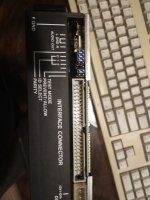 | |
| Posted by: jessenator on 2020-12-30 16:21:09 I am almost in the same boat. My caddy-load is still reading discs ...sometimes, but I finally found this old page I'd seen a while back w/re: diagnosis and repair: http://www.asterontech.com/Asterontech/next_cdrom_refurb.html which is somewhat useful, but only for the AppleCD150.. Our Centris models have the AppleCD 300 (2x), which has a different logic board, but would be a similar repair job. I suppose it wouldn't be too difficult to decode the capacitance numbers and order replacements. Who knows, they may even be the same values. Here's mine. It wasn't hard to get to. Be sure to disconnect everything carefully, of course.  Looking at your jumper settings, it's the same as mine, so it should be SCSI ID 3, by the looks of it?  | |
| Posted by: techknight on 2020-12-31 03:52:10 Dont rule out the optical pickup as well. In addition to the capacitor issues due to age, don't forget CD drives were usually rode hard and put away wet and have optical pickup issues. Then caps get em from age. | |
| Posted by: Franklinstein on 2021-01-01 00:44:02 Caps are definitely becoming a problem on these earlier drives so if it's being really crazy or not powering up at all, that's probably item #1 to fix. Smokers kill the things in short order too since the smoke leaves a brown haze all over everything inside the drive, even seeping deep into the optical block and covering not only the lens but the prism, the diode, and the pickup sensor. Generally these things can't be cleaned so if the drive is filled with tar it's not really worth the effort. Occasionally, if the laser diode and pickup still work but the drive has problems with discs, adjusting the pots on the pickup block will resurrect them. Just gotta fiddle with the pots a bit until it works since most people have neither proper test data for the drives or any optical power meters to correctly dial-in the required values. | |
| 1 |