68kMLA Classic Interface
This is a version of the 68kMLA forums for viewing on your favorite old mac. Visitors on modern platforms may prefer the main site.
| Click here to select a new forum. | |
| 512k 800K crazy floppy drive help!! | |
Posted by: Plottem on 2020-12-29 12:30:21Good night from Spain!! Merry Christmas to all! I tell you, I have restored a 512k with an 800k floppy drive. Apparently it works fine, but the floppy drive many times does not work, already going crazy, I started to do tests and I realized that when I take out the floppy drive from the mac it works perfectly and inside it does sometimes. I have read that it may be due to some interference from the crt, but I don't know how to solve it, I have always tried it with the metal support post. Ahh I have tried another unit and the same thing happens, any ideas? Thanks a lot | |
| Posted by: cheesestraws on 2020-12-29 12:42:04 I think something has gone a bit weird with the formatting of this message; the text is huge and impossible to read because of scrolling. You might want to try it again... | |
| Posted by: 8tto on 2020-12-30 01:12:50 Merry Christmas! Did you read this thread? Do you use the same cable inside and outside of the Mac - and the same cable with the other drive? | |
| Posted by: Plottem on 2020-12-31 02:00:50 Sorry about the formatting error in the text, I wrote from the iphone and I don't know what happened, I'll try to change it. Yes, indeed I have always used the same cable, both inside and outside, and outside it works and inside it doesn't, how strange. Interesting the text is similar to what happens to me | |
| Posted by: Plottem on 2021-01-25 10:10:57 Hello friends, I wanted to tell you how I solved the floppy drive problem. After thinking about it a lot, trying different cables and various floppy drives, I came to the conclusion that floppy drives only worked when they were out of the mac case. Then I remembered reading that it could be because the support of the dam could have been magnetized by the radiation from the crt. So I started looking for how to demagnetize metallic objects and I found a very simple solution ... drop the object to the ground, so the ions would return to their place. I did it and voilà !! a week later it still works perfectly. | |
| Posted by: onabeach on 2021-01-31 06:04:22 Now thats the wierdest solution to a problem that I have ever heard of. Usually the result is breaking something, not fixing it. Actually there is a scientific basis for it; magnets can be weakened by mechanical shock. Congrats Plottem! | |
Posted by: Plottem on 2021-01-31 09:39:38Now thats the wierdest solution to a problem that I have ever heard of. Usually the result is breaking something, not fixing it. Actually there is a scientific basis for it; magnets can be weakened by mechanical shock. Congrats Plottem!Thank you very much, I must say that what I have dropped is only the part that supports the unit, this part is the one that seems to be magnetized. Please do not drop the unit, I may not explain it well! but after 3 weeks it still works perfect, I turn it on daily to check it. 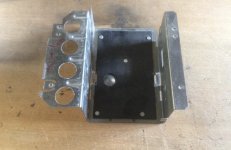 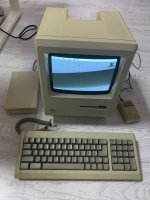 | |
Posted by: DeChief on 2021-02-08 16:39:31Hello friends, I wanted to tell you how I solved the floppy drive problem. After thinking about it a lot, trying different cables and various floppy drives, I came to the conclusion that floppy drives only worked when they were out of the mac case. Then I remembered reading that it could be because the support of the dam could have been magnetized by the radiation from the crt. So I started looking for how to demagnetize metallic objects and I found a very simple solution ... drop the object to the ground, so the ions would return to their place. I did it and voilà !! a week later it still works perfectly. I'm glad my thread helped, this same problem was driving me crazy too! A friend suggested that I drop the cage as well but I didn't get around to trying that after I solved the problem by using another cage. Glad to hear that it works to demagnetise it. | |
| 1 |