68kMLA Classic Interface
This is a version of the 68kMLA forums for viewing on your favorite old mac. Visitors on modern platforms may prefer the main site.
| Click here to select a new forum. | |
| M5126 Keyboard acting weird | |
| Posted by: glay78 on 2020-11-20 06:39:02 After recapping my M5126, it works however keyboard is acting weird, here are the findings. 1. number 3,4,5 and 6 is not working. 2. alphabet U and D will cause system error. however I tried - changing keyboard - switch over to RHS with mouse - changing keyboard ribbon cable all doesn’t works. however external ADB keyboard will work perfectly. checked C116 Caps and the connectivity is correct. It was working well before recapping. what could be wrong? I’m short of this step to have a perfect M5126. anyone has an idea where to start tracing this problem 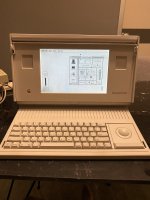 | |
| Posted by: techknight on 2020-11-23 04:23:52 broken traces between the keyboard connector and the keyboard controller chip. Try plugging in the keyboard on the right side instead of the left side to see if the problem goes away. the caps eat the traces right there on the left hand side where the power controller circuits are, and so are the keyboard traces. | |
Posted by: glay78 on 2020-11-23 04:25:03broken traces between the keyboard connector and the keyboard controller chip.thank you for replying! I’ve seen so much about your repairs! yes I tried plugging to the right side and the same issue. Even changed a keyboard and it’s the same. | |
Posted by: techknight on 2020-11-23 04:26:05thank you for replying! I’ve seen so much about your repairs! Then you need to follow the schematic in the keyboard section and verify all the traces from the two sockets back to the keyboard controller IC. If that verifies good, then replace keyboard IC. | |
| Posted by: glay78 on 2020-11-23 04:26:51 Ok great I’ll do that, no choice | |
Posted by: glay78 on 2020-11-23 05:36:20Then you need to follow the schematic in the keyboard section and verify all the traces from the two sockets back to the keyboard controller IC.@techknight how do I read the schematics for the this? Do you mind guiding me a bit? I know U12K is the Keyboard chip. But how do I read the pins and which are the 2 sockets? 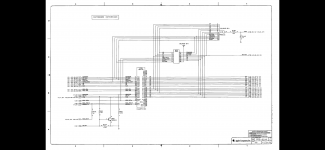 | |
| Posted by: techknight on 2020-11-23 05:45:47 These are one of those sheet-by-sheet style schematic. Regardless, you have to follow the connection points back to another sheet which has the pinouts of the connectors. I don't want to sound cold, but I cant really teach you how to read a schematic, as its a super involved process and I am not really a good teacher. If you don't know how to read schematics, you have a long long way to go. May I suggest youtube videos or something for basic electronics training and schematic reading. I know there are some good ones out there. | |
Posted by: glay78 on 2020-11-24 04:56:35These are one of those sheet-by-sheet style schematic.Thank you for your tips. Problem solved, J13 pin 13 trace is broken. Fixed. Perfect working piece now. I’m glad I part of this forum. Next are my sad Macs M5120 which shows Ram error. | |
| Posted by: techknight on 2020-11-24 13:42:33 Good 🙂 | |
Posted by: glay78 on 2020-11-26 01:37:05Good 🙂Thank you. for my M5120 which have error codes 0000 0003 0000 00FF 0000 0003 0000 FFFF how should I troubleshoot? | |
| 1 |