68kMLA Classic Interface
This is a version of the 68kMLA forums for viewing on your favorite old mac. Visitors on modern platforms may prefer the main site.
| Click here to select a new forum. | |
| SE/30 weird floppy drive issue | |
| Posted by: ronan on 2020-11-08 15:23:03 Hi everyone, I'm becoming crazy as I have huge trouble making my original floppy drive work reliably. I have been investigating this for more than one week nearly full time. It looks like my drive is working sometimes but not always : Sometimes it will just eject the drive quickly. Sometimes I will be able to format a disk, write to it and read from it with no issues. I am also able to write disk images using a modern mac and sometimes see the files on the SE/30 itself. I sometimes manage to boot System 6 floppies, sometimes it half boots and sometimes it never boots. I never managed to boot from System 7 floppies. The eject mechanism works great, there is not that much dust. I did clean it fully and lubricate it, as well as clean the head with alcohol. It did work perfectly one year ago. I'd like not to buy a FloppyEmu for the time being. I did try with 10 different floppies that were known to work well a year ago. I did check most traces between the CPU and the floppy port on the Logic Board. I attached the traces I tested. Do you have any ideas why this drive would behave in a random manner ? Thanks a lot for your help. PS : did I say I'm becoming crazy !? 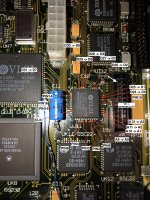 | |
| Posted by: Cinan on 2020-11-09 01:24:56 I had a similar problem see link below. Check your Dxxx and Axxx data traces between IC's. I see you ahem recapped the board, mine was caused by a broke trace near C9. | |
| Posted by: ronan on 2020-11-09 01:39:58 Yes I did recap my Logic Board. I checked all Data and Address traces between CPU and floppy chip and they are ok. The rest of the board should be ok as I'm able to use System7 from HD without issues. I had an issue with another trace (https://ronangaillard.github.io/posts/my-mac-se30-is-back-alive/) but it's fix for now. | |
| Posted by: Cinan on 2020-11-09 03:29:50 I would also check traces between components not just between components and CPU. | |
| Posted by: ronan on 2020-11-09 05:15:43 I see. Do you have any hints on how to figure out which between the logic board and the floppy drive is having an issue first ? (whithout buying a new drive) I'd like to avoid testing 1000 traces for nothing 😛 | |
| Posted by: Cinan on 2020-11-10 01:46:25 I would start with the chips that have traces passing by any caps so UK11, UK12, UJ11, JI12, UG12, UE11. these should all have D and A connections and pass but eh group of caps around C9. I started with identifying any visual damage, and then looked at the traces around that and started there. Also built a spread showing pin on origin chip and pin on destination pin for easy lookup while holding the multimeter probes. | |
| 1 |