68kMLA Classic Interface
This is a version of the 68kMLA forums for viewing on your favorite old mac. Visitors on modern platforms may prefer the main site.
| Click here to select a new forum. | |
| [help] SCSI2SD monitor says SD Test failed | |
| Posted by: Shymon184 on 2020-11-01 06:24:32 I've been struggling to set up SCSI2SD for my Mac CC for quite a while and I've decided to try the SCSI2SD monitor and to my dismay it said "SD Test: FAIL". My question is: does this mean that SCSI2SD adapter is damaged? (the worse case) or is it just that the SD card is damaged? (a bit unlikely yet better case) 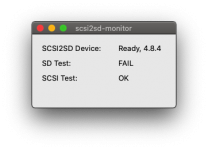 | |
| Posted by: davidg5678 on 2020-11-01 06:31:21 I think this probably means that something is wrong with the SD card. The easiest way to find out is to try using another SD card. The monitor says that the SCSI2SD Device is ready, which probably means that it is working. | |
Posted by: Shymon184 on 2020-11-01 06:35:00I think this probably means that something is wrong with the SD card. The easiest way to find out is to try using another SD card. The monitor says that the SCSI2SD Device is ready, which probably means that it is working.I've tried with another SD card and SD Test failed again :/ | |
| Posted by: Shymon184 on 2020-11-01 07:01:52 I'm no expert on these things, but I've noticed that the SCSI2SD utility log said: 15:44:56: SD Capacity (512-byte sectors): 0which seems suspicious to me, any SD card should not have 0 sectors... | |
| Posted by: Shymon184 on 2020-11-01 23:52:20 Good news! The SCSI2SD adapter doesn't seem broken but is just picky about the way the SD card is inserted. I've decided to run SCSI2SD monitor once again and it said "SD Test: fail" at first, but then I applied some force on the SD card and it flashed to "SD Test: OK". | |
Posted by: cheesestraws on 2020-11-02 01:47:51Good news! The SCSI2SD adapter doesn't seem broken but is just picky about the way the SD card is inserted. I've decided to run SCSI2SD monitor once again and it said "SD Test: fail" at first, but then I applied some force on the SD card and it flashed to "SD Test: OK". Ahhh, it's the mechanical parts that get you 🙂 | |
| Posted by: Shymon184 on 2020-11-28 04:49:20 I have some news: the SCSI2SD works, but has a defective SD card socket, I have to hold down the card to make it work. I've bought it from a chinese seller on eBay which means the SCSI2SDs manufactured in china have poor assembly quality. WARNING: DO NOT buy SCSI2SDs from china/chinese distributors, they are poorly assembled. | |
| Posted by: Crutch on 2020-11-28 11:48:34 If from Chinese distributors, I am pretty sure those are knockoffs, not genuine SCSI2SDs. | |
Posted by: max1zzz on 2020-11-28 11:54:42If from Chinese distributors, I am pretty sure those are knockoffs, not genuine SCSI2SDs.If they are form ITEAD they are genuine, if they are form anyone else they are knockoffs | |
Posted by: Daniël on 2020-11-30 13:35:30If they are form ITEAD they are genuine, if they are form anyone else they are knockoffs Well, knockoffs, that really depends. The older SCSI2SD versions are open source, so they're not knockoffs per se, unless they are infact cloning the newer revisions. They're just not from any of the dealers aligned with codesrc/Michael McMaster, and thus not of guaranteed quality. And definitely not of the same level of support... | |
| 1 |