68kMLA Classic Interface
This is a version of the 68kMLA forums for viewing on your favorite old mac. Visitors on modern platforms may prefer the main site.
| Click here to select a new forum. | |
| Macintosh Classic RAM not working | |
| Posted by: dylan4397 on 2020-10-29 17:50:53 Hello, I recently got my Macintosh Classic up and running. It had some system issues, but that isn't what this is about. So one day, about a month ago (before I resolved the system issue with the help of people on this forum) I took the computer off of my shelf and it wouldn't boot. It gave me some error messages and when I removed the RAM it booted again. Now with the machine running, the 1MB of onboard RAM is not enough to do anything. I tried using the expansions card without the SIMMs installed. I switched the jumper as well, and it still didn't work. Does anyone know if there is a solution? Thanks, Dylan 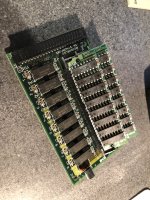 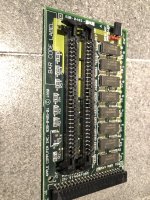 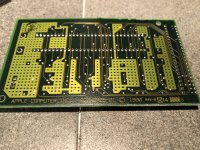  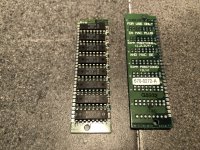 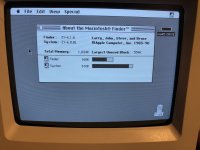 | |
| Posted by: rplacd on 2020-10-29 18:06:54 Two things come to mind – first, what error messages do you get? A Sad Mac screen will have an error code that might tell us something. Second, I notice the shunt on the expansion card is on "SIMM NOT INSTALLED" – what happens when you move it to "SIMM INSTALLED", with the extra RAM in, and try to boot? What happens without the extra SIMMs? | |
| Posted by: dylan4397 on 2020-10-29 20:54:50 The error message is 00000005 00100000 with the SIMMs installed and setting on SIMMs installed. If I remove the SIMMs, I get a white and black bar screen, as you can see in the photo. And as you can see in the second photo, I get this vertical rolling image when leave it set as SIMM installed, but remove the SIMMs Thanks, Dylan 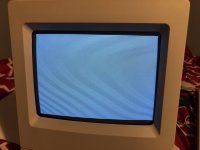 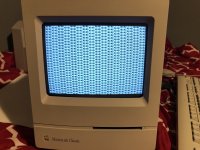 | |
| Posted by: bibilit on 2020-10-30 02:32:05 Sorry, but don't understand your answer. What's happening with the card card only (so without any stick of ram) and jumper moved to " simm not installed" ? You have got 1 Mb of Ram onboard, the card only will give you another 1 Mb (when jumper set correctly) then the card plus sticks a maximum of 3 Mb. So card alone and jumper "not installed" 1 Mb Card + sticks and jumper "simm installed" 1 Mb + whatever is present. | |
| Posted by: dylan4397 on 2020-10-30 06:13:25 Yeah, I did make that a little confusing. With the SIMMs not installed and jumper set to SIMM not installed, I get the white and black bars that I attached to my last reply. Thanks, Dylan | |
| Posted by: bibilit on 2020-10-30 11:08:48 So probably the card itself is bad. | |
| Posted by: dylan4397 on 2020-10-30 11:43:00 Ok, that is what I was thinking, but I just wanted to see if maybe that was a common thing with these cards. Thanks for the help! Dylan | |
Posted by: warmech on 2020-10-30 15:13:19So probably the card itself is bad.Ran into a similar problem a while back; the on-screen pattern was slightly different, but the card was bad. | |
| Posted by: dylan4397 on 2020-10-30 19:01:58 Can you really do much with only 1mb of RAM? The only things I could open were simple games like Tetris. I wanted to use Word and programs like that with the computer, but no such luck. Thanks, Dylan | |
| Posted by: MrFahrenheit on 2020-10-30 19:38:42 You can certainly make do with only 1MB. I did for 3 years!! If you use a minimal System 6 install and something like Microsoft Word 3 it will work just fine. Heck I did SuperPaint, HyperCard, and all kinds of games on mine with just 1MB of System ram. | |
| Posted by: dylan4397 on 2020-10-30 20:54:41 Ok thanks for the info! I checked and the version of word I have is 4.0, so I will just find some older versions of the software I have. Thanks, Dylan | |
| Posted by: MrFahrenheit on 2020-10-30 21:50:04 Word 4.0 requires 512KB, so should work comfortably within 1MB. | |
| Posted by: dylan4397 on 2020-10-30 22:27:16 Sounds good! I do have another possibly big question, that I should maybe start another discussion for. I am trying to use an ImageWriter ii with the Macintosh. I think that they were used together at one point, because I pick both of them up from the same guy. But anyways, I cannot get it to print. I looked up the different settings for the DIP switches, and tried to set it accordingly. I also think that I have the proper system files installed for the printer. They are ImageWriter, ImageWrite LQ, LaserWriter, etc. But no ImageWriter ii. Are the ImageWriter and ImageWriter ii system files the same? I will attach photos of what I have going on. I did get the self test on the printer to work, so I know it at least sort of works. Thanks for the help, Dylan 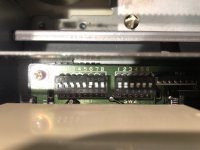  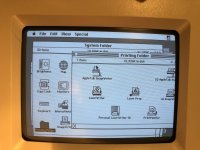 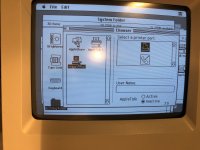 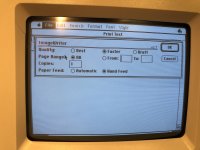 | |
Posted by: elemenoh on 2020-11-01 18:20:38The error message is 00000005 00100000 with the SIMMs installed and setting on SIMMs installed. If I remove the SIMMs, I get a white and black bar screen, as you can see in the photo. And as you can see in the second photo, I get this vertical rolling image when leave it set as SIMM installed, but remove the SIMMsHmm I have a classic that is showing that screen with the lines when no memory expansion is installed, and distorted bars when it is installed. Yours boots if you remove the expansion card? | |
| Posted by: dylan4397 on 2020-11-02 13:31:13 Yep, boots fine without the RAM expansion card installed. | |
| Posted by: Elv1s on 2024-07-07 09:14:31 I have the same issue…but here is the thing, I have two classics with 3 expansions card AND one classic is totally fine and boots with all expansion cards with or without extra ramsticks installed. The other one was battery bombed but I got it working…without the expansion card installed it boots fine but with it in it wont boot anymore, with any of the cards with or without ramsticks. If I have any card in it starts with a sad mac, No sound, error code 00000005 00100000. It is verry weird and the fault cant be on the expansion card/s because they work just fine in my fully functional classic. | |
| Posted by: Elv1s on 2024-07-08 08:04:49 Found this video with Adrian Black on youtube! My problem still presist though, had a broken trace under the LS174 chip and pin 5. So now the mac boots with a ramcard if I choose the ”No sims installed” but system still says its only 1mb of ram! with ”sims installed” still gives me the 00000005 00100000 code. I even changed the LS174 for for another one but same same. | |
| 1 |