68kMLA Classic Interface
This is a version of the 68kMLA forums for viewing on your favorite old mac. Visitors on modern platforms may prefer the main site.
| Click here to select a new forum. | |
| Is it just a caps issue? PowerBook 145B screen | |
| Posted by: Lobo on 2020-09-27 03:11:37 This is how my PowerBook 145B screen looks like: 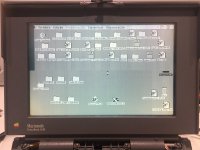 From what I've been reading about PowerBook screens I think that all those "weird" lines in the screens and faded parts are due to bad capacitors, am I right? But what about that black part in the top-left side of the screen?? That doesn't look too good, does it? is that issue also the caps fault or maybe something else? Thanks! | |
| Posted by: Byrd on 2020-09-27 06:24:46 Recapping the caps on the back of the LCD might improve some of the contrast, but that's what a passive screen usually looks like (remove some icons on desktop for a clearer picture). The black band is where the LCD itself has a fault; taking it apart you might be able to devise a clamp to hold the connector (top left corner) more firmly in place. | |
| Posted by: Lobo on 2020-09-27 16:54:20 Thanks Byrd. I'll check the connector on the LCD to see if it's the issue with that black band 🙂 | |
| Posted by: Lobo on 2020-09-27 18:13:39 Just opened the screen and saw this: 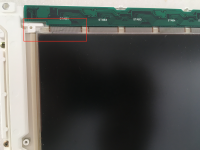 That doesn't look good at all :sad: I guess the only option is to get a replacement screen | |
| 1 |