68kMLA Classic Interface
This is a version of the 68kMLA forums for viewing on your favorite old mac. Visitors on modern platforms may prefer the main site.
| Click here to select a new forum. | |
| The MacIPpi Rpi. The MacIPpi concept for Raspberry Pi. | |
| Posted by: mactjaap on 2020-09-09 06:24:12 New from MacIP.net the…. MacIPpi Rpi. The MacIPpi concept for Raspberry Pi. The first beta is finished, running MacIPpi 5.0.1  As always. MacIP.net gives you a MacIP gateway out of the box thanks to the linux port of macipgw done by Stefan Bethke. You can find more information about this port on: https://github.com/zero2sixd/macipgw The basics: You can connect Macintosh computers over LocalTalk with the use of cabling between the printer ports. On this kind of network it is not possible to “speak” TCP/IP right away. To speak TCP/IP on a LocalTalk network it is necessary to encapsulate Internet Protocol (IP) packets within the AppleTalk DDP protocol. To do this right you need a piece of hardware or software to do this. For now a beta test which runs on a Rasberry Pi is ready. I have Raspberry Pi B3+. Would be nice to find out on which types the images runs. Download it from: https://cdn.macip.net/MacIPRpi-5.01-BETA-rc01.img d906702aaafdd2167125c06ef29873ef MacIPRpi-5.01-BETA-rc01.img (3.8G) or the compact 7zipped version: https://cdn.macip.net/MacIPRpi-5.01-BETA-rc01.img.7z 3b8abdfcd83c1efddea6d31be9fb6b89 MacIPRpi-5.01-BETA-rc01.img.7z (949M) To unzip use 7Zip. Do not try to load the 7z version on the SD card. Use dd on Linux systems (and MacOSX) to put the image on the SD disk. This will be a command like this: dd if=MacIPRpi-5.01-BETA-rc01.img|pv|dd of=/dev/sdX bs=1M On a Linux/Unix/MacOSX system you can check the name of the SD card with the command: dmesg On Mac/Linux/Windows Etcher or on Windows only you can use a tool like Win32DiskImager (this tool is deprecated…but sometimes people work with it). Etcher is THE tool! Connect you MacIPRpi to the network with a network cable. Do not try to connect the MacIPpi with wifi. No Appletalk over WIFI! It will get an IP address from your home router if you power it on. After a few minutes it will be ready. Take this time because the appletalk daemon needs some time to settle. Even no need to connect a screen. If you want you can login from your Macintosh with Telnet or SSH. You can use IP address 172.16.2.1 to connect. If you want to connect from a Mac OSX, Windows or Linux machine you can connect to macippi.local. If you want to login username is: macipgw and password: macipgw You can become root by entering $sudo -i and password macipgw What does the MacIPpi has?

    Please try it out and test this version. I will add and document more features. And also improve things. For now there is to little storage. I like to make use of the full storage capacity of your SD card. If you have feedback or tips you can reach me at info (at) macip.net | |
| Posted by: mactjaap on 2020-09-15 07:17:13 I got the results of two beta testers: One tester confirmed that the image is also working for the P4 This is the second test result. Nice to read all along. Here are some beta test notes so far. . . - For beta rc 02 I will add macipgw to sudoers. Work around is to login as root. Expanding your SD card to the max with first boot will be standard in bet rc 02 - Show up of shared disk in all kind off protocols is a feature. I think it is noce you can always access this disk to "feed" your old macs. - Printing will be not on this one, because of the setup per printer. Difficult to get generic. | |
| Posted by: Hopfenholz on 2021-01-21 01:05:07 Apologies if this is a really stupid question but what is the physical interface between my Classic Macs on their LocalTalk network and the Ethernet network? As the pi doesn't have serial port. | |
Posted by: cheesestraws on 2021-01-21 01:21:51Apologies if this is a really stupid question but what is the physical interface between my Classic Macs on their LocalTalk network and the Ethernet network? As the pi doesn't have serial port. Not a stupid question at all 🙂 You really have two options at this stage:
| |
| Posted by: Hopfenholz on 2021-01-21 02:09:03 Thank you, understood. Great though this project is, what would be even more useful is a modern gizmo that replaces the Asante. It can't be that hard, presumably the Apple serial port is a standard part. Mind you that's easy for me to say, I have none of the skills required to create such a thing! The file sharing is cool. Currently I have a PB G4 12" running 10.3.7 which can be seen by MacOS 9.2.2 and my M1 Air running Big Sur but I haven't got my older Macs onto my network yet, mainly because I don't have one of those Asante gizmos. I do have an Ethernet card coming for my Colour Classic though 🙂 Maybe I can press it into service as an Ethernet bridge Quick question: if I use my pi as a MacIPpi can I also run stunnel on it at the same time so my OS 9 machines can still check gmail? Cheers, Joel | |
Posted by: cheesestraws on 2021-01-21 02:21:13Great though this project is, what would be even more useful is a modern gizmo that replaces the Asante. It can't be that hard, presumably the Apple serial port is a standard part. It wouldn't be that hard, just quite a lot of faff. The problem is that the Mac serial interface is significantly more flexible than the standard PC serial port, and LocalTalk uses that flexibility. In fact, an awful lot of LocalTalk is done inside the serial controller chip that the Mac uses. Members of that family of chips are still available, so in theory it could be done. There are technotes out there from Zilog about how to implement it, and the algorithms for how to implement the link-layer protocol are documented in Inside AppleTalk. So, again, it's not particularly hard, it would more just require time and attention to detail. I'm intending to play with this at some point, but as for when... | |
| Posted by: Hopfenholz on 2021-01-21 03:55:35 Just out of interest while we're talking about it, let's say I put an Ethernet card in my Colour Classic, what software would I need to bridge the 2 network interfaces? Presumably this would slow the poor old CC down even more but there we are. The problem with this approach is you need to have the bridging Mac on all the time. An Asante dongle for the LocalTalk Mac would be a better solution for this reason. Joel | |
Posted by: cheesestraws on 2021-01-21 03:59:49Just out of interest while we're talking about it, let's say I put an Ethernet card in my Colour Classic, what software would I need to bridge the 2 network interfaces? The drivers for the network card (if it's an Apple NIC then the drivers are in the OS already) and Apple's free "LocalTalk Bridge" control panel, available from the normal places. This is not a high-demand job; it can be done by a microcontroller without too much effort, so it's unlikely to seriously slow down the machine. The main reason why I have a dedicated machine is that I have a pile of network kit and I just wanted to add this function to that pile without having to worry about it too much | |
Posted by: mactjaap on 2021-01-22 04:42:30It wouldn't be that hard, just quite a lot of faff. The problem is that the Mac serial interface is significantly more flexible than the standard PC serial port, and LocalTalk uses that flexibility. In fact, an awful lot of LocalTalk is done inside the serial controller chip that the Mac uses. Members of that family of chips are still available, so in theory it could be done. There are technotes out there from Zilog about how to implement it, and the algorithms for how to implement the link-layer protocol are documented in Inside AppleTalk. So, again, it's not particularly hard, it would more just require time and attention to detail. I'm intending to play with this at some point, but as for when... I would love to see a modern replacement been made for a LocalTalk bridge. I think it is not so simple. A few years ago a working prototype is build on a BBB. I have tested it also and it is working fine. Read about it here: https://mac68k.info/forums/thread.jspa?threadID=275&start=0&tstart=0 A device which could combine a MacIPpi and LocalTalk bridge would also be nice. But to develop something like that is out of reach for me. 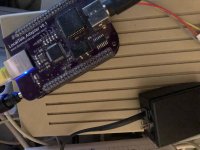 | |
Posted by: davidg5678 on 2021-01-22 05:00:32Read about it here:I think the link is broken, do you mind re-posting it? | |
| Posted by: mactjaap on 2021-01-22 05:05:36 https://mac68k.info/forums/thread.jspa?threadID=275&start=0&tstart=0 Her is the link to the thread: Localtalk bridge | |
| Posted by: dougg3 on 2021-01-22 17:12:44 That's my LocalTalk adapter project. It uses an actual Zilog Z85C30 SCC and a microcontroller that talks to the SCC. The microcontroller talks to the BeagleBone Black over a UART (serial port) to exchange the LocalTalk data back and forth. It creates an actual LocalTalk network interface in Linux on the BeagleBone Black and then you can use netatalk or whatever to bridge between Ethernet and LocalTalk. Theoretically it should also be possible to get MacIP working with it. I really want to finish it and turn it into something that people can get for themselves. mactjaap is my one and only alpha tester 🙂 I just can't find the time to finish it...I also kept debating in my mind whether to continue to use the SCC (cost of $8 to $12 depending on clock speed) or try to replicate its functionality for cheaper... | |
| Posted by: kerobaros on 2021-01-22 20:17:00 I would love to see this developed further. Is there any advantage to using the BBB platform in particular over a Pi, or is that just what was on your desk when you built it? I seem to remember that a Pi can run a UART over its GPIO pins, but I don't know much about it. | |
| Posted by: dougg3 on 2021-01-22 21:38:46 I honestly don't remember the thought process there, but I think you're right -- it's what I had available on my desk. If I go back in the linked thread and read through it, it looks like I was considering both the Pi and BBB. I think I was enamored by the BBB's "capes". I can't think of a reason that it couldn't be done on a Pi too. I think the older Pi models only have the console UART available on the GPIO header, I'd hate to lose the console. The Pi 4 has a bunch of UARTs available on the header though. | |
Posted by: kerobaros on 2021-01-23 18:57:45The Pi 4 has a bunch of UARTs available on the header though.The idea of using a Pi 4 as a low power file server on a small PhoneNet network is very appealing to me, haha. | |
| Posted by: BacioiuC on 2021-02-05 00:31:06 Hi, I'm an avid user of MacipPi for my setup but it seems like I have to flash it again every 5-7 days. The original installation comes as a 4 GB image for the RPI and, even though I flash it to an 8 GB sdcard, the original space it can take up is 4 GB. Up till now I've added a USB stick and added it to AppleShare netatalk configuration and it works. However, the web servers and other applications keep writing log files and the remaining space is being eaten up really fast. In case of my RPI, it leads to it doing quite a number of reboots through the day until it corrupts the file system. Is there a chance you can provide an image that's bigger in size (8 gb)? This way we don't have to fiddle with usb sticks at startup and it will really be flash and go for file sharing. Edit: the image seems to be configured to use a RPI Display connected to the GPIO Pins. I don't have PI display to attach and in case I want to do debugging when SSH doesn't want to start I can't connect a HDMI cable and use another monitor to see what the problems are. So reflashing and resetting everything up is the way to go for me, for now. Maybe, if you ever update the pi image, you can also keep that in mind for those of us without PI Displays 🙁 | |
| Posted by: mactjaap on 2021-02-05 01:15:19 For now you can login with ssh and use raspi-config to enlarge your disk. I will make a beta 2 soon where this is done at boot. | |
| Posted by: History_SE30_Dude on 2021-08-15 18:32:38 @mactjaap Is MacIPgw compatable with PAP for Appletalk printing? I was thinking it might be useful to some to make it possible to connect to a Appletalk enabled ImageWriter with the pi and reshare it as something a modern protocol. There are a couple drivers for the ImageWriter for modern systems, I've been able to do it with a OS X 10.4 system sharing the printer. | |
| Posted by: History_SE30_Dude on 2021-09-04 15:18:17 After installing PAP and confirming it was installed and many hours of trying to get it to print to my ImageWriterII I found a GitHub of someone who discovered that PAP had a bug making it not compatible with the ImageWriter printers and they had begun looking into it but discovered it was way above their skillset. Presumably it works with the laser printers but I can not confirm this. For now I have the printer connected to a modern Mac through a USB/Serial adapter so that i don't need a vintage system running just to print to it. | |
| Posted by: mactjaap on 2021-09-07 12:48:57 I must be honest. I never tried to do anything with Macs and printers. So it was not on my list for the MacIPpi projects. I’m also not sure if you can make something generic with PAP for all users. My goal is always just to boot your Pi and that everything is working out of the box. | |
| 1 > |