68kMLA Classic Interface
This is a version of the 68kMLA forums for viewing on your favorite old mac. Visitors on modern platforms may prefer the main site.
| Click here to select a new forum. | |
| Completed my Apple Upgraded Mac Plus | |
| Posted by: ilitch64 on 2020-08-28 08:34:41 I finally got a Plus keyboard from Herb over at retrotechnology.com and now I can finally use my Mac Plus which has been sitting on my shelf for about half a year now! It has been upgraded to 4MB and a book on Think C is currently on its way! 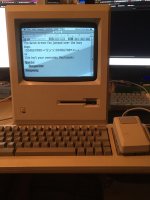 I love the smaller foot print it has versus my ADB Performa Keyboard. | |
| Posted by: olePigeon on 2020-08-28 09:53:52 I'm confused ... it's NOT playing Dark Castle? 😉 | |
| Posted by: ilitch64 on 2020-08-28 10:02:28 Does The Colony count, I misplaced my Dark Castle disk  | |
| Posted by: Crutch on 2020-08-28 21:10:28 Such a cool game. Impossible to solve though, as I recall. Also, the font used there for “BY DAVID ALAN SMITH” is Commando, one of my all-time favorite Mac fonts. I remember finding it in The Colony’s resource file, extracting it and using it countless times thereafter. | |
Posted by: ilitch64 on 2020-08-28 21:56:39Such a cool game. Impossible to solve though, as I recall. Also, the font used there for “BY DAVID ALAN SMITH” is Commando, one of my all-time favorite Mac fonts. I remember finding it in The Colony’s resource file, extracting it and using it countless times thereafter.Alright now I gotta extract that font! I thought that was just a bitmap logo! | |
| Posted by: ilitch64 on 2020-08-29 04:10:53 I have been trying to figure out how to extract the font for about an hour now. How'd you do that? | |
| Posted by: Crutch on 2020-08-29 04:16:14 Oh jeez I am remembering something I did in probably 1988 ... isn’t the font in the resource fork? You should be able to see it with ResEdit, you can then copy it to your system file. There should be a FONT resource called “Commando” or similar. If that doesn’t work, I can probably dig it up somewhere ... | |
| Posted by: ilitch64 on 2020-08-29 08:37:16 I figured it out in resedit you copy the FOND and the FONT data from Colony and paste it into the System file’s FOND and FONT tables. | |
| Posted by: elbaroni on 2020-09-01 12:52:05 Font/DA mover, hold “option” as you click on the “open” button. Will let you open applications, not just suitcases and system files. | |
Posted by: cheesestraws on 2020-09-01 18:24:50Font/DA mover, hold “option” as you click on the “open” button. Will let you open applications, not just suitcases and system files.I did not know this. Thankyou for the tip! | |
| 1 |