68kMLA Classic Interface
This is a version of the 68kMLA forums for viewing on your favorite old mac. Visitors on modern platforms may prefer the main site.
| Click here to select a new forum. | |
| What A Wonderful Morning! | |
| Posted by: JustG on 2020-08-19 01:33:43 I'm in the processing of diagnosing a floppy drive on a Classic undergoing repair that fails when trying to initialize a disk. I figured it'd be good to see if the disk was any good so I pulled out my Classic II that I recapped last year: 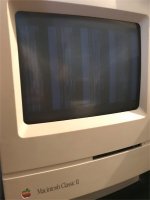 Super! Well, let's not ruin the morning, how about the other Classic that's recapped: 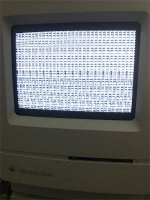 What an enjoyable time! It's been hot here so I'm wondering if something came unseated. I haven't cracked open the cases to inspect further yet, just figured I'd jump on here and vent first. | |
| Posted by: bibilit on 2020-08-19 02:14:01 Any issue with the Analog board, voltages low ? | |
| Posted by: JustG on 2020-08-21 06:50:26 1/2 good news. Reseated the ROM of the Classic II. It's happily starting up now. The Classic however, no such luck. I pulled the ROM, gave it a conservative wipe down of deoxit and reinstalled. Same issue. @bibilit voltages check out, 5V is at 4.97 and 12V is at 11.97. I doubt my multimeter is much more accurate than 3 hundredths of a volt. I've got my other Classic which is working just fine however I am a little concerned with swapping ROMs in case something got cooked in the malfunctioning Classic. | |
| Posted by: bibilit on 2020-08-21 14:20:32 If you have another Classic, you can swap boards for a test. | |
| Posted by: JustG on 2020-08-24 00:52:28 Board swap with my functional Classic worked. So the problem lies somewhere on the logic board. I swapped ROMs and the same issue appeared. Same garbled screen. Interestingly enough if I pull the memory expansion board/ram I get a very defined checkerboard on the screen. Dead Mac Scrolls says to reseat the ROM, which I have done several times now. Not sure what else I should try. | |
| Posted by: karrots on 2020-08-26 11:22:57 On the Classic you'll also get that if the ROM is seated shifted the wrong direction. I did that accidentally once when replacing it. | |
| Posted by: JustG on 2020-08-27 03:30:21 I've double and triple checked to make sure the ROM is seated in the correct direction. I'm thinking one of the capacitors may have not been soldered correctly. I bought this computer recapped before I worked up the courage to recap myself. I'm going to go back over each of the capacitors with my iron and make sure everything is soldered properly. | |
| Posted by: karrots on 2020-08-27 03:31:39 My comment wasn't about direction. The ROM chip is 40 pin. The socket is 42 pin. | |
| Posted by: techknight on 2020-08-27 03:34:03 The other thing you have to keep in mind too, How did you handle the recap? If you simply just removed the old caps, maybe a quick wipe with IPA, and replaced the caps, thats not enough! the electrolyte from the old caps is still sitting on the board, not neutralized and eating away the vias and traces. When you do recaps, you must wash and scrub the board, and neutralize the electrolyte. Then recap. | |
| Posted by: karrots on 2020-08-27 07:31:59 See chapter 10 of the Mac Classic & SE Repair and Upgrade Secrets book for ideas on the checkerboard. http://maccaps.com/MacCaps/Repair_books_files/Mac Classic %26 SE Repair and Upgrade Secrets.pdf | |
| Posted by: JustG on 2020-08-30 05:23:23 Thanks everyone for your comments! ROM is in socket correctly. That's why I triple checked 😉 I wanted to be sure I had it not only oriented in the correct direction but in the proper socket pins. @techknight I'm afraid you're right. I didn't perform the recap of this machine, I bought it with the work completed I have a feeling that the board was not properly washed. I intend to give it a full wash and go through all the capacitors to make sure they have a good solder connection to the board. As soon as I have the time that is! | |
| 1 |