68kMLA Classic Interface
This is a version of the 68kMLA forums for viewing on your favorite old mac. Visitors on modern platforms may prefer the main site.
| Click here to select a new forum. | |
| Duo 230c Heating up - battery short? | |
| Posted by: jdlanza on 2020-07-25 06:30:31 Hi everyone- I'm likely dealing with multiple points of failure, but here's what I got. Have a Duo 230c that has been docked in a Duo Dock for quite a while. Fired it up ~6 months ago and everything was fine. Today, I plugged the dock into power and nothing. No response from the power button, either on the dock itself or from a directly-connected keyboard. We'll get to that. Opened up the dock to extract the Duo230c and noticed a burning smell, faint, but there. Connected the extracted Duo 230c to power using the OEM power brick and smelled the burning smell again. Anyone have any experience with these old NiMH battery packs? Is this smell from the battery, or something worse? Suggestions for next steps? Thanks, johnl | |
| Posted by: Darrell Johnson on 2020-07-25 15:40:28 I'm not sure we have the same exact issue, but my Duo 230 recently developed a burning smell, which I narrowed down after disassembly to the area of the motherboard near the battery charging terminals. In my case the Duo continues to work, but I don't want to use it. In my case the NiMH battery was not installed, and the Duo was operating on the adapter, so it was not the battery. | |
| Posted by: Papichulo on 2020-07-25 20:42:17 i had the same problem its probably the capacitors leaking and burning the chips below the board. they should be replaced | |
| Posted by: jdlanza on 2020-07-25 22:44:32 Thanks, guys. I had been considering a recap project, but hadn't really expected to start with my Duo 230c! | |
| Posted by: Trash80toHP_Mini on 2020-07-25 23:58:29 230c? 2300c/upgrade hybrid? I recall advice that Duos shouldn't be started up before the caps in "Tank Farm" under the metal frame at the rear have been replaced as it can result in Dead Board Syndrome. | |
| Posted by: jdlanza on 2020-07-26 10:04:42 @Trash80toHP_Mini, yeah, that was a typo. I meant 280c, not 230c! Not liking the sound of Dead Board Syndrome, but I am concerned that something may gone wrong and killed both the 280c and the dock into which it was plugged! | |
| Posted by: sutekh on 2020-07-26 23:56:00 Yes, must be recapped! Just did my 280c, and every. single. cap was leaking badly. Electrolyte had flowed through the vias to the other side and was making a mess of the SMD ICs there too. After re-capping, the whole board should be thoroughly cleaned. I hit mine with a deoxidizer (deoxit), gently scrubbed the contacts of any affected components, then followed with contact cleaner, isopropyl, and compressed air. Mine also had an open Zener diode (see my recent thread detailing the fix) causing "Dead Board Syndrome". | |
| Posted by: jdlanza on 2020-07-27 11:46:56 Thanks, @sutekh! | |
| Posted by: Darrell Johnson on 2020-07-28 02:38:43 Related Post to Duo Recapping - https://68kmla.org/forums/index.php?app=forums&module=forums&controller=topic&id=48570 Also - I verified my issue was due to electrolytic fluid from leaking motherboard capacitors migrating down the board to short out the battery connector. While the motherboard recap is doable, there are also capacitors in the display that are much more difficult to replace. | |
Posted by: sutekh on 2020-07-28 03:16:03While the motherboard recap is doable, there are also capacitors in the display that are much more difficult to replace.They're not too bad really. The display cover comes off with just two screws (above the hinges under the little gray, square stickers) and aside from the fact that you have to peel off a couple pieces of tape to remove the shield around the screen, they're readily accessible. Here's a couple of pics of the caps on the driver board (there are many!) and inverter if you want to order them in advance and reduce your downtime. The caps pictured are 8mm, 6.3mm, and 4mm (only that one little 10uf 16v) in diameter. 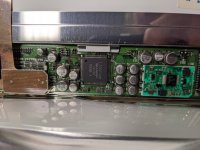 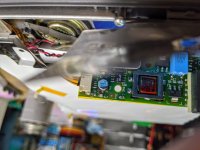 | |
| Posted by: Darrell Johnson on 2020-07-28 03:46:28 Excellent @sutekh Thanks for the excellent pics! I stand corrected. Inserting this phrase for search: "Duo display recapping" | |
| Posted by: sutekh on 2020-07-28 04:24:54 *** BE ADVISED *** I provided some bad info above. Caps measure 6.3mm, 5mm, and 4mm in diameter, not 8mm, 6.3mm, and 4mm as previously stated. Need to read my notes more carefully... | |
| Posted by: Darrell Johnson on 2020-08-01 14:46:20 Update: For the grayscale Duo 210 and 230 there are no capacitors to replace in the display, so you only need to focus on capping the motherboard. Other Duo models as show above will have capacitors to replace in the display. I'm attaching a photo of the Duo 230 Display Board and also the full Macintosh Duo 200 Series Repair Manual which provides detailed instructions on how to disassemble. For video disassembly, please refer to Jason's Macintosh Museum YouTube "Apple Macintosh PowerBook Duo 250 (1993) Full Tour and Disassembly" 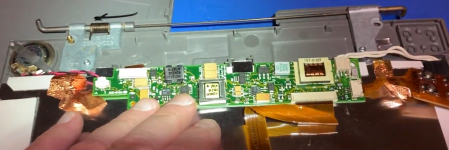 View attachment PowerBook_200_Series_Apple_Repair_Manual.pdf | |
| Posted by: Darrell Johnson on 2020-08-01 15:57:09 Technical correction " For the grayscale Duo 210 and 230 there are no electrolytic capacitors to replace in the display . . . " | |
Posted by: superjer2000 on 2020-08-02 01:49:26Update: For the grayscale Duo 210 and 230 there are no capacitors to replace in the display, so you only need to focus on capping the motherboard. Other Duo models as show above will have capacitors to replace in the display. I'm attaching a photo of the Duo 230 Display Board and also the full Macintosh Duo 200 Series Repair Manual which provides detailed instructions on how to disassemble. For video disassembly, please refer to Jason's Macintosh Museum YouTube "Apple Macintosh PowerBook Duo 250 (1993) Full Tour and Disassembly"Just a note that this isn't accurate - there are caps in the greyscale displays. | |
| 1 |