68kMLA Classic Interface
This is a version of the 68kMLA forums for viewing on your favorite old mac. Visitors on modern platforms may prefer the main site.
| Click here to select a new forum. | |
| Convert PNG to MacPaint? | |
| Posted by: Crutch on 2020-07-20 04:40:28 Anyone know of a tool for converting a PNG to MacPaint, or otherwise getting a black & white raster image from a modern Mac to an SE/30? (It doesn't have to be MacPaint and the image is smallish, embedding it in a Word doc would work too if there were a way of saving in an old enough format...) | |
| Posted by: cheesestraws on 2020-07-20 04:54:41 GraphicConverter will save to both PICT and MacPaint, at least as of version 11.1 | |
| Posted by: Crutch on 2020-07-20 05:38:48 Cool! Thanks! Wow it’s also $40 though .... anyone know of a free option? 🙂 | |
| Posted by: cheesestraws on 2020-07-20 05:42:14 You can just download it, it has a reasonably long evaluation period (and after that just a nag screen. I didn't pay for it until shamefully recently). So if you only need it for one project... | |
| Posted by: cheesestraws on 2020-07-20 05:49:54 An afterthought: imagemagick looks like it will write PICT, though I've never actually tried it. | |
Posted by: Dog Cow on 2020-07-20 11:27:48Anyone know of a tool for converting a PNG to MacPaint, or otherwise getting a black & white raster image from a modern Mac to an SE/30?I use Adobe Photoshop, convert to bitmap, then save as some format which AppleWorks 6 can open. Then in AppleWorks I save as MacPaint. | |
| Posted by: Daxeria on 2020-07-22 16:17:15 There's a free Photoshop plugin that lets you open and save documents in MacPaint format. To save as MacPaint, your image must be in Bitmap mode and fit within the MacPaint canvas of 576 by 720 pixels. If it's smaller than that, it will be saved to the upper left corner of the document. | |
| Posted by: tt on 2020-07-27 15:47:42 I've used Photoshop CS3 to save as a PICT. I don't know if newer versions have kept that "save as" option. | |
| Posted by: Mu0n on 2020-07-28 00:25:18 I checked out my modern day options too, on the Windows side and it seems there's a really nifty web solution for this. BatchPhoto Espresso. PICT is right there in the first choices in the pulldown menu! 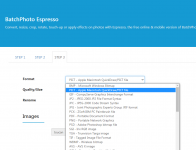 my steps were: 1) in Gimp, change the image to indexed color, 1-bit black and white. I'm sure you can do this in photoshop as well 2) export to BMP 3) go to https://www.batchphoto.com/espresso/ EDIT - this route does NOT work. The website exports to a blank page, it does not recognize the 1-bit bmp in the right hand side view, even though the preview shows up on the left side, at the upload step. EDIT - route 2: export to png instead from gimp use batchphoto espresso to pict import to System 7, Aldus Superpaint 3.5 Opens fine 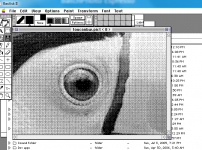 Using that, I can save to an older MacPaint format, which opens fine in Claris MacPaint 2 under System 6. I assume I'd be able to open it with the original MacPaint as well 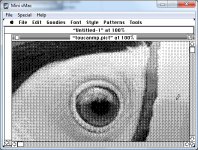 | |
| 1 |