68kMLA Classic Interface
This is a version of the 68kMLA forums for viewing on your favorite old mac. Visitors on modern platforms may prefer the main site.
| Click here to select a new forum. | |
| Arcade Adapter for Mac*Man | |
| Posted by: Mu0n on 2020-07-19 13:08:57 This little thing connected to the DB9 mouse port of pre-ADB Macs: 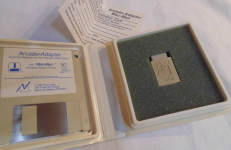 and allowed you to play Mac Man using an Atari Joystick. I just tried plugging my custom gamepad and running the game, but it will show that it doesn't recognize its adapter. Perhaps the normally unused pin of the DB9 connector is set high with this adapter by linking it to the 5V pin? It's hard to say without having access to the interior of that casing (I don't own such an adapter). 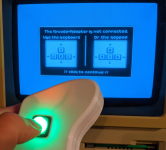 I also found a reference to that game and adapter in a MacUser August edition of 1987 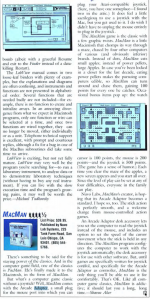 | |
| Posted by: Crutch on 2020-07-19 19:39:50 Wow, I’d forgotten all about that thing. I had one circa 1987. Couldn’t tell you how it worked, though, I’m afraid ... I do recall that Mac Man was not a great game! | |
| Posted by: Mu0n on 2020-07-19 20:24:41 do you know what would happen if I just use a jump wire inside the Mac Plus case between pin 2 and 6? Smoke? Is it possible for the Mac to probe pin 6 for special checkups? View attachment 33816 | |
| Posted by: sfiera on 2020-07-20 20:29:09 The Mac Plus schematic indicates that pin 6 is not connected at all. Here’s a thought—what happens if you plug in a regular mouse and hold down the button when launching the game? It could be as simple as Mac•Man checking for the mouse button being held down (pin 7 being grounded), on the assumption that players wouldn’t do that while opening the game. | |
| Posted by: Crutch on 2020-07-21 02:22:13 If that doesn’t work - We could figure out what it’s doing by launching Mac Man and dropping into the debugger to see what it’s checking before popping this error. | |
| Posted by: Mu0n on 2020-07-23 02:39:13 I'll try those ideas! This is so freaking hard to search for that derelict item either on eBay or just the web. | |
| Posted by: Mu0n on 2020-07-23 02:46:35 Right after double clicking to launch the game, I tried a 3rd, held click, but it seemed to have no effect. There are several spots where it might do some kind of check. Before the splash screen, during it, after it. after selecting PLAYER 1 from the menu (that's when it tells you it can't detect a joystick and shows you the keyboard control layout). | |
| Posted by: NJRoadfan on 2020-07-23 03:45:00 Best bet is above, dissembling the game's detection routines. Annoying, but doable. Being that you can't send data out the mouse port, it can't be too complicated. | |
Posted by: napabar on 2021-02-18 06:39:49ion routines. Annoying, but doable. BeiWhat kind of custom controller is it? Just having the Atari plug doesn't mean Atari compatible. Systems like the Genesis and the Vertex have the same plug, but are electrically different. Easiest solution is to get an Atari 2600 joystick and try it out. | |
| Posted by: olePigeon on 2021-02-18 07:14:55 @napabar @Mu0n The linked article says "Atari compatible joystick." So I would test it with an Atari joystick. | |
| Posted by: Mu0n on 2021-02-19 06:51:04 Again, I don't have the adapter, that image was taken off the net. | |
| Posted by: Tonust on 2024-01-26 14:56:39 I have macman, a macplus, an Atari joystick. I would like try to recreate this adapter. So I use this plan : Resurrecting my Macintosh Plus · tomek's blog blog.rekawek.eu
When the message show to connect your joystick or click to continue I deconnect the mouse and I connect my adapter and the joystick. The message don’t disapear and the joystick is not detected. Only click button works, no direction. any solution ? | |
| Posted by: Tonust on 2024-01-27 02:52:25 Macman is not the only compatible game. Apache strike from the company silicon beach software and surely Dark castle too. There is therefore a strong interest in finding a solution to redo this adapter. | |
| Posted by: Tonust on 2024-01-27 03:01:11 I don't know how to launch the debugger. I tried to search in resedit to see if there was not a hidden information. Is there any software to advise me? Knowing that apparently just plugging in the adapter (without the joystick) is enough to allow the computer to detect it. | |
Posted by: cheesestraws on 2024-01-27 03:21:28So I use this plan : The adapter in this blog post only adapts pinouts so that different mice can work. I would not expect it to work with a joystick or similar. | |
| Posted by: Tonust on 2024-01-27 05:29:28 there is two subject : 1. detection of the adapter by the game 2. the compatibility of a joystick Atari on Mac (with a simple adapter pin to pin) for the 2 I read this plan (approximately the same as the mouse) If I try the joystick on the finder the cursor move of 1 pixel in the right and the bottom, not left and top (strange) tks for your help | |
Posted by: cheesestraws on 2024-01-27 05:36:25If I try the joystick on the finder the cursor move of 1 pixel in the right and the bottom, not left and top (strange) Yes, because the pinout for a mouse is using quadrature, not separate up, down, left and right pins. So just sending a pulse in on one of the wires will not actually achieve very much except maybe a single-pixel twitch in one axis. | |
Posted by: Tonust on 2024-01-27 05:45:00Yes, because the pinout for a mouse is using quadrature, not separate up, down, left and right pins. So just sending a pulse in on one of the wires will not actually achieve very much except maybe a single-pixel twitch in one axis.😢 Any chance to resolve this problem ? | |
Posted by: cheesestraws on 2024-01-27 07:22:11Any chance to resolve this problem ? There are actually two problems here, and they're not really dependent. 1. Can one build something to make an Atari joystick behave like a mouse and move the cursor? The answer to this is yes, but you can't just wire it up as a passive adapter: you have to have a microcontroller in the middle to turn the joystick button presses into suitable waveforms for the computer to read. I built one for analogue joysticks: I believe @Mu0n built one for digital joysticks but I can't find the thread now. They may have a link. 2. Can one build something to wire up an Atari joystick just like the macman adapter? This is a totally different question, because I don't think it's clear to anyone how the macman adapter actually works. I wonder whether, if the adapter is detected (how? I don't know) it actually reads directly from the VIA (or something) to use the four X1/X2/Y1/Y2 lines as individual inputs. But nobody really knows how this works, and nobody has yet got far enough with macsbug to reverse-engineer it from the software side. If anyone actually had one and could tell us what the circuitry inside looked like (or if it were wired up in some other clever way) that would really help... Does that help? 🙂 | |
| Posted by: Tonust on 2024-01-27 07:39:01 Thank you very much, it's already clearer in my mind. I have a joystick for atari 2600 that I would like to run on my mac plus by making an adapter similar to the tinkerboy db9. Unless there is a simpler solution. I am open to everything -🙂 Did you write a tutorial to build one? Regarding the adapter delivered with macman I understand the difficulty and I will wait to find one on eBay… | |
| 1 > |