68kMLA Classic Interface
This is a version of the 68kMLA forums for viewing on your favorite old mac. Visitors on modern platforms may prefer the main site.
| Click here to select a new forum. | |
| SCSI ID Selector Switch on back of Hard Disk SC | |
| Posted by: JDW on 2020-07-16 11:26:46 I have a Hard Disk 20SC external SCSI drive enclosure that has a SCSI ID selector switch on back. Because I am using a non-stock IBM DGHS 4.5GB drive inside, I've left the SCSI ID select switch cable disconnected. But I am eager to change the SCSI ID on the fly. Here's a photo of the drive label, showing the SCSI ID jumper settings:  I believe the precise jumper settings follow what is shown on page 17 of this PDF. And here's a photo of the inside of my HD20SC (a still image from my PSU recapping video): 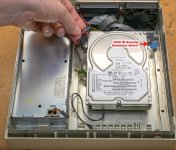 It seems that an ST-225N was the stock drive and its SCSI ID jumpers seem to correspond to that blue connector in my above photo:  What I am curious about is how the HD20SC's SCSI ID selector cable works. I haven't yet torn apart my HD20SC to figure it out myself. I will do that, but I wanted to post here first. The above ST-225N diagram shows 4 pairs of pins that can be shorted to select SCSI ID, but the drive enclosure's blue connector only has a 6-wire cable, meaning it could only control 3 pairs, not 4. Any thoughts? | |
| Posted by: JDW on 2020-07-16 14:35:18 Now that I ponder the DGHS's jumper table a bit further, it seems that only 3 pairs of pins are jumpered in order to select SCSI ID's 1 to 7. So it should be a simply matter of extending the wires of that Blue connector so it reaches the front of the drive. | |
| Posted by: superjer2000 on 2020-07-16 14:38:27 Yes. It's generally only ever three jumpers, one for each bit of a 3 bit address allowing for 0 to 7. | |
| Posted by: JDW on 2020-07-31 12:12:52 I made a video on the subject here, released today... | |
| Posted by: erichelgeson on 2020-08-05 00:56:35 Great video, I'm going to see if I can follow the same procedure for the SCSI selector on my external CD ROM drive - put a 300i in a Panasonic SCSI enclosure (Panasonic drive was dead) - would be nice to be able to select the ID's. | |
| Posted by: JDW on 2020-08-05 09:05:28 Thank you for the kind words, Eric. Getting the SCSI ID selector to work on my HD20SC has been very useful, so I know you will benefit from the effort required to make it happen on your CD drive. | |
| 1 |