68kMLA Classic Interface
This is a version of the 68kMLA forums for viewing on your favorite old mac. Visitors on modern platforms may prefer the main site.
| Click here to select a new forum. | |
| SCSI problem. | |
| Posted by: Stephen_Usher on 2020-07-14 22:30:00 After finally getting around to looking at my second SE/30 and its SCSI problem I think I need a second opinion: The machine is fully recapped and other than the SCSI issue works perfectly. Symptoms:
I've buzzed out all the SCSI lines and the system data lines and they seem fine. Using an oscilloscope I can see data transfer on every SCSI data line. I'm using a known good SCSI device which works on other systems. All the PCB tracks look fine, as you can see from the attached image. So, I'm guessing that the issue is with a bad NCR53C80 SCSI chip? 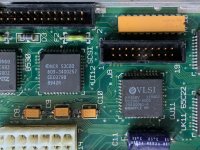 | |
| Posted by: LaPorta on 2020-07-14 22:51:18 What do you mean exactly by the disks being “seen?” Do they mount on the desktop? Are you using a utility to scan the bus? | |
| Posted by: davidg5678 on 2020-07-14 23:32:10 If you have the equipment to do a swap, I don't think it would hurt to try another SCSI chip. As of last month, Mouser Electronics still sells these chips for about $6. | |
Posted by: Stephen_Usher on 2020-07-15 00:02:28What do you mean exactly by the disks being “seen?” Do they mount on the desktop? Are you using a utility to scan the bus?System 7.0.8 reports the disk as unreadable and asks if you want to initialise it. Disk First Aid says "Bad Disk Name". | |
| Posted by: LaPorta on 2020-07-15 00:04:42 This is with multiple disks? | |
Posted by: Stephen_Usher on 2020-07-15 00:04:50If you have the equipment to do a swap, I don't think it would hurt to try another SCSI chip. As of last month, Mouser Electronics still sells these chips for about $6.I could try getting it off the board, I do have a hot air rework station, but any such work is risky, so I'd leave that as a last resort. I'd install a socket afterwards if I did remove it though. | |
Posted by: Stephen_Usher on 2020-07-15 00:07:03This is with multiple disks?No, just the one. | |
| Posted by: LaPorta on 2020-07-15 00:23:25 It’s possible it’s just the disk itself. I once had a bad HD that caused that very same issue: Bad Disk Name | |
Posted by: Stephen_Usher on 2020-07-15 02:17:34It’s possible it’s just the disk itself. I once had a bad HD that caused that very same issue: Bad Disk NameAs previously stated the device I'm testing with works fine on another SE/30 and Mac Portable. It's a SD2SCSI and the filesystem was created on the other SE/30. The drive was just moved from one machine to the other. By one drive I thought you meant one drive connected at the time rather than a particular drive. | |
| Posted by: LaPorta on 2020-07-15 02:28:33 Sorry, I was confused. Now this makes a bit more sense. I’ve also had this issue with SCSI2SDs before. You are hooking it up internally or externally? Do you have a spare SD card you can test to format on this SE/30? Any other real SCSI HD to test? I’ve had to set up individual SCSI2SDs before on various machines to make it work well. Just ruling anything else out...using a SCSI2SD is a whole different thing. | |
| Posted by: Stephen_Usher on 2020-07-15 03:25:44 The SD2SCSI (v5.1) works in all my other classic Macs as it is, without any configuration changes and with the same SD card and filesystem, so it's unlikely to be an incompatibility. I've run out of Mac compatible SCSI drives now as they all seem to have died with age. | |
| 1 |