68kMLA Classic Interface
This is a version of the 68kMLA forums for viewing on your favorite old mac. Visitors on modern platforms may prefer the main site.
| Click here to select a new forum. | |
| HELP with my analog board! [Macintosh Classic] | |
| Posted by: OsvaL on 2020-07-07 10:42:58 Hello everyone! I don't want to quit from this project yet, I recapped each and every single capacitor on the logic board and the analog board. Replaced the two diodes (DP3, DP4) and the optocoupler as some suggested. Reflowed most of the solder joints on the back of the board and searched for broken or cold joints. No luck. The only way I'm able to increase the voltage to the minimum required to boot is using a hair dryer (shown on the video below). I tried to pinpoint the exactly location where the hot air flow is directed and it seems to be the top part where the MOSFET and some caps are located. Does anyone know what could be the issue? Please I don't know what else to try. Many thanks! | |
| Posted by: Joe on 2020-07-07 11:31:16 I have had a large number of Mac Classics and Mac Pluses where I needed to replace the optocoupler (QP1) in order to reach the required voltages. After Googling around I learned that the LED light output inside the optocoupler deteriorates over decades and no longer delivers the required light on the internal photo transistor. The studies showed that the deterioration varied between 10% to 30%. Other suspects in a Mac Classic include the TDA4605 (IP1) IC and the 5.6V zener diode (DP11). All components are quite cheap so it might pay to just replace them all. | |
| Posted by: OsvaL on 2020-07-08 00:53:01 Thanks @Joe I already replaced the optocoupler with no luck. The other suspects need to be changed, still I don't know what the heat from the hair dryer has to do with the problem. | |
| Posted by: OsvaL on 2020-07-12 00:51:03 Another video, this time booting the Classic using a heater. | |
| Posted by: aeberbach on 2020-07-12 06:47:42 What mounts on that big heatsink you are heating? I guess you have already looked at the back of the CRT under the sheet of white plastic covering the solder side of the small board? I just found two cracked joints on mine that were the cause of a problem I was sure was on the analog board. | |
Posted by: OsvaL on 2020-07-12 07:22:52What mounts on that big heatsink you are heating?I think that big heatsink is attached to a power transistor. I didn't check the little board on the back of the CRT. I'm taking note to check it next time. | |
| Posted by: OsvaL on 2020-07-12 07:31:52 I'm posting an image of my analog board just in case someone notice something. 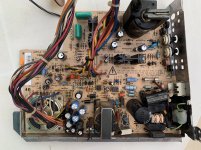 | |
| Posted by: OsvaL on 2020-07-17 11:58:12 Finally in some way, I found the solution to the problem. Is not quite elegant but at least it allows me to play with my computer. For some reason when I use an adapter to plug the computer to the power outlet without connecting the ground pin, the voltages remain stable, both the 5V and 12V rails. If I plug the Mac without the adapter the voltages go down. It looks like a lot of energy is escaping through the grounded cable. 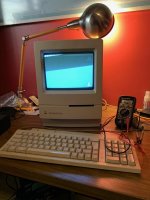 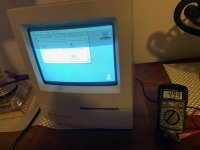 | |
| Posted by: LaPorta on 2020-07-17 12:08:15 Sounds like a massive short somewhere between one of the rails and ground that is causing a huge potential difference and draining all of your current. | |
| Posted by: CC_333 on 2020-07-17 14:22:15 Definitely. It's probably not 100% safe and should be fixed ASAP, but at least you can play around with it for now. c | |
| Posted by: techknight on 2020-07-18 04:18:31 yea you have something that has gone thermally intermittent. youl have to troubleshoot it splyed away from the system to pinpoint it. basically freeze spray/heat each individual part until you find it. | |
| Posted by: karrots on 2020-08-16 02:24:24 I assume the safety caps were checked? | |
| Posted by: techknight on 2020-08-16 20:31:26 One more thing I noticed, I still see some original caps in there. Including the main filter cap, These leak too BTW and cause problems. | |
| Posted by: OsvaL on 2020-08-21 06:15:54 Thank you all for the tips and recommendations! | |
| 1 |