68kMLA Classic Interface
This is a version of the 68kMLA forums for viewing on your favorite old mac. Visitors on modern platforms may prefer the main site.
| Click here to select a new forum. | |
| External FDHD Superdrive thinks disks are write protected | |
| Posted by: Bendix on 2020-06-23 01:59:02 I just bought this external Apple FDHD superdrive on ebay and find, that it thinks, that all floppies are write protected, even when they are not. Occasionally after a few times of reinserting I can write/format. The drive itself is in spotless condition, the eject mechanism works flawlessly. I bet, there is an optical sensor somewhere. Any suggestions? 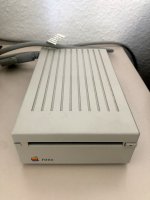 | |
| Posted by: Bendix on 2020-06-23 04:52:46 In case anyone has the same problem: There is a litte pin connected to a switch on the drive‘s board, determining the write protection status. Put a tiny amount of oil on it and now everything works fine. 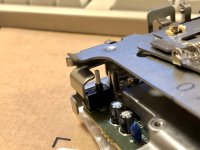 | |
| Posted by: JustG on 2020-06-23 05:44:26 I'm working on a Classic right now that is experiencing the same issue. Thank you for the tip! Was the switch stuck and the oil helped move it or do you think the contacts inside were the problem? | |
| Posted by: Bendix on 2020-06-24 00:25:53 Unfortunately it seem to be the contacts inside the switch, which are the problem, because the fault came back. The sony drive looks like new, probably because it was in an fanless external case and never hang in the constant dust wind of a computer. The pin itself is easy to press down. I found a post in (I think macrumors), where someone stated that normally some compressed air and contact spray would help. Tried that today, still no luck. Sometimes it works, sometimes I have to eject, press down the pin with a spudger, reinsert and it would work again for one or two floppies. In these rarer cases the guy said, the only thing, that helps is to cannibalize another defect floppy drive and get a SW1 (the name of the switch on the board) from there. Unfortunately I neither have a spare switch nor am I very good in soldering. Anyone here on the forum, who knows more about implanting a new write protection switch into one of these marvelous mechanical pieces of art? And maybe a source for these switches? | |
| Posted by: ScutBoy on 2020-06-24 00:56:13 You might try putting in contact cleaner (not oil) and actuating the switch over and over again for a few minutes, adding more contact cleaner from time to time. Can't hurt at this point. The cleaner plus a lot of physical contacts may move enough grime to get back to functionality. It works with keys on an Apple ][ keyboard! 🙂 | |
| Posted by: Bendix on 2020-06-24 00:58:37 Just one more pic of sw1. Another, less attractive solution, could be to shorten the switch. Any floppy drive gurus out there, who know, what to do? 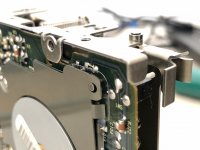 | |
Posted by: Bendix on 2020-06-24 00:59:40You might try putting in contact cleaner (not oil) and actuating the switch over and over again for a few minutes, adding more contact cleaner from time to time.Yeah, will try that right away. | |
| Posted by: Bendix on 2020-06-24 01:41:44 So I took off the top of the floppy drive with the two springs on the sides and gave the switch a good massage and now it seems to work. Tried 20+ floppies and so far all good, thanks ScutBoy. Will give it another try tomorrow, to see if it lasts. I almost felt adventurous enough to try and open the switch but that would probably have destroyed it. 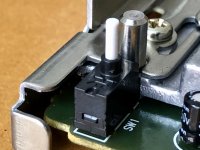 | |
Posted by: ScutBoy on 2020-06-24 04:43:00I almost felt adventurous enough to try and open the switch but that would probably have destroyed it.Don't - that only leads to tears 🙂 Glad to hear it's acting better! | |
| Posted by: Bendix on 2020-06-24 21:44:54 The drive still works, so the fault seems to be fixed for now :b&w: | |
| 1 |