68kMLA Classic Interface
This is a version of the 68kMLA forums for viewing on your favorite old mac. Visitors on modern platforms may prefer the main site.
| Click here to select a new forum. | |
| SE 30 - Bad Picture - Need advice | |
| Posted by: RJC on 2020-06-09 07:30:53 Hello, I am looking for an advice about my problem with the SE 30. The picture shows analog horizontal lines. Looks not like an error from a digital part. I have already washed the board completly in the dishwasher and after some research about this problem I have also completly replaced the analog video board that is fixed at the end of the CRT tube. When the Mac starts i can hear the start ing sound and the bad image appears directly. What can I do to identify the problem? Thank you all very much in advance! Best Roman 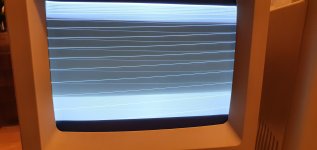 View attachment 20200610_003045.mp4 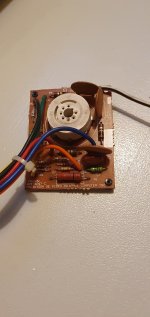 | |
| Posted by: IlikeTech on 2020-06-09 08:10:08 That looks like the brightness is set way too high, rescan lines. Adjust the internal brightness control? | |
| Posted by: Crutch on 2020-06-09 10:37:29 Yeah, but he’s got no video at all. That’s exactly what you’d see if the video signal weren’t hooked up at all. It’s not just the cutoff. | |
| Posted by: bibilit on 2020-06-09 14:36:19 I was not able to hear the bong. Any picture of the board ? looks like UE8 is bad | |
| Posted by: RJC on 2020-06-09 16:48:28 The bong is very quite. I have also read about the UE8. What can I do to test it or do I need to replace it directly? 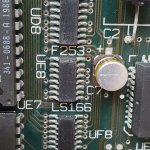 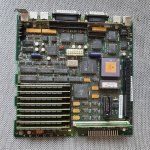 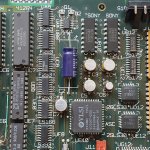 | |
| Posted by: Bolle on 2020-06-09 16:53:37 Replace all electrolytic capacitors on the logicboard. Any further troubleshooting is pointless before that has been done. | |
| Posted by: dochilli on 2020-06-09 17:06:44 And perhaps you can bath the board in vinegar to get rid of some corrosion. But remove ROM and RAM before. | |
| Posted by: PB145B on 2020-06-09 18:34:37 UE8 doesn’t really look too bad to me, but, as @Bolle said, the caps MUST be replaced before diagnosis can begin. | |
| Posted by: RJC on 2020-06-10 01:46:53 @All Thanks for your replies. I will try to do that but I have not so much experience in soldering. I thought if I hear the starting sound this would indicate that main functions inculding capacitors would be fine. I am wrong with that? | |
Posted by: bibilit on 2020-06-10 02:06:48Replace all electrolytic capacitors on the logicboard. Any further troubleshooting is pointless before that has been doneI agree a 100% with Bolle, replace capacitors first and clean the board, you are lucky you have got sound, even faint. But something else is wrong for sure. Yes having sound is a good sign, meaning that most of the board is working ok, but capacitor's fluid is shorting things around and probably the issue here. You are lucky to have this first generation board with the socketed CPU, don't wait too much. | |
| Posted by: techknight on 2020-06-10 04:11:44 Oh and ill mention something as well... GET RID OF THE BATTERY. | |
Posted by: RJC on 2020-06-10 18:15:57I agree a 100% with Bolle, replace capacitors first and clean the board, you are lucky you have got sound, even faint.Fully understand. Is there a good tutorial to change the capacitors on the SE/30 you can recommend? As I have only a soldering station I am wondering if it is possible to recap the board properly. I have seen that additional tools like a hot air gun could be expensive. Why exactly I am lucky with socketed CPU? :beige: Oh and ill mention something as well...Yes. | |
| Posted by: Daniël on 2020-06-10 19:21:38 I can always recommend Bruce from Branchus Creations'/Recap-a-Mac's tutorials and recapping videos/livestreams. He uses hot air, but there is the method of using pliers. You take needlenose pliers, grab the capacitor on its sides, twist left or right (do not pull up while doing this!), until the capacitor itself breaks off from its leads. Once it is broken off and loose, you can then remove it, and the leads will be left on the board. You can carefully remove the plastic base that sits under the capacitor (you can carefully break it in half, it's very brittle), then use a soldering iron to remove the leads, and clean the pads with some flux and soldering braid, before applying fresh solder and capacitors. I am personally not a fan of any mechanical removal methods without some form of solder melting, but, I do hear that a lot of people have good luck with it. Do it at your own risk, YMMV, etc. I would recommend finding scrap hardware with SMD capacitors to practice on, before you take on the Mac, regardless of what method you pick. | |
| Posted by: Franklinstein on 2020-06-10 21:26:25 Looks like an early production board: socketed '030 with an EPROM for a video ROM chip. Is it possible the EPROM failed? They're not as durable as the masked ROMs normally used. | |
| Posted by: Bolle on 2020-06-11 01:24:41 Would be horizontal stripes without the video ROM, so that’s likely not the cause. The video output of the logicboard is stuck in the on state. It’s all white pixels that you’re seeing on the screen. The scan lines are visible because the beam never turns off. That’s caused by a fault in the video logic somewhere... bad counter, bad UE8 - something along those lines. | |
| Posted by: RJC on 2020-06-12 21:28:18 Bad means that the chip itself is damaged or it is mostly because the outside pins of the chip are corroded and cause are short circuit? | |
Posted by: davidg5678 on 2020-06-12 22:09:53Bad means that the chip itself is damaged or it is mostly because the outside pins of the chip are corroded and cause are short circuit?In the best-case scenario, there may just be a bit of corrosion around the chips in the video circuit that is causing issues. After replacing the capacitors, you may be able to scrub it off with isopropyl alcohol and a toothbrush to have a working machine. It is also very possible that the corrosion has damaged traces on the logic board, or that there are broken chips present that will need to be replaced. "Bad" could mean either that a chip no longer works correctly, or that it is no longer making all of the electrical connections that it should (this could be due to a short or a damaged trace). Before replacing any chips or checking the schematics of the computer for bad traces, I would highly recommend getting the logic board cleaned and recapped, as this procedure can fix many broken computers without further hassle. | |
| Posted by: RJC on 2020-06-14 03:27:43 Thank you a lot for the very detailed answer. Should be clear now to me. I will try to recap and clean then report here. | |
| Posted by: Bama on 2020-09-04 10:21:15 Hi RJC, Did you find the solution? FYI, I had a similar pattern (?”retrace lines?”) after recapping my SE’s Analog board. As part of that process, I unsoldered and resoldered the fly back transformer. I forgot to resolder one pin! When I resoldered that pin, the screen returned to working as expected. | |
| 1 |