68kMLA Classic Interface
This is a version of the 68kMLA forums for viewing on your favorite old mac. Visitors on modern platforms may prefer the main site.
| Click here to select a new forum. | |
| AppleColor 13" RGB Monitor Red Shift | |
| Posted by: mattsoft on 2020-06-04 11:56:17 Greetings all - Picked up some Mac stuff and in the pile was a very yellowed AppleColor 13" RGB monitor. The CRT has a very nice, sharp image, with great geometry and brightness, but the screen is shifted red. Check out the attached picture. The desktop is the standard grey pattern. Having never torn one of these down before, are there color adjustments hidden beyond the metal shielding? Thanks! 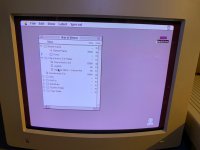 | |
| Posted by: jessenator on 2020-06-04 12:13:29 Yes, there are drive trimmers for each color channel under this panel, after you remove the plastic case (goes without saying, but be careful):  They're not that apparent in the photo, but there should be screen printed indicators, some unfortunately obscured by wires.  I need to go back and fine tune mine soon as well, it's better than it was though:  | |
| Posted by: mattsoft on 2020-06-04 12:17:19 WOW! Excellent! I will give that a try then. If I can get the color adjusted on this, it will be a very nice monitor for use. 🙂 Thanks! | |
| Posted by: jessenator on 2020-06-04 12:19:16 No prob! I got desperate one day and decided to just start taking it apart... thankfully I didn't get electrocuted. Definitely use plastic trimmer tools. I didn't have any, so I used an old, whittled down credit card, just something that wasn't metal.... | |
Posted by: mattsoft on 2020-06-04 13:53:45No prob! I got desperate one day and decided to just start taking it apart... thankfully I didn't get electrocuted. Definitely use plastic trimmer tools. I didn't have any, so I used an old, whittled down credit card, just something that wasn't metal.... Yup, I have plastic tools for the job. Hopefully this does the trick. The 13" RGB monitor has such a nice picture -- I'd love to get it looking perfect. Will get to it tomorrow night and report back. Thanks again! | |
| Posted by: mattsoft on 2020-06-05 08:03:11 Monitor adjusted and the color looks great. Thanks @jessenator! | |
| Posted by: jessenator on 2020-06-05 08:09:43 No prob! Glad to help. Also, I don't know why I didn't think to look it up when I did it, but there's a WHOOOOOLE procedure I might try to fine tune mine even more in the official Apple manual :lol: View attachment AppleColor_High_Res_RGB_Mon.pdf Also, apparently that "Display Service Utility" application mentioned in the Adjustments section is on this CD image https://macintoshgarden.org/apps/apple-service-manuals | |
| Posted by: mattsoft on 2020-06-05 09:42:18 Oh yeah, that would be sweet. I just downloaded and skimmed the PDF. I love this instruction on page 48: "[SIZE=10pt]If capacitor C522 is missing, install a new capacitor." My question is, where did C522 go in the first place? 🙂 [/SIZE] | |
| Posted by: LaPorta on 2020-06-05 21:51:30 Perhaps there was an earlier revision that did not have it in place. But, then again, why would there even be a C522 spot if that was the case? | |
| 1 |