68kMLA Classic Interface
This is a version of the 68kMLA forums for viewing on your favorite old mac. Visitors on modern platforms may prefer the main site.
| Click here to select a new forum. | |
| What do I need to know about RAM for my SE/30? | |
| Posted by: erichelgeson on 2020-06-02 23:26:50 Hi all! Just finished my first recap of an SE/30 - was quite the job, but it works! This is my first SE/30 so trying to learn what's possible for my machine. Now I need to find some ram. I only have 1mb in it currently, so no system 7. My goal would be to have System 7.5.5 on it - I do have a network card so I'd like to go online/transfer files/etc. OWC has new 16mb modules - And 64mb seems overkill. - 64mb(16x4) $48 - $0.75/mb Ebay/etc have a lot of 4mb though they'd cost about 2x more per mb as OWC. I don't see any 8mb 30pin simms for sale. - 16mb(4x4MB) $25 - $1.56/mb (2x OWC price per MB) - so if i got 8x4(32mb) would cost more than the 64mb option 🙂 I would like to have 16-32mb, but 64 seems overkill. My questions are:
| |
| Posted by: LaPorta on 2020-06-02 23:47:10 All I can tell you for sure about that is that Mode 32 is not needed for the machine to work with more ram, only to use that ram. | |
| Posted by: Bendix on 2020-06-02 23:58:44 I have two SE/30 and recently equipped both of them with 64 MB from this source: https://www.amazon.com/-/de/gp/product/B00FAYV3NO I found the price reasonable and with more than 32 MB you can add a nice ram disk, so I can recommend the 64 MB. Boot time has increased by a few seconds but not dramatically. As I found out in another thread here the large ram increases boot time _before_ the happy mac. The Mac still boots up with 4x16 MB on bank A but it can only make use of more than 8 MB with mode32 installed. When it comes to large amounts of ram the Rom Initiator would only be needed for the latest APPLE UNIX A/UX 3.1.1, which needs a 32 bit clean rom. Otherwise it is not necessary. | |
| Posted by: erichelgeson on 2020-06-03 01:04:35 Thank you both for the info on booting/rominator. Never thought to look on amazon for 30 pin simms 🙂 | |
| Posted by: SoundChances on 2020-06-03 06:16:43 Another Amazon source for 30 pin, I've bought plenty from these guys and they work fine https://www.amazon.com/gp/product/B01IC1A1O8/ | |
Posted by: blindowl on 2020-06-06 16:23:04The Mac still boots up with 4x16 MB on bank A but it can only make use of more than 8 MB with mode32 installed.In this thread they’re saying that it’s not possible to run with 4x16 MB in Bank A only. Also Bank B has to be filled with something. Is this something you have experienced? | |
| Posted by: Bendix on 2020-06-06 17:05:45 No I have not. I know, that 64 MB on Bank A only are not supposed to work but with the amazon simms I advertised further up in this thread it worked on both my SE/30s. | |
Posted by: blindowl on 2020-06-06 18:15:10No I have not. I know, that 64 MB on Bank A only are not supposed to work but with the amazon simms I advertised further up in this thread it worked on both my SE/30s.Sounds promising! For some reason my SE/30 won't boot if I install anything in Bank B. So using 64 MB in Bank A only would give me more than enough RAM, and getting around the issues with Bank B. So I was quick to order the Amazon SIMMs above. But then I started to regret it after I found the other thread. We'll see when they arrive... | |
| Posted by: erichelgeson on 2020-06-07 01:10:57 Well I got the yellow ones in the mail yesterday. Will not boot in any combination. Also they are thinner then the other ram so doesnt feel secure when seated, wobbles a mm or two each way. Will try a few more things but glad I got on Amazon so returns shouldn't be a hassle... Edit: the fit is the issue, I propped it up for gravity to assist, gave them each a wiggle and it booted.... So u guess if you don't mind bumping your desk and your ram gets unseated... Edit2: actually while it does boot it is not seen, so likely only visiting because not seated properly. | |
| Posted by: erichelgeson on 2020-06-07 01:33:13 Video of wobble View attachment VID_20200607_113330.mp4 | |
| Posted by: blindowl on 2020-06-07 01:54:54 So same issue if you put them in Bank A (well seated)? In the other thread I linked someone said larger RAM must be placed in Bank A. | |
| Posted by: erichelgeson on 2020-06-07 02:17:56 Yes, that was just my Nth attempt and I wanted to record the wobble | |
| Posted by: Bendix on 2020-06-07 04:27:38 So sorry to hear it. I had actually some wobbling, too, but only with one module. Compared to the others it was a little bit shorter. The guy responded quickly, wanted a pic, I sent it and now there is another simm module in the mail, which could take a while to Germany. Said, if it was not here in 4 weeks, he would send out another. Thought the short module was a single mistake, otherwise I had not recommend the amazon link to you. Sorry! | |
| Posted by: erichelgeson on 2020-06-08 01:10:29 After giving everything one more try I've RMA'd the Yellow ones, very quick response from seller, already in the mail. Ordered the ones you sent in the link | |
| Posted by: SoundChances on 2020-06-08 03:42:20 You should be fine with ordering the ones I linked. I have bought 4M and 16M sticks from them over the years and never had an issue in any compact Macs I've stuck them in. I actually just bought another batch of 16M sticks a few weeks ago and they are happily running in an SE/30. | |
| Posted by: erichelgeson on 2020-06-12 06:19:46 The new ram is a perfect fit, booted up the first try. Any idea why the system software is taking 60mb of my 66 free? 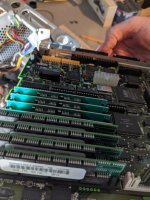 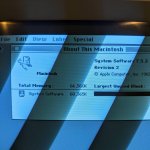 | |
Posted by: cheesestraws on 2020-06-12 06:47:53Any idea why the system software is taking 60mb of my 66 free?You perhaps need to turn on 32 bit addressing in the memory control panel? | |
| Posted by: erichelgeson on 2020-06-12 10:21:31 Ahh that was it! First time using a non-clean 32 rom with this much memory 😀 | |
| Posted by: PotatoFi on 2020-06-12 13:38:55 I received 64 mb of RAM today from a seller on eBay. When putting it in Bank A with nothing in B, it did a horizontal zebra strip pattern and a never-ending loud chime thing. Horrible! I tried doing 16mb x 4 in Bank A, and 256kb x 4 in Bank B. No fix. Then I tried 256kb x 4 in Bank A, and 16mb x 4 in Bank B. It worked! Before installing MODE32, System 7.0 (plan to upgrade) showed 2 MB of RAM. After installing MODE32, activating it, and rebooting, it now shows 65mb! Curiously, the machine seems to do the RAM count during the Happy Mac icon, not before the Happy Mac like my older Macs. Also, it seems that the MODE32 setting is stored in PRAM, as it defaults back to off if I turn off the machine for more than a few seconds. It does feel strange having 256kb sticks in Bank A. Do you all think that I could get another 64mb from the same seller and populate all slots with 16mb sticks, and get 128mb? It's strange to me that I had to do things backwards... | |
| 1 > |