68kMLA Classic Interface
This is a version of the 68kMLA forums for viewing on your favorite old mac. Visitors on modern platforms may prefer the main site.
| Click here to select a new forum. | |
| Macintosh Classic II Power Issues | |
| Posted by: rushfan82 on 2020-05-30 10:36:03 Hello all, I recently acquired a Classic II and am trying to get in running. Currently it displays just garbage on the screen, or vertical lines. I've put the motherboard through the dishwasher and have a new cap set on the way, even so the fluid leaks were very minimal on the board and it appears to be in good shape. All to no avail, as it still displays vertical lines. I decided to test the power output, and it is at 11.7v on the 12v rail, and 4.8v on the 5v rail. Does the analog board need to be recapped as well? Thanks for any advice! | |
| Posted by: PB145B on 2020-05-30 10:44:56 You’ll have to recap the ENTIRE machine before you can really start troubleshooting. The Classic and Classic II are notorious for bad caps. If it still doesn’t work after recapping, then you can start looking at other things. Good luck! | |
| Posted by: rushfan82 on 2020-05-31 05:02:33 I have begun the process of recapping everything, and I'd like to replace the two diodes on the analog board. Which ones should I buy? Is there a schematic somewhere of the analog board on this machine? Thanks! | |
| Posted by: bibilit on 2020-06-04 00:11:09 1N4148 (DP3 AND DP4) | |
| Posted by: rushfan82 on 2020-06-04 08:44:03 So I've replaced every capacitor and cleaned everything as best I could, still no luck, same issue. I haven't replaced the diodes but I'm not suspecting them as the voltages are now a perfect 5v and 12v. Could this be bad RAM? I have attached an image with what is displays after recapping. 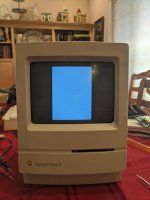 | |
| Posted by: rushfan82 on 2020-06-04 08:49:02 I installed the 8MB of RAM I bought for it and now it does this, after displaying vertical lines for a while. Reset sometimes makes it change between vertical lines and this. I've also installed a new PRAM battery. 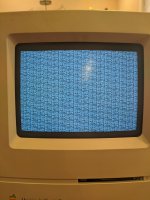 | |
| Posted by: beachycove on 2020-06-04 09:13:28 That's bad luck. I am no expert but would myself try to confirm that the RAM is good first, as it is possible that you just have two sets of bad ram. After that I would suspect the analog board in general and the flyback transformer in particular, given the varied square and herringbone patterns. There are others on here who are much more knowledgeable technically, however, who will hopefully chime in, though recurring questions get a little wearing to answer repeatedly.... Some resources that you may or may not know about in the meantime: https://vintageapple.org/macbooks/pdf/The_Dead_Mac_Scrolls_1992.pdf https://www.jagshouse.com/classicrepair.html | |
| Posted by: rushfan82 on 2020-06-04 09:28:38 How would the flyback be an issue if the CRT is working correctly? | |
| Posted by: rushfan82 on 2020-06-04 10:01:11 So I'm narrowing down on bad ram, as I notice that the screen patterns change whether I install my two 1MB sticks or the two 4 MB sticks, versus no additional RAM at all. Is it really worth it to go this far and replace integrated ram, or should I just call it a day and try to sell it? I already had a hard enough time soldering the new capacitors to the logic board, I can't even imagine trying to replaced the ram... those solder pads are tiny. | |
| Posted by: dochilli on 2020-06-05 00:21:28 Do you hear a chime? If not then there may be a problem with the ROM. Pull the chips, clean and reseat them. You should recap the LB! | |
| Posted by: rushfan82 on 2020-06-05 00:56:35 I've recapped everything, reseated the rom countless times, no chime. | |
| Posted by: OsvaL on 2020-06-19 10:03:21 If you didn't replace the diodes try using a hairdryer and blow to the place where all the caps on the analog board are, after heating the zone for a minute, try turning the computer on. That is happening to my Macintosh Classic now, I may need to replace the diodes as well. | |
| Posted by: JRL on 2020-06-19 10:44:54 I have since acquired this particular Classic II and this isn't a issue with the AB, it's an issue with the logic as the screen pictured happens with my working analog boards. I'm working on figuring out the issue now. | |
| Posted by: Mikeyy00 on 2020-07-26 13:06:37 My Classic II was doing the exact same thing. I recapped the logic board only.. first two power ons were the same garbage.. then it started working? It’s been fine since. Would love to know why.. I don’t trust it to stay working.. | |
| 1 |