68kMLA Classic Interface
This is a version of the 68kMLA forums for viewing on your favorite old mac. Visitors on modern platforms may prefer the main site.
| Click here to select a new forum. | |
| Help! How to Install OS X Leopard | |
| Posted by: Pbauti114 on 2020-05-22 11:55:36 Hi Can anyone please help me. Every time I put the disk of OS X Leopard this error always shows up. I have already tried to format the HDD and the error still occurs. Mac G5 3GB of Ram 1.8 Ghz Any suggestions on how I can install the OS on the G5 unit? 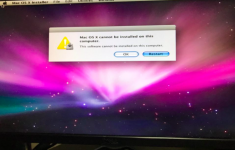 | |
| Posted by: markyb86 on 2020-05-22 12:17:20 That looks like Snow Leopard 10.6 if I am not mistaken, which won't run on a PowerPC G5, You'll need a Leopard 10.5 disk. | |
| Posted by: sstaylor on 2020-05-22 12:18:58 I'm guessing you may be trying to install from the installer disk for another computer, maybe a PowerMac G5 or a Mac Mini or something. You're going to want a retail Leopard disk. I understand there are ways of modifying an image of your disk to allow it to install but it's easier to just get the retail disk. | |
| Posted by: Pbauti114 on 2020-05-22 17:23:22 Hi! sstaylor! I have this cd And it says “Mac OS Version 10.5.5” 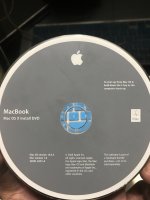 | |
| Posted by: markyb86 on 2020-05-22 17:28:00 That disk is for intel based systems, your going to need to find one for the G5 explicitly or a PowerBook G4 / Mac Mini G4 Disc | |
| Posted by: sstaylor on 2020-05-22 18:01:00 If you have a dvd burner, you can download a disk image from Macintosh Garden and burn a copy. They have images of the retail disk and might have an image of the original disk for your iMac/PowerMac G5. | |
| 1 |