68kMLA Classic Interface
This is a version of the 68kMLA forums for viewing on your favorite old mac. Visitors on modern platforms may prefer the main site.
| Click here to select a new forum. | |
| Failing Hard Drive - Week old Macintosh SE FDHD | |
| Posted by: jpsulisz on 2016-02-19 20:53:51 Hello 68k Forum Members, Just got this cool Macintosh SE FDHD that has been in storage since 1994. Cool, right? Well I was having fun for a couple days while it worked, decided to order the special screw driver to take the panel off. Just got the panel off today, cleaned it up, and put it all back together. However, the horrible screen showed up: A Mac Cursor and a Floppy Disc with a "?". The poor hard drive from 1991 is finally dying, whether it's from me taking off the back panel or just age. When the unit powers on, I can still hear the hard drive start to spin up, but when it gets up to speed, it dies down. Is there any way to get the hard drive a new motor or possibly a easy fix? If needed, I will upload a video with sound of the hard drive. Thanks for any helpful advice, JP 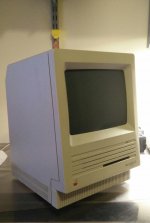 | |
| Posted by: Elfen on 2016-02-19 21:40:43 Go back in and see if the connector on the drive and logic board got loose; just press down on it. If all goes well, it should boot up again. | |
Posted by: jpsulisz on 2016-02-19 21:59:31Go back in and see if the connector on the drive and logic board got loose; just press down on it.Unfortunately I didn't get any change. I have posted a picture of the hard drive connected to the logic board as well as a YouTube video of what the dying drive sounds like. https://www.youtube.com/watch?v=DC0gwQtj5Qo Please turn up the volume to hear it all the way. 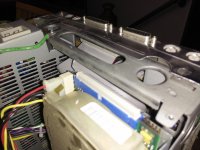 | |
| Posted by: bibilit on 2016-02-19 23:50:43 What is your HD brand ? look here for stiction. | |
| Posted by: techknight on 2016-02-20 05:04:18 Dunno, sounds like its running to me. Whether the head actuator moves or not is yet to be determined. Try something stupid simple like a boot disk with lido and see if you can recognize the drive. It may simply need reformatted. | |
Posted by: jpsulisz on 2016-02-20 07:00:04What is your HD brand ? look here for stiction.The hard drive is a ST-138N, which I believe is a Seagate. | |
Posted by: jpsulisz on 2016-02-20 07:07:38Dunno, sounds like its running to me.Issue is that I don't have a computer that even has a floppy disc writer, nor do I have a compatible keyboard with this guy. I'm not sure why is needs to be reformatted when it literally worked a couple days prior, the only reason I could see that is if it had data corruption, but then the disc should still spin? | |
| Posted by: bibilit on 2016-02-20 08:17:17 Have you got a multimeter ? let us know what voltages the PSU is outputting. | |
| Posted by: Elfen on 2016-02-20 10:28:49 The connector on the hard drive looks like it is not even; one side higher than the other. If the connector came off and you put in back in, a pin may have bent. You need to remove the connector and look at the row of pins and see if any are bent. Then you need to put it back in slowly and evenly. | |
| Posted by: Tam 400 on 2016-02-20 13:47:02 Watched the vid,sounds like the drive spins up,your read heads are hunting! an then sounds like it stops.i would try the Power Supply Like other member said,maby? from a external hard drive case,just un plug the SE30 Power Supply,you don't even have to take the drive out of the SE.pull apart the external hard drive case,there should be a Power plug in there just like the one on the hard drive in the SE30.just plug it in to the SE drive,power it up, if the drive spins up an boots the Mac,then check the PSU in the SE ,if it does the same thing as I'd did befor, then I would look at the hard drive it self.this may help,good luck | |
Posted by: jpsulisz on 2016-02-20 20:18:42Have you got a multimeter ? let us know what voltages the PSU is outputting.Will get the multimeter tomorrow and test it! Watched the vid,sounds like the drive spins up,your read heads are hunting! an then sounds like it stops.i would try the Power SupplyUnfortunately I only have the power supply on the actual unit to test, while get another computers power supply and test it with that tomorrow. The connector on the hard drive looks like it is not even; one side higher than the other. If the connector came off and you put in back in, a pin may have bent. You need to remove the connector and look at the row of pins and see if any are bent. Then you need to put it back in slowly and evenly.The connector actually never came off; I did unplug it and plug it back in firmly, while it still didn't work I did notice that the hard drive tries to spin up almost instantly when the computer turns on, compared to it trying to start after 20 seconds of computer on time. | |
Posted by: bibilit on 2016-02-21 02:33:27another computers power supply and test it with that tomorrow.Any PC PSU will do the trick (just short the green wire with a black one in the main connector) and use any Molex to test the HD. | |
| Posted by: techknight on 2016-02-21 09:55:30 I dunno what yall are hearing, but it sounds to me the drive is still spinning to me? | |
| 1 |