68kMLA Classic Interface
This is a version of the 68kMLA forums for viewing on your favorite old mac. Visitors on modern platforms may prefer the main site.
| Click here to select a new forum. | |
| Trackpad double click with System 9.2.2 ? | |
| Posted by: macclassic on 2016-02-19 15:03:11 If I boot my Clamshell iBook in OSX and then start the Classic System 9.2.2 I retain the OSX setting to double click on the trackpad. If I boot into System 9.2.2 I can't use double click on the trackpad because I can't find a control panel to let me set this function and I find the computer harder to use without it. Is there a control panel that will work with 9.2.2 which will give me this function or am I at odds with the dual nature of these machines. [?] | |
| Posted by: Elfen on 2016-02-19 15:35:34 Check the Mouse Control panel in OS9. I think there is a double click option in there. | |
| Posted by: macclassic on 2016-02-20 04:17:58 Hi Elfen, I checked, when I boot into System 9.2.2 the mouse control panel (version 8.1.1) only allows me to alter the double click speed of the mouse, it doesn't allow me to enable double click on the trackpad under System 9.2.2, and I can't find anything related to the trackpad?  | |
| Posted by: MikeatOSX on 2016-02-20 04:28:39 Are you shure, that this is a machine specific install and not an universal one? | |
| Posted by: macclassic on 2016-02-20 05:45:42 Ooops!, [:I] ]'> my System 9.2.2 is from a universal install CD downloaded from Macintosh Garden as I didn't get any disks with the Clamshell, the OSX is a retail version too, but that said, could my problem be fixed with a machine specific Clamshell iBook control panel?? | |
| Posted by: MikeatOSX on 2016-02-20 11:36:18 BTW: when I copied a Mac mini G4 system to a Cube G4, I didn't get any sound. I would install 9.0/.1 and do the updates. | |
| Posted by: macclassic on 2016-02-22 08:00:23 I also put System 9.2.2 on a partition which I suppose might not help integration with the functions of OS 10.4, but the lack of double clicking the trackpad in System 9.2.2 is just a minor irritation of an otherwise fully functioning great machine. | |
| Posted by: macclassic on 2016-02-22 12:28:46 RESOLVED. I just dragged and dropped the Trackpad Control Panel from a System 9 image and it works ! 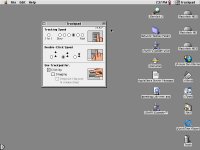 | |
| 1 |