68kMLA Classic Interface
This is a version of the 68kMLA forums for viewing on your favorite old mac. Visitors on modern platforms may prefer the main site.
| Click here to select a new forum. | |
| SE/30: another battery leak victim (in the bag) | |
| Posted by: marcelv on 2020-05-04 08:11:56 Got another SE/30 with leaking maxwell. This one has a different leak pattern while is was stored in an apple Macintosh bag on its back. you can see the leakage dripping down to the ports on the back side of the board. the video rom lost a number of legs the 68030 has holes from the corrosion have removed the video rom, socket, battery holder and capacitors and cleaned the board 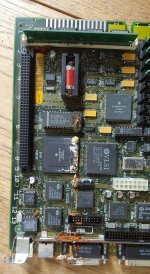 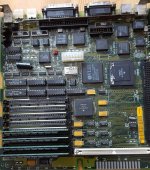 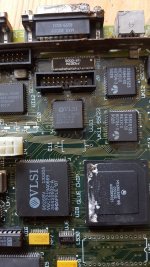  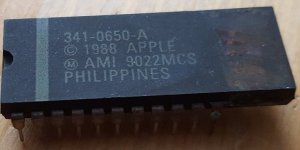 | |
| Posted by: techknight on 2020-05-04 08:55:51 Thats actually not too bad, its far better than what I typically see these. It may be easier to restore than others. You will need a good desoldering iron to remove that 68K CPU, and if you go through that trouble, install a socket. and then install a new CPU. you might be able to burn an EPROM that works in place of that video ROM, but you will need to look out for broken traces/vias. Should be alot less than normal. Only thing I am unsure about is the ROM SIMM/Socket, and the 74F253 muxes because the picture just isnt good enough for that section so I dont know how bad the damage is there. | |
| Posted by: marcelv on 2020-05-05 03:02:32 i have to replace UE8, has too much corrosion, rest of the muxes seem ok. the rom socket looks ok, with a magnifier I can see some black corrosion, have to figure out how to remove it the rom did have corrosion on the upper half of the connection points , removed the corrosion using a fiber brush and put new solder on 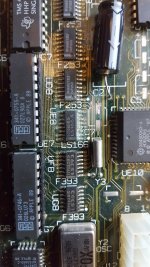 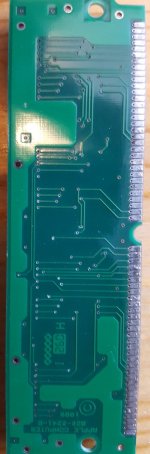 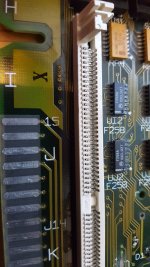 | |
| Posted by: marcelv on 2020-05-12 03:21:08 - replaced UE8 (and fixed some connections) - replaced UK6 video rom socket - made 2 wire connections from the video rom socket to J13 - burned a 27C64 eprom with the SE30 video rom - cleaned up some more - lubricated the disk drive The SE/30 is working ! so the 68030 is still working even though is has holes from the battery corrosion. to do: - put the capacitors on the logic board - replace the disk drive connector internal, (missing some pins) - replace the external disk drive connector (very corroded) - treat the rust on the chassis - get the hard disk running 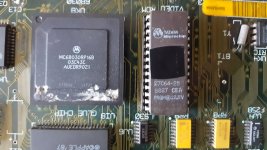 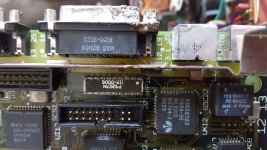 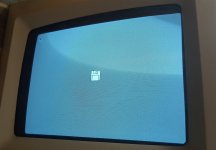 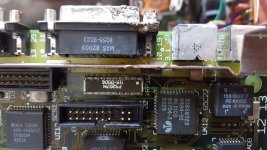 | |
| Posted by: techknight on 2020-05-12 05:55:07 Wow, you certainly did get lucky.. but yea, I would clean up the best you can with the CPU, and then seal the holes with some Epoxy or something. the 20 pin floppy drive connector will need replaced, sometimes you can get away with pulling the bad pins and inserting 2 new pins from a new connector but thats tricky at best. | |
| Posted by: marcelv on 2020-05-13 12:08:04 removed the 20 pin connector, ordered a new one. there was more corrosion under the connector so best thing to replace it. What do you recommend to seal the CPU holes with? 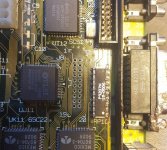 | |
| Posted by: joshc on 2020-05-13 23:00:33 Just want to say, great job you've done with this - it's always impressive and really nice to see another SE/30 board being saved! | |
| Posted by: PotatoFi on 2020-05-14 22:24:05 Truly impressive work. Thank you for rescuing this board! | |
| Posted by: marcelv on 2020-05-15 08:18:25 progress - replaced the 20 pin connector - put the capacitors on the board and booted from the floppy emu - treated the rust on he chassis - booted using a floppy disk and with the floppy emu the se/30 will not boot from the scsi hd, it starts to boot but after a while the question mark disk comes back, think the scsi drive has bad sectors What is the best tool to fix bad sectors on the scsi drive? 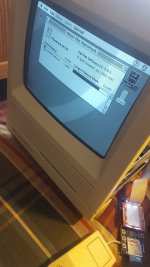 | |
| Posted by: LaPorta on 2020-05-15 09:30:45 Does the HD show up on the desktop when you start from the floppy emu at all, or no? I’d wager that your SCSI system is fine or you wouldn’t be able to start at all. | |
| Posted by: marcelv on 2020-05-16 01:05:51 Tried to install system 7 on the Macintosh HD, got an error message unable to install. will try with another HD to check if the scsi is ok. | |
| Posted by: marcelv on 2020-05-16 11:55:55 The Macintosh HD does show up when booted from floppy emu, am able to open some of the folders but when I open the system folder the mac keeps searching a long time, are there tools to check the disk? | |
| Posted by: archer174 on 2020-05-16 14:39:13 Excellent work! My favorite machines in my collection are the ones that originally looked the worst. Is there a hardware diagnostic utility for the SE/30? On the NeXT side of things we have the factory utility for some of the machines which I run after something this extreme. It seems like there could be a lot of corner case issues that would be hard to diagnose. | |
| Posted by: radiorich on 2020-05-16 18:12:20 Hello Marcelv, First all nice job on your repair well I lucked out on my Mac Se/30 the battery was still good no leakage and a very minor corrosion as you can see in the photo . Anyway Marcely Did you use Tantalum capacitors to replace the SMD caps my board has 8 sticks of ram 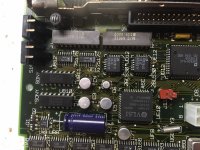 | |
| Posted by: marcelv on 2020-05-17 07:15:49 Personally I always use tantalum to replace the smd caps | |
Posted by: davidg5678 on 2020-05-17 07:34:03What is the best tool to fix bad sectors on the scsi drive?You could try using Norton Disk Doctor: https://macintoshgarden.org/apps/norton-utilities-20 It is also possible that your mechanical hard drive is failing and needs to be replaced, so there might not be a ton that can be done to fix this drive. It is equally possible that the SCSI circuitry was damaged by the corrosion and needs to be repaired. You can try testing with a known good drive to see if it is all SCSI that is broken or just one hard disk. You might also want to look into replacing the drive with a SCSI2SD and seeing if that solves the issues you are having. | |
| Posted by: radiorich on 2020-05-17 10:40:23 Hello Marcelv, Thanks and when to this point I hope my hard drive is good Anyway David that's so great info. Marcelv good luck with your machine and keep up the good work | |
| Posted by: marcelv on 2020-05-18 04:22:35 I created the following table to check the connections between the video rom and other components Also checked the address and data lines connectivity to the cpu and copro maybe someone can use this to check their board. 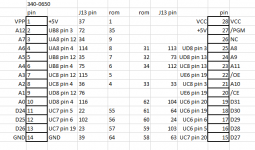 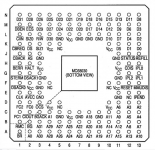  | |
| Posted by: techknight on 2020-05-18 11:23:01 To answer your question about the CPU, just use 2-part epoxy and seal it up. Not a huge ordeal. Just make sure you neutralize what electrolytes are there, sand it a bit, and then epoxy it. | |
| 1 |