68kMLA Classic Interface
This is a version of the 68kMLA forums for viewing on your favorite old mac. Visitors on modern platforms may prefer the main site.
| Click here to select a new forum. | |
| Classic Mac as Serial-connected Terminal? | |
| Posted by: cocoadelica on 2020-04-23 04:00:54 Hey all, I'm thinking about using a Classic Mac running MacTerminal (or similar) with the mini din-8 serial port adapter-d to an RS-232 port which is in turn adapter-d to USB. I think I can then bring this in to a TTY device on a 10.x running MacBook and send the terminal output to it. Has anyone seen/done similar? Any total blockers? | |
| Posted by: cheesestraws on 2020-04-23 04:06:11 Nope, it's pretty easy. I'm doing exactly this with my eMate, actually, as a console onto a switch, but I did it with a PowerBook previously onto a Linux box. 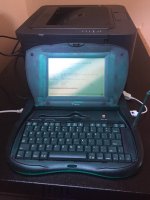 Only thing to be aware of is the usual serial stuff about making sure that the Tx/Rx lines are swapped in the cable and/or using an adapter that will swap them for you, since at least all my 8-pin to RS232 leads are straight-through wired. | |
| Posted by: cocoadelica on 2020-04-23 04:25:12 Nice!! Now I just want to do it with an eMate 🙂 Thanks for the positive support. | |
Posted by: cheesestraws on 2020-04-23 07:04:09Now I just want to do it with an eMateIt's the most incongruously cute emergency network equipment console I've ever seen, I must say. | |
| Posted by: Crutch on 2020-04-23 17:59:14 Believe this DIN8 to DE9 adapter switches the wires for you so is a proper prefab Mac-to-RS232 cable. I bought one in January to get an arduino talking to me SE30 over serial, works great. | |
Posted by: Dog Cow on 2020-04-23 18:16:16Hey all,I recommend FreeTerm 2.0 for the terminal emulator, or ClarisWorks 2.1v3 if you've got a newer Mac. The hardest part is making the cable, but if you get a KeySpan USA-28X adapter, you can use a standard Apple printer cable. | |
| 1 |