68kMLA Classic Interface
This is a version of the 68kMLA forums for viewing on your favorite old mac. Visitors on modern platforms may prefer the main site.
| Click here to select a new forum. | |
| Powerbook 180 LCD ribbon cable repair | |
Posted by: OleLila on 2020-04-21 06:46:22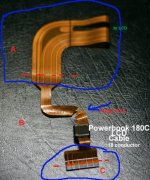 So after ALOT of work as my last action on a working 180c, I replaced the hinge covers closed the top and walked 20 feet inside, plugged in and got a white screen only. I had pinched the LCD cable with the hinge cover then ripped it when I closed. I'm not counting on finding a replacement cable but is it possible to splice this cable from part A to part C? The back of the LCD does have some wiggle room for small connectors. I'm considering an 18 conductor molex cable (https://www.digikey.com/products/en?keywords=WM11388-nd) with connectors (https://www.digikey.com/product-detail/en/molex/5034801800/WM11113CT-ND/5171269) on the back of the LCD through the hinge and into the bottom of the computer. I think I can work on the wide cables above and below the red dashed lines and I need new cable going through the hinge. Maybe a thin plastic sheet with the cable epoxied to it then using a conductive pin to draw the connections between the old cable and new connectors? This molex cable calculates out to 9 mm in width with 18 conductors as compared with the original that is 11 mm wide with 18 conductors. Is this molex cable flexible enough? Is there a 18 conductor circuit board that will widen from the narrow connection to something I can work on? Still not sure of the best way to get from the molex connectors to the wide top and bottoms of original connectors. | |
| Posted by: OleLila on 2020-04-25 16:42:55 Well...proof of concept anyway. The fat lady has not sung. 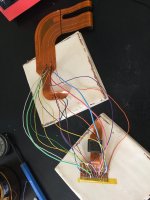 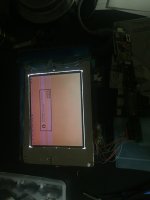 Going to try this next (https://pmdway.com/products/fpc-ffc-flat-cable-to-through-hole-dip-breakout-board?_pos=192&_sid=3e93c12a8&_ss=r) because the video signal breaks down into 12 small caliber traces. Was going to separate the power and ground traces to help with interference. If I was going to do it again, I'd probably;y try the USB 3 breakout circuit from this sight first. | |
| Posted by: LongAlphabet on 2022-03-24 21:06:45 @OleLila how'd it turn out in the end? I have a PowerBook 180c that has a white and bright backlight, but, no video appearing on the screen - just like yours - it's likely the cable that's broken (the hinges were long gone - the user kept using it, despite being broken). I'd love to get this machine working again! Your ideas sound like they were sound.. open to suggestions. @sutekh you seem to know your stuff too, any ideas oh what solution to attempt? | |
| Posted by: 3lectr1cPPC on 2022-03-25 04:20:09 If the cable looks broken, it’s the cable. But due to being a 180c, it’s likely that the caps in the display have gone, and they will need to be replaced before the screen will display a good image. I’m not sure if the white screen can be caused by bad caps or not, but they will need replacing either way before you can use the display for very long. | |
Posted by: LongAlphabet on 2022-03-25 11:31:35If the cable looks broken, it’s the cable. But due to being a 180c, it’s likely that the caps in the display have gone, and they will need to be replaced before the screen will display a good image. I’m not sure if the white screen can be caused by bad caps or not, but they will need replacing either way before you can use the display for very long.Caps, I hope! I doubt it's as simple as that.. the hinge is badly cracked, and the prior owner used it as it was, weakening the ribbon (I imagine). I'll update when I get a chance to peek inside. I'm going to work with the assumption it needs both caps and ribbon repair. Won't be throwing it out, either way. A solution may present itself.. I mean, it's already 30 years old, what's another 10 or 20 years, right? 😉 | |
| Posted by: OleLila on 2022-04-08 05:43:55 I still haven't gotten back too it, have the parts .....but need a clear day and some better magnifying glasses and right out look before attempt; the couple of times I have looked at it, it's not hard to imagine getting it all hooked up and then not being able to get the cable folded and back into an assembled machine. | |
| Posted by: LongAlphabet on 2022-04-08 09:02:44 Agreed, not something you'd like to rush! I opened mine up, and got the cable out - indeed, very torn: https://imgur.com/a/xGeCggG Definitely putting it back isn't easy. Have you been able to test it yet? Also, how'd you repair the hinges? All my plastic bits were broken in mine too - but luckily, the bras screw-stands and the screws themselves were all still there. | |
| Posted by: sutekh on 2022-04-27 14:32:23 Yep, as you now know, blank white screen almost certainly means torn / disconnected cable. File this under very tedious but possible to repair. Here's a writeup of how I fixed mine, which is still working great BTW: Basket Case PowerBook 180cWell, I officially need my head examined. I threw a low offer out on an untested "parts" PB 180c, and to my surprise it was accepted and arrived today in one piece. It's a wreck though. Its installed aftermarket NiCad has leaked and was fused in place. Plastic at the hinges is of course broken...
 68kmla.org
| |
| Posted by: tedcy on 2023-12-30 05:59:32 Hello friends. Anyone has a PowerBook 180c LCD ribbon cable that he can sell? Or knows where I can get one? I tried the above method (it was a pain) but I don't think it will last long. | |
| 1 |