68kMLA Classic Interface
This is a version of the 68kMLA forums for viewing on your favorite old mac. Visitors on modern platforms may prefer the main site.
| Click here to select a new forum. | |
| SE/30 - Somasi Mac (after recapping) | |
| Posted by: Ithink_there4imac on 2020-04-14 08:15:06 Hello all! First post on here. I found a free SE/30 in my area and have been trying to repair it. It had leaky caps so I recapped them (I’m not the best at soldering, but I can get by). The one cap (C4) took its pads and some trace with it, so I found the schematic and wired a replacement cap directly to Leg 10 of UB11 and ran a wire to the back of the board to R12 where the trace was heading to. One of the legs of UD8 was also corroded and looked like it may have broken. So I put some solder on it...not sure if that actually worked or not. Transistor Q3 has fallen off, I haven’t gotten a new transistor yet, but I’ve heard from someone else that is just for keyboard/mouse. i saw “this does not compute”‘s videos on YouTube about his journey getting his SE/30 to work. I’ve tried swapping the ram around and turning it on with one inserted at a time. Any insight on what to do next would be awesome. Thanks all. 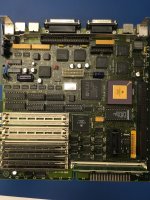 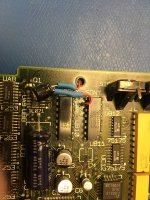 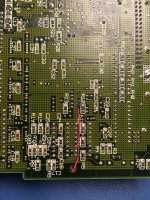 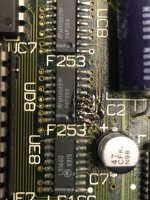 | |
| Posted by: Bolle on 2020-04-14 09:09:51 One RAM stick at a time won't get you anywhere. You need to fill a whole bank at once with working SIMMs, otherwise the board will behave as if there was no RAM installed at all. What does the screen look like exactly when you turn it on? Getting any sort of chime? Your soldering does look pretty good 😉 | |
Posted by: Ithink_there4imac on 2020-04-14 09:17:25One RAM stick at a time won't get you anywhere. You need to fill a whole bank at once with working SIMMs, otherwise the board will behave as if there was no RAM installed at all.Oh interesting! Good info! Maybe I do have some bad ram then, who knows! no chime/sound, I should gave mentioned that! I’ll attach a photo of the screen (ignore the tiny happy Mac taped to it haha, it’s stored on my desk at work) 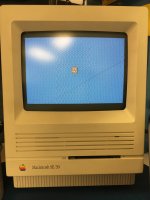 | |
| Posted by: OleLila on 2020-04-16 15:16:58 Will be watching with interest. I just got a SE/30 a couple of days ago that would work normally for a little while then crash. Recapped....then what you see below. It kinda looks familiar. I've tried reseating RAM, ROMS, re-replaced capacitors, confirmed traces and have nt found the cause. The one thing I have found is that pin 7 of the power connection ( J12) and the negative side of C9 and the topside connector (J14, pin 12) all give me -11.68 volts, however, pin 5 of the floppy port gives 0 volts. 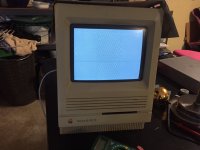 | |
| Posted by: Ithink_there4imac on 2020-04-20 08:21:20 bump | |
| Posted by: OleLila on 2020-04-20 10:00:45 Are you getting the correct voltages through the floppy port? | |
Posted by: Ithink_there4imac on 2020-04-20 10:30:16Are you getting the correct voltages through the floppy port?Do you know how I would check that and what voltages I should be getting? | |
| Posted by: OleLila on 2020-04-20 14:01:43 http://www.maccaps.com/MacCaps/Repair_books_files/Macintosh Repair and Upgrade Secrets.pdf Page 38 I cannot find anything that says any differently for the SE/30. | |
| Posted by: OleLila on 2020-04-21 02:11:13 Found it......Page 169 some macs do not have the -12 Volt connected https://vintageapple.org/macbooks/pdf/Troubleshooting_Your_Macintosh_1992.pdf | |
| Posted by: OleLila on 2020-04-22 07:50:09 I don't know, but in your picture of UD8 its hard to imagine that pins 3 and 4 aren't shorted at the board...andmaybe its the angle but is there a Pin 3 even there coming from UD8? | |
Posted by: Ithink_there4imac on 2020-04-22 10:28:32I don't know, but in your picture of UD8 its hard to imagine that pins 3 and 4 aren't shorted at the board...andmaybe its the angle but is there a Pin 3 even there coming from UD8?The pins are definitely very corroded...one was broken on UD8 and I tried to reconnect it to the pad. Maybe that chip is just toast at this point. I don't think I have the soldering skills or proper tools to really replace that chip though, maybe i'll have to send my board to someone for full repair. If only they were through-hole haha | |
| Posted by: Juror22 on 2020-04-26 21:37:01 You did wash your boards as part of the re-capping process, right? That cap goo is insidious. I had one that I re-capped and when I powered it up, it showed simasi sign - I removed the board, washed it thoroughly and after letting it dry a few days, it started normally. ithinkthere4imac - I agree that you need a bit more attention to the UD8 chip, The first thing that I would do, is clean it with alcohol (>> 91%, 99% or better if you can get it) with a Q-tip. Then check continuity with a voltmeter. If you do go with having someone else take a look, there is no shame in that. I had a Macintosh portable that I could not sort and sent the board off to someone WAY better than I and I still use that machine. | |
Posted by: Ithink_there4imac on 2020-04-27 04:26:16You did wash your boards as part of the re-capping process, right? That cap goo is insidious. I had one that I re-capped and when I powered it up, it showed simasi sign - I removed the board, washed it thoroughly and after letting it dry a few days, it started normally.I did, but just to be sure, I just removed the ROM and RAM chips and I have it soaking in 70% isopropyl alcohol in a plastic container, we will see if that helps anything! Does anyone know of someone on here that would be willing to replace UD8 and maybe UE8? | |
| Posted by: Ithink_there4imac on 2020-04-27 05:21:15 After soaking in 70% isopropyl alcohol for only an hour (going to let it soak for at least a few more hours), it has really brought out how bad UD8 is. It really brought out the damage, so I want to say UD8 is my culprit. I’ll have to look into maybe finding someone to replace it. If anyone knows someone, let me know. Thanks! Edit: You can actually see that Pin 1 has completely disintegrated. Same with Pin 2 after this was taken 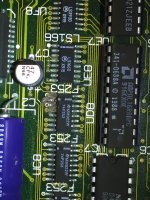 | |
| Posted by: krishnadraws on 2020-04-27 05:46:53 Mouser.com sells UE8's. Not sure how to advise on the lifted pads. I have a "basket-case" SE/30 board that's in much worse shape that I've given up on because there were many traces eaten and a few pads lifted. Good luck! | |
| Posted by: Ithink_there4imac on 2020-04-27 05:50:29 I've searched the chip number 74F253 and found three on Mouser that are surface mount...not too sure what the difference between these are. EDIT: Comparing the datasheets of the two top chips below (the two they have in stock), all pages of the datasheets are completely identical. The product comments on the second one address why "G4" is added to the part number: "The G4 and E4 suffixes were added for ROHS conversion. The G4 and E4 parts are exactly the same as the original parts without the G4 or E4 suffix." 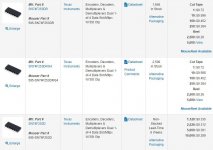 | |
| Posted by: Ithink_there4imac on 2020-04-27 09:20:41 Another update, I went ahead and removed that UD8. Most of the legs disintegrated when touched after all. Removing the chip shows damage to pads 1, 2, and 11. i don’t feel comfortable attempting a fix with my novice skills, so if anyone knows someone who can soldier on a new UD8 for me, I’d gladly consider sending this to them. Thanks everyone for your help so far! 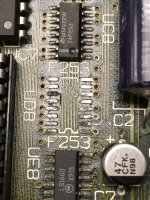 | |
| Posted by: marcelv on 2020-04-28 01:50:50 what is your location? you should als consider replacing UE8 | |
Posted by: Ithink_there4imac on 2020-04-28 05:02:49what is your location?Located in Raleigh, NC I agree with UE8. The legs aren’t crumbling but they aren’t very pretty either | |
| 1 |