68kMLA Classic Interface
This is a version of the 68kMLA forums for viewing on your favorite old mac. Visitors on modern platforms may prefer the main site.
| Click here to select a new forum. | |
| How to power up PowerBook 100 w/o keyboard! | |
| Posted by: bengi3 on 2020-04-07 12:38:31 I am replacing the caps to this PB 100 motherboard and want to see if I can sort out the known dark screen syndrome. Is there any way to power-up this thing without reconnecting any time the keyboard? Usually in the logic boards there are two small contacts to short for the machine to power up, I cannot get to locate them. Help | |
| Posted by: bibilit on 2020-04-07 12:59:00 Don’t know for sure, but have you tried with an ADB keyboard ? | |
| Posted by: bengi3 on 2020-04-07 15:01:19 Thank you. Will try tomorrow, but IIRC it doesn't work. Anyhow it would be useful if someone could come up with another solution. | |
| Posted by: Fizzbinn on 2020-04-07 18:51:23 Curious, having recently gotten my PB 100 back in working order (recap and LCD backlight from parts machine, thanks @CharlesT! ) what do you mean by “dark screen syndrome”? FYI I reassembled mine enough to connect the keyboard when testing after the recap. Can’t see the keyboard in this pic but it was there: 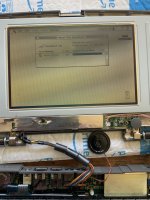 My “dark screen” culprit: 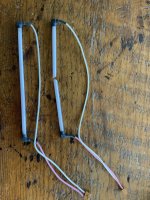 Of course the screen also needed a re-cap. LCD caps before (mine basically fell off when nudged): 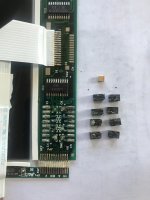 LCD caps after: 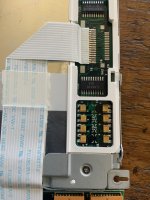 | |
| Posted by: 80sboy on 2020-04-07 19:35:33 I just recapped a Powerbook 100, screen and all and still have dark blue screen on boot. : ( | |
Posted by: bengi3 on 2020-04-07 21:46:13I just recapped a Powerbook 100, screen and all and still have dark blue screen on boot. : (So far I have recapped the whole logic board but still get the dark blue screen on boot: tomorrow will recap the LCD. I have read that sometimes the complete recap does not solve. | |
| Posted by: bengi3 on 2020-04-08 06:40:02 Recapped also the LCD: no way :-( | |
Posted by: bengi3 on 2020-04-08 09:48:33Don’t know for sure, but have you tried with an ADB keyboard ?Doesn’t work | |
| Posted by: bengi3 on 2020-04-08 09:50:12 These are the projects during the quarantine: PowerMac G5 LCS PowerBook 100 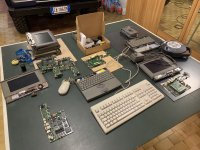 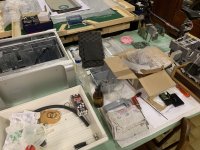 | |
Posted by: Trash80toHP_Mini on 2020-04-08 15:13:34Interesting, my PowerBooks always seem to boot when I plug in the the power cord. That's probably do to bad backup batteries. So if you haven't, try doing that with and without backup batteries in battery so to speak.Don’t know for sure, but have you tried with an ADB keyboard ?Doesn’t work edit: I wish my quarantine projects were so neatly laid out. Is that because you have all the room you want or that's all they'll let you have? :lol: | |
Posted by: bengi3 on 2020-04-09 03:20:53Interesting, my PowerBooks always seem to boot when I plug in the the power cord. That's probably do to bad backup batteries. So if you haven't, try doing that with and without backup batteries in battery so to speak.They moved me to the basement ;/) | |
| Posted by: electricmonk on 2020-04-11 06:51:31 That's a lovely heap of Powerbook 100s you have there! It's a great machine and I have fond memories of it from when I was a child which is why I'm plugging away with my own PB100 restoration project. I thought mine was totally fixed but I managed to get it back into BSOD mode by fiddling a bit carelessly with the power supply. A PMU reset appeared to get it going normally again. Pity you can't advance the date past 2019 but what a gorgeous Powerbook, eh? | |
| Posted by: Trash80toHP_Mini on 2020-04-11 08:39:18 Indeed, called mine BabyPB and dearly loved it as it became my first ever laptop/notebook. Sometimes I wish I hadn't started hacking it almost 20 years ago, but I've got a couple more. One day, BabyPB will become the center focus of my collection's display unit. @bengi3 did the family quarantine you in the basement. Things have been really rough over there. | |
| Posted by: bibilit on 2020-04-11 10:02:43 There is a capacitor also in the dauther/processor board, can be missed. | |
| Posted by: bengi3 on 2020-04-11 12:28:15 Now I am recapping another logic board, this time the right way: desolder, clean with isopropyl alcohol, dishwasher, dry thoroughly (a week or two), recap. Yes, I know thet there is a capacitor in the processor board. | |
| Posted by: electricmonk on 2020-04-11 17:47:18 Good one. I'll be doing another PB100 soon and will be more rigorous this time, now that the initial breathless excitement of getting one working has been replaced by a strong desire to do it right. I haven't got around to doing the daughterboard cap or the trackball caps on mine yet but I'll do those too. @Trash80toHP_Mini, any thoughts about replacing the rubber in the channels on the bezel? | |
| Posted by: Trash80toHP_Mini on 2020-04-12 10:49:11 Dunno offhand, I'll give it a look and try to figure something out. Maybe casting replacements in that goopy stuff? | |
Posted by: bengi3 on 2020-04-15 12:19:54Now I am recapping another logic board, this time the right way: desolder, clean with isopropyl alcohol, dishwasher, dry thoroughly (a week or two), recap. Yes, I know thet there is a capacitor in the processor board.Another Mac liberated! Incidentally, is it possible that a whole lot of cheap caps is bad? The same lot that I used for a Mac Classic and also at that time I had to recap everything. | |
Posted by: cheesestraws on 2020-04-16 03:15:54is it possible that a whole lot of cheap caps is badCaps that you bought? Yeah, possible - how likely it is depends where you got them from. If they're from eBay then it's decidedly possible. If you got them from a more reputable supplier then it's much less likely. | |
| 1 > |